Handwritten Newspaper Hero
Name a theme: images + line art to color
Description
Why we love this skill
Handmade Poster Savior intelligently generates posters based on grade level and topic, offering colored finished versions or outline coloring versions, and also allows you to choose whether to keep text, meeting personalized needs, making poster creation a breeze.
At 10 PM, your child suddenly says, "I need to hand in a handwritten newspaper tomorrow"—have you ever panicked? 😱 Scrolling through Xiaohongshu for templates, spending money to have someone else do it, staying up late to draw until your hand cramps... Every handwritten newspaper assignment doesn't torment the child—it torments the parents. Even worse: after spending time and money, the teacher still says it lacks effort. 🦸 Handwritten Newspaper Hero is here to cure this 'back-to-school anxiety.' Just tell me the theme—any theme works—and within 30 seconds, you get images: a beautiful color version for reference and a black-and-white line art version for your child to color and write on. The teacher will praise the effort, your child will feel accomplished, and all you did was tap a few times. ⏰ How long did it take before? 30 minutes searching for materials, 1 hour planning the layout, 2 hours drawing—an entire evening gone. Now? Enter the theme, choose a size, and you're done. 3 steps save you 3 hours. ✅ Why it's worth it: 🖼️ The black-and-white line art keeps room for your child's creativity—it's not just outsourcing, so teachers approve. 💬 Any theme works—no fixed templates, just say what you want. 📐 Supports standard sizes like A4 and A3—print directly after generation, no reformatting needed. 🙌 No drawing skills required, no software to download—just open and use. One sentence summary: While others are still up late drawing their handwritten newspapers, you're already asleep with the lights off.
Related Skills
View all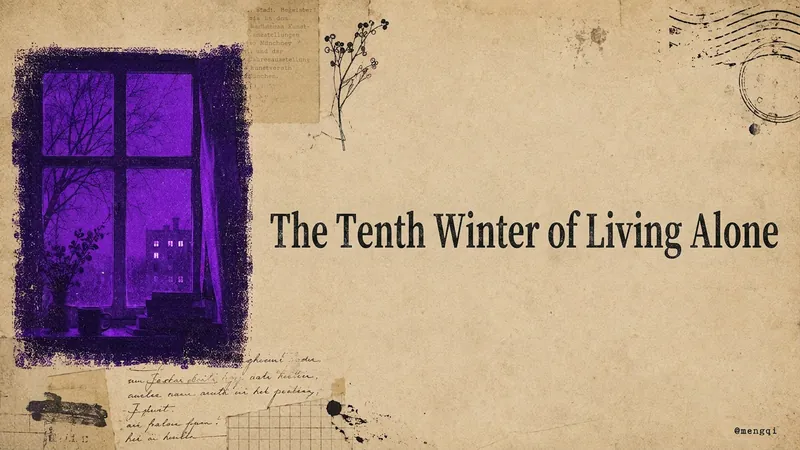
Atmospheric Covers
This is an everyday productivity tool for content creators who publish to Xiaohongshu, WeChat Official Accounts, WeChat Channels, Twitter, and YouTube. How many covers do you have to make by hand for every post you publish? Xiaohongshu needs a vertical cover with extra-bold serif type that stays readable in feed thumbnails. WeChat Official Account needs a horizontal header image. WeChat Channels needs a vertical 6:7 cover with text placed toward the top to avoid the UI overlay. Twitter needs a quote card. YouTube needs a restrained essay cover. Five platforms, five aspect ratios, five sets of text-density rules—if you adjust them manually every time, covers alone can eat up half an afternoon. Worse, the result is either too plain and template-like, or too cluttered like a sticker collage, and the styles never match each other, so your account's visual identity always feels scattered. This Skill takes that high-frequency task off your plate. Drop in a sentence, a mood, a title, or a whole article. It first extracts the keywords, translates them into a central visual concept, and expands that into 3–5 atmospheric elements. Then it produces covers for all five platforms at once—vertical or horizontal, whitespace ratio, and text rules are all adjusted automatically to each platform's style. All five images share the same imagery, the same mood color, and the same paper-textured cover family, so your account's visual identity naturally becomes a cohesive system. What makes it most valuable is that the visuals are rich without being messy, with the weight of printed matter rather than a pile of digital stickers. It has a built-in mood-to-color engine: quiet moods go cobalt blue, afternoons go ochre orange, a solitary winter goes violet. You don't need to understand color theory to get the right feel. One sentence in, five platform covers out, with a unified brand feel—no more tweaking each one individually. All you need to do: Input: a sentence, a mood, a topic, or a piece of content. ↓ Get all five platform-tailored atmospheric covers for Xiaohongshu, WeChat Official Account, WeChat Channels, Twitter, and YouTube in one go. ↓ Sit back and watch the followers roll in!
Idea to Infographic
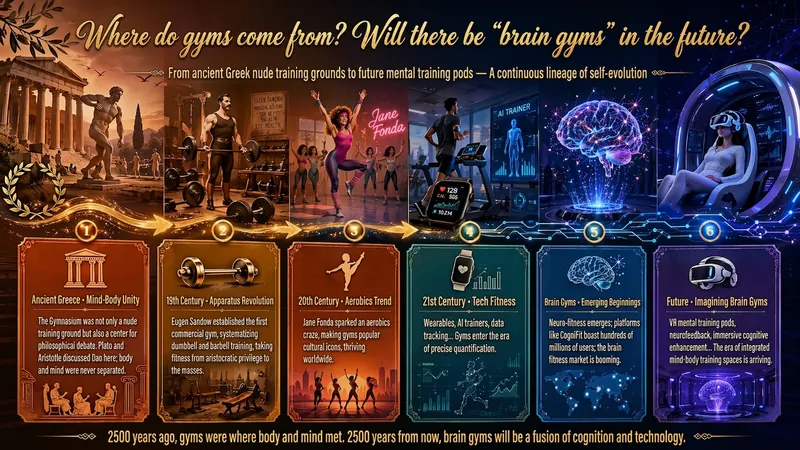
A single image, a single sentence is all it takes. Have you ever had this experience—you have a great idea and want to turn it into an infographic like the ones big accounts post, but: - Open an AI image tool, rewrite prompts over and over, and the result either has terrible layout or completely mismatched style. - Tried several prompt templates, each requiring three or four adjustments, and half an hour later you're still not done. - Want styles like financial literacy, Chinese classic, science, tech... each time you have to research colors and layouts from scratch. Now you don't have to. 「Idea to Infographic」automates all of this: You say "make an emotion management infographic," and it decides whether to use a warm Chinese style or a healing scientific style, searches and organizes core knowledge points, breaks them into 6-8 module cards, assembles the optimal prompt, and quality-checks—if it fails, it automatically redoes; if it passes, it hands it right to you. Four killer capabilities, all built-in: 🧠 **Style Engine** — Not a rigid four-choice. If your topic matches financial literacy, it automatically goes with deep blue gold; if it matches Chinese classics, it uses rice paper and ink; if it matches technology, it uses cyan neon. For topics outside these four? It automatically synthesizes a new style. Coffee encyclopedia → food warm tones; exercise and fitness → vibrant orange gray. No style it can't handle. 🔍 **Content Brain** — You give a word, it searches the web to fill out content; you give a paragraph, it extracts the core; you give nothing but a topic, it organizes everything clearly. All three input methods are supported—the simpler, the more effortless. 📐 **Layout Adviser** — Progressive ladders, side-by-side comparisons, causal chains, overarching-subcategory radiation... Five logical patterns automatically matched. Not just stuffing text into an image, but actually designing an infographic. ✅ **Self-Inspection** — After generating, it automatically checks layout, text density, image-to-text ratio, and style match. If there's an issue, it adjusts and regenerates, up to two times. You don't need to know how to write prompts; you just need to know how to speak. **Who is this Skill for?** - Social media creators who need to produce images daily but don't want to learn design. - Knowledge commerce creators who want to visualize course content but lack a designer. - Corporate trainers who need professional infographics but lack budget for outsourcing. 🔍 - Anyone who wants to turn an idea into a great image. In a word: You have the idea, it has the image. All the hassle in between, it handles for you.
No-Yell Morning Wake-Up System
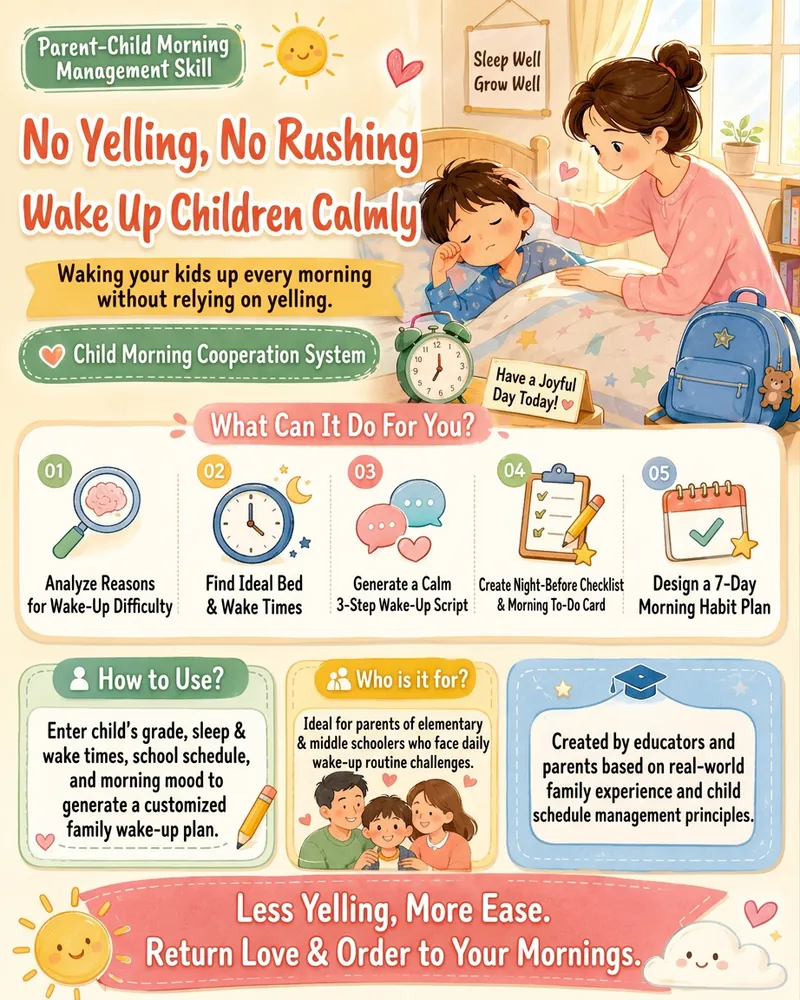
Does this sound like your morning? The first call to wake up gets no response. The second, a rollover. By the third call, you're losing your temper, and your child is already annoyed. Before you've even left the house, your relationship is strained. This Skill helps parents of school-aged children analyze the reasons behind their child's difficulty waking up and generates a ready-to-use morning improvement plan. You'll get: - Diagnosis of wake-up difficulties - No-yelling wake-up scripts - The night-before preparation checklist - Morning routine schedule - 7-day improvement plan - A screenshot-ready "Tomorrow Morning Wake-Up Card" Simply input your child's grade, bedtime, wake-up time, and morning behavior, and a customized plan for your family will be generated. Less yelling, more ease — let mornings be loving and orderly again.
Handwritten Newspaper Hero
Name a theme: images + line art to color
Description
Why we love this skill
Handmade Poster Savior intelligently generates posters based on grade level and topic, offering colored finished versions or outline coloring versions, and also allows you to choose whether to keep text, meeting personalized needs, making poster creation a breeze.
At 10 PM, your child suddenly says, "I need to hand in a handwritten newspaper tomorrow"—have you ever panicked? 😱 Scrolling through Xiaohongshu for templates, spending money to have someone else do it, staying up late to draw until your hand cramps... Every handwritten newspaper assignment doesn't torment the child—it torments the parents. Even worse: after spending time and money, the teacher still says it lacks effort. 🦸 Handwritten Newspaper Hero is here to cure this 'back-to-school anxiety.' Just tell me the theme—any theme works—and within 30 seconds, you get images: a beautiful color version for reference and a black-and-white line art version for your child to color and write on. The teacher will praise the effort, your child will feel accomplished, and all you did was tap a few times. ⏰ How long did it take before? 30 minutes searching for materials, 1 hour planning the layout, 2 hours drawing—an entire evening gone. Now? Enter the theme, choose a size, and you're done. 3 steps save you 3 hours. ✅ Why it's worth it: 🖼️ The black-and-white line art keeps room for your child's creativity—it's not just outsourcing, so teachers approve. 💬 Any theme works—no fixed templates, just say what you want. 📐 Supports standard sizes like A4 and A3—print directly after generation, no reformatting needed. 🙌 No drawing skills required, no software to download—just open and use. One sentence summary: While others are still up late drawing their handwritten newspapers, you're already asleep with the lights off.
Related Skills
View allAtmospheric Covers
This is an everyday productivity tool for content creators who publish to Xiaohongshu, WeChat Official Accounts, WeChat Channels, Twitter, and YouTube. How many covers do you have to make by hand for every post you publish? Xiaohongshu needs a vertical cover with extra-bold serif type that stays readable in feed thumbnails. WeChat Official Account needs a horizontal header image. WeChat Channels needs a vertical 6:7 cover with text placed toward the top to avoid the UI overlay. Twitter needs a quote card. YouTube needs a restrained essay cover. Five platforms, five aspect ratios, five sets of text-density rules—if you adjust them manually every time, covers alone can eat up half an afternoon. Worse, the result is either too plain and template-like, or too cluttered like a sticker collage, and the styles never match each other, so your account's visual identity always feels scattered. This Skill takes that high-frequency task off your plate. Drop in a sentence, a mood, a title, or a whole article. It first extracts the keywords, translates them into a central visual concept, and expands that into 3–5 atmospheric elements. Then it produces covers for all five platforms at once—vertical or horizontal, whitespace ratio, and text rules are all adjusted automatically to each platform's style. All five images share the same imagery, the same mood color, and the same paper-textured cover family, so your account's visual identity naturally becomes a cohesive system. What makes it most valuable is that the visuals are rich without being messy, with the weight of printed matter rather than a pile of digital stickers. It has a built-in mood-to-color engine: quiet moods go cobalt blue, afternoons go ochre orange, a solitary winter goes violet. You don't need to understand color theory to get the right feel. One sentence in, five platform covers out, with a unified brand feel—no more tweaking each one individually. All you need to do: Input: a sentence, a mood, a topic, or a piece of content. ↓ Get all five platform-tailored atmospheric covers for Xiaohongshu, WeChat Official Account, WeChat Channels, Twitter, and YouTube in one go. ↓ Sit back and watch the followers roll in!
Idea to Infographic
A single image, a single sentence is all it takes. Have you ever had this experience—you have a great idea and want to turn it into an infographic like the ones big accounts post, but: - Open an AI image tool, rewrite prompts over and over, and the result either has terrible layout or completely mismatched style. - Tried several prompt templates, each requiring three or four adjustments, and half an hour later you're still not done. - Want styles like financial literacy, Chinese classic, science, tech... each time you have to research colors and layouts from scratch. Now you don't have to. 「Idea to Infographic」automates all of this: You say "make an emotion management infographic," and it decides whether to use a warm Chinese style or a healing scientific style, searches and organizes core knowledge points, breaks them into 6-8 module cards, assembles the optimal prompt, and quality-checks—if it fails, it automatically redoes; if it passes, it hands it right to you. Four killer capabilities, all built-in: 🧠 **Style Engine** — Not a rigid four-choice. If your topic matches financial literacy, it automatically goes with deep blue gold; if it matches Chinese classics, it uses rice paper and ink; if it matches technology, it uses cyan neon. For topics outside these four? It automatically synthesizes a new style. Coffee encyclopedia → food warm tones; exercise and fitness → vibrant orange gray. No style it can't handle. 🔍 **Content Brain** — You give a word, it searches the web to fill out content; you give a paragraph, it extracts the core; you give nothing but a topic, it organizes everything clearly. All three input methods are supported—the simpler, the more effortless. 📐 **Layout Adviser** — Progressive ladders, side-by-side comparisons, causal chains, overarching-subcategory radiation... Five logical patterns automatically matched. Not just stuffing text into an image, but actually designing an infographic. ✅ **Self-Inspection** — After generating, it automatically checks layout, text density, image-to-text ratio, and style match. If there's an issue, it adjusts and regenerates, up to two times. You don't need to know how to write prompts; you just need to know how to speak. **Who is this Skill for?** - Social media creators who need to produce images daily but don't want to learn design. - Knowledge commerce creators who want to visualize course content but lack a designer. - Corporate trainers who need professional infographics but lack budget for outsourcing. 🔍 - Anyone who wants to turn an idea into a great image. In a word: You have the idea, it has the image. All the hassle in between, it handles for you.
No-Yell Morning Wake-Up System
Does this sound like your morning? The first call to wake up gets no response. The second, a rollover. By the third call, you're losing your temper, and your child is already annoyed. Before you've even left the house, your relationship is strained. This Skill helps parents of school-aged children analyze the reasons behind their child's difficulty waking up and generates a ready-to-use morning improvement plan. You'll get: - Diagnosis of wake-up difficulties - No-yelling wake-up scripts - The night-before preparation checklist - Morning routine schedule - 7-day improvement plan - A screenshot-ready "Tomorrow Morning Wake-Up Card" Simply input your child's grade, bedtime, wake-up time, and morning behavior, and a customized plan for your family will be generated. Less yelling, more ease — let mornings be loving and orderly again.
Find your next favorite skill
Explore more curated AI skills for research, creation, and everyday work.