
Token Actuary
Max info density, top quality, no depth loss
Token Actuary
Max info density, top quality, no depth loss
Showcase
Description
Have you ever calculated how much you pay each month for AI's "fluff"? "Okay, let me help you..." "First, let's review your question..." "In summary, here's what we covered..." You don't even glance at these, but every word eats your tokens. 💸 I built a Skill called "Token Actuary" to fix this: ✅ Automatically identifies task type and applies token-saving strategies ✅ Cuts redundancy without cutting depth—quality stays 100% ✅ Generates an itemized bill: "This time saved 40%+", clear and transparent For heavy AI users, install it once and save the cost of a few bubble teas. A fact most overlook: a significant portion of what you pay for AI isn't for the "answer" — it's for "process language": opening pleasantries, restating the question, transitional filler, closing summaries. These add no value, but every token costs you. I've packaged the entire methodology of information density optimization into a Skill: "Token Actuary". Its logic is straightforward: after identifying the task type, it automatically matches token-saving strategies, executes tasks with maximum information density, eliminates all redundancy, and enforces strict quality constraints so output doesn't degrade. After completion, it auto-generates a token breakdown report showing consumption per stage, savings vs. standard mode, and future optimization tips. Supports both launch-time activation and mid-task takeover—no configuration needed. If you're a heavy AI user—writer, researcher, bulk content creator, or pay-per-token API user—this Skill is essentially a "money-saving machine": install once, and every conversation compresses your costs. It's now available on the YouMind Skill Market. Search for "Token Actuary" to install.
Related Skills
View all
Model Routing & Token Saver
Based on task difficulty, content type, and project stage, it helps you choose a more suitable AI model and apply quota-saving rules to AI to reduce token usage. While keeping quota consumption under control, it supports programming, creative work, planning, design, and information analysis. Whether you need page components, API integrations, simple bug fixes, architecture design, complex logic, code reviews, or refactoring, it provides clear model recommendations and directly delivers the requested results. It is also well suited to everyday copywriting, titles and hooks, story-driven content, brand proposals, marketing plans, PPT outlines, visual concepts, market trends, competitor analysis, and data interpretation. Simple, batch, and formatting tasks are prioritized for greater quota efficiency. For major decisions, complex reasoning, or final polishing, it reminds you to invest in a more suitable model for quality. With continued use, it adjusts its recommendations based on your model preferences, output habits, project tech stack, key decisions, pending tasks, and known issues, reducing repetitive communication. For coding tasks, it focuses by default on the core changes and summarizes what was modified. For copywriting and proposal tasks, it first organizes the overall framework and then expands it as needed, making each conversation better aligned with your current project and working rhythm.
 Research
One-Click Bill Checkup
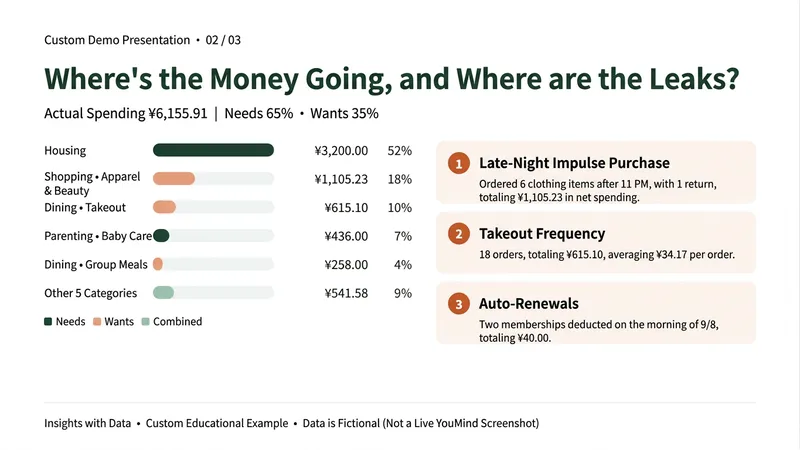
By the end of the month, do you only know that your money is gone—but not where it went? Don’t want to track every expense, and tired of ads and subscriptions in budgeting apps? This Skill gives one month of transactions a checkup. Upload a bill exported from WeChat or Alipay (or paste the text) to get: ① Actual spending: Automatically excludes Huabei repayments, transfers into Yu’e Bao, and incomplete orders. Refunds offset the original purchase, so transfers of thousands of yuan aren’t mistaken for spending. ② Where your money goes: Ranked spending categories, including how much goes to needs versus wants. ③ Checkup findings: Money leaks such as frequent food delivery, late-night impulse orders, automatic renewals, and frequent small purchases—each backed by numbers. ④ A draft budget for next month: Identifies the three habits worth changing most, estimates potential savings, and breaks them into weekly amounts based on your savings goal. When it’s unclear whether an entry is a red envelope, transfer, or split bill, it asks you first instead of guessing. It won’t guess amounts that are unreadable in screenshots. Choose between a gentle or sharp-tongued tone. Suitable for office workers who want to save but can’t stick with expense tracking, parents managing household spending, and young people who want a clearer view of their spending habits. The examples shown use fictional teaching data. This Skill only analyzes personal spending; it does not recommend investments, funds, insurance, or loans. Bills are used only for this analysis, and you should remove names, card numbers, and other personal information before uploading.
Mero — AI Memory Manager
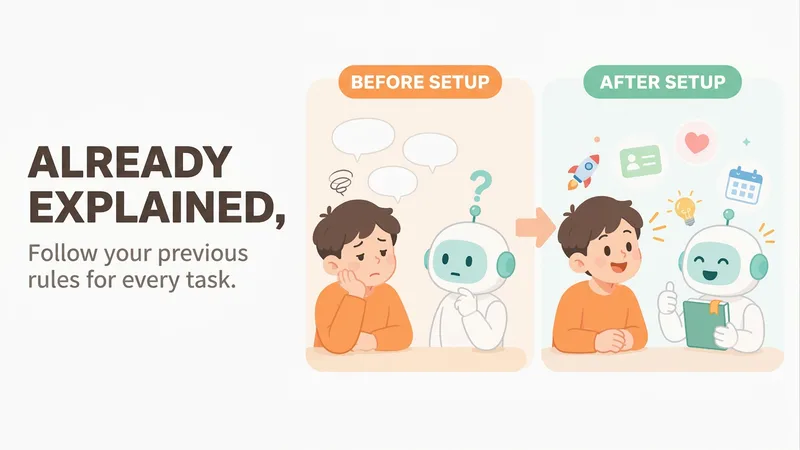
【What problem does it solve?】 Do you have to explain the same things every time you ask AI to do something? “Keep the answer short.” “Don’t use that kind of canned phrasing.” “Write in my voice.” “Give me the conclusion first.” “I work in product—don’t explain the basics.” You may have said these dozens of times, but start a new conversation and AI forgets everything. 【What changes after setup】 You only need to say these things once. After that, AI follows your usual rules first: · Writing articles: It automatically uses your voice, and avoids words and formatting you’ve said you don’t want · Writing weekly reports or proposals: It knows what you do and what you’re currently working on, so you don’t need to explain the background first · Asking questions: Answers come in the length and style you want 【What you’ll get】 1. A project called “My Memory Bank,” organized into “Who you are / How to work with you / What you’re working on / Your preferences,” which you can open, edit, or delete at any time 2. A “memory notebook” stored in the project you’re using, which AI reads before every conversation 3. A prepared “Who I am” profile that you can paste into your YouMind personal settings so it applies to all projects; you can also send it directly to Doubao, ChatGPT, or other AI tools 4. Automatic weekly organization: duplicates are removed, outdated items are archived, and contradictions are brought to your attention 【How to use it】 You don’t need to learn any special steps—just mention things naturally in everyday chats: “Remember, do it this way from now on.” “Forget that.” “Change it to this.” “What do you remember about me?” It also automatically records new details you mention in passing, such as changing jobs, starting a new project, or having a deadline next week. 【Who it’s for】 People who often use AI to write or get things done and are tired of repeating the same instructions. No technical knowledge is required. 【How to get started】 The first time, tell it one or two things you often repeat to AI, such as “Use simpler language and give more examples,” or simply say “set me up.” 【Privacy】 Personal matters such as health, emotions, and finances are not remembered by default. Web clippings and other people’s articles are not treated as information about you. You can ask at any time what it remembered and why.
Information
- Version
- v2
- Last updated
- Runtime credits
- Usage-based
- Models
- Auto
