Meeting Notes Amplifier
Meeting notes to personal tweets & articles
Description
Turn meeting notes into 4 publishable content assets: redacted notes, an insight document, and tweets and a Newsletter in your personal style. It learns your writing style and content topics on first use—the more you use it, the better it knows you. One meeting, four times the output.
Related Skills
View all
Research Report Generator
📝 Value in one sentence: Enter a topic or upload materials, and AI handles the entire process from organizing sources to drafting. 🔍 Core features: Smart source integration: Upload multiple documents and AI automatically extracts key viewpoints, critical data, and representative cases, while removing duplicates and flagging conflicts. Automatic outline generation: Based on the topic or source content, it creates a logically clear and well-structured article outline. One-click draft writing: Generates content section by section according to the outline, with every data point and case study source-tagged and traceable. Five writing styles: Supports formal reports, WeChat articles, Xiaohongshu notes, academic papers, and business briefings. Transparent citations: Every figure and viewpoint is marked with its source—no fabrication or invention. Automated content workflow: Source parsing → viewpoint extraction → outline generation → writing in five styles. 🎯 Use cases: 📊 Industry research: Enter "Humanoid Robot Industry 2026" to generate a draft analysis report with data and case studies. 📝 Content creation: Upload 3 related articles to combine into an in-depth WeChat article. 📚 Academic writing: Upload multiple paper abstracts to create a literature review draft. 📋 Competitor analysis: Upload several competitor documents to instantly generate a comparative analysis report. 🧠 Personal learning: Enter a new-domain topic to quickly generate a knowledge overview. 💼 Business decisions: Input business data and background information to produce a decision brief for the CEO. 👩💼 Who it's for: Researchers, analysts, content creators, product managers, students, and consultants—anyone who needs to quickly produce high-quality first drafts.
WeChat Post Formatter
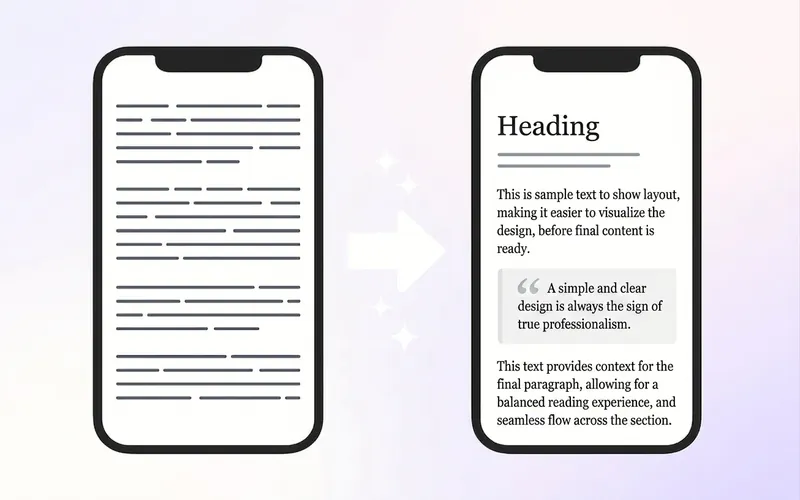
Upload Markdown, plain text, or dictated drafts, and automatically deliver 3 ready-to-use outputs: ① HTML pasteable into WeChat Official Account, ② mobile long-image preview, ③ pre-publish check report. It doesn't just apply templates—it first restructures the reading hierarchy: separate subheadings, break long paragraphs, extract key quote cards, control bold density, then match a style from 6 professional bases. On first use, you can create a "Brand Style Profile" that records the Official Account name, primary and secondary colors, heading and quote styles, byline, and footer. Subsequent articles automatically reuse this to maintain visual consistency across the account. Before publishing, two rounds of checks are performed: first, check heading hierarchy, paragraphs, and content fidelity; second, check WeChat compatibility, including inline CSS, narrow screen overflow, garbled text, tables, images, and dangerous tags. Issues are fixed before delivery to reduce style loss and rework after pasting. Suitable for knowledge accounts, personal IP, industry analysis, reading notes, and branded content teams. Companion tools: For infographics in text, use "Infographic Maker"; to publish one article across multiple platforms, use "一鱼多吃 五平台分发器".

One Draft, All Platforms
Have you ever counted how much of your week is spent on 'transporting' instead of creating? Write an article, publish it on WeChat. Break it into cards for Xiaohongshu. Rewrite it as a script for a short video. Same idea, five different versions, five times the effort. The real creative work might take an hour, but the rest of the day is lost in translation. This skill puts an end to that. Drop in one piece of content—an article, a recording, or just a few ideas. It first analyzes what format suits it best, then spins it into the formats you need: WeChat long-form, Xiaohongshu visuals, short video storyboards, PPT, infographics, newsletters, comics, or even reusable frameworks. One skeleton, eight forms, with the core message intact. What truly sets it apart are two things no rewrite tool gives you: ① The output sounds like you, not AI. Feed it a few of your past pieces (5 minutes), and it learns your tone, pet phrases, and rhythm. Every platform's copy carries your voice—and it gets better as you use it. ② It's built to remove 'AI flavor.' A built-in set of rules cleans up machine-like phrases like 'leverage,' 'close the loop,' and 'in summary'—so readers can't tell it was written by AI. Write once. Publish everywhere. Give the time back to real creation.
Meeting Notes Amplifier
Meeting notes to personal tweets & articles
Description
Turn meeting notes into 4 publishable content assets: redacted notes, an insight document, and tweets and a Newsletter in your personal style. It learns your writing style and content topics on first use—the more you use it, the better it knows you. One meeting, four times the output.
Related Skills
View allResearch Report Generator
📝 Value in one sentence: Enter a topic or upload materials, and AI handles the entire process from organizing sources to drafting. 🔍 Core features: Smart source integration: Upload multiple documents and AI automatically extracts key viewpoints, critical data, and representative cases, while removing duplicates and flagging conflicts. Automatic outline generation: Based on the topic or source content, it creates a logically clear and well-structured article outline. One-click draft writing: Generates content section by section according to the outline, with every data point and case study source-tagged and traceable. Five writing styles: Supports formal reports, WeChat articles, Xiaohongshu notes, academic papers, and business briefings. Transparent citations: Every figure and viewpoint is marked with its source—no fabrication or invention. Automated content workflow: Source parsing → viewpoint extraction → outline generation → writing in five styles. 🎯 Use cases: 📊 Industry research: Enter "Humanoid Robot Industry 2026" to generate a draft analysis report with data and case studies. 📝 Content creation: Upload 3 related articles to combine into an in-depth WeChat article. 📚 Academic writing: Upload multiple paper abstracts to create a literature review draft. 📋 Competitor analysis: Upload several competitor documents to instantly generate a comparative analysis report. 🧠 Personal learning: Enter a new-domain topic to quickly generate a knowledge overview. 💼 Business decisions: Input business data and background information to produce a decision brief for the CEO. 👩💼 Who it's for: Researchers, analysts, content creators, product managers, students, and consultants—anyone who needs to quickly produce high-quality first drafts.
WeChat Post Formatter
Upload Markdown, plain text, or dictated drafts, and automatically deliver 3 ready-to-use outputs: ① HTML pasteable into WeChat Official Account, ② mobile long-image preview, ③ pre-publish check report. It doesn't just apply templates—it first restructures the reading hierarchy: separate subheadings, break long paragraphs, extract key quote cards, control bold density, then match a style from 6 professional bases. On first use, you can create a "Brand Style Profile" that records the Official Account name, primary and secondary colors, heading and quote styles, byline, and footer. Subsequent articles automatically reuse this to maintain visual consistency across the account. Before publishing, two rounds of checks are performed: first, check heading hierarchy, paragraphs, and content fidelity; second, check WeChat compatibility, including inline CSS, narrow screen overflow, garbled text, tables, images, and dangerous tags. Issues are fixed before delivery to reduce style loss and rework after pasting. Suitable for knowledge accounts, personal IP, industry analysis, reading notes, and branded content teams. Companion tools: For infographics in text, use "Infographic Maker"; to publish one article across multiple platforms, use "一鱼多吃 五平台分发器".
One Draft, All Platforms
Have you ever counted how much of your week is spent on 'transporting' instead of creating? Write an article, publish it on WeChat. Break it into cards for Xiaohongshu. Rewrite it as a script for a short video. Same idea, five different versions, five times the effort. The real creative work might take an hour, but the rest of the day is lost in translation. This skill puts an end to that. Drop in one piece of content—an article, a recording, or just a few ideas. It first analyzes what format suits it best, then spins it into the formats you need: WeChat long-form, Xiaohongshu visuals, short video storyboards, PPT, infographics, newsletters, comics, or even reusable frameworks. One skeleton, eight forms, with the core message intact. What truly sets it apart are two things no rewrite tool gives you: ① The output sounds like you, not AI. Feed it a few of your past pieces (5 minutes), and it learns your tone, pet phrases, and rhythm. Every platform's copy carries your voice—and it gets better as you use it. ② It's built to remove 'AI flavor.' A built-in set of rules cleans up machine-like phrases like 'leverage,' 'close the loop,' and 'in summary'—so readers can't tell it was written by AI. Write once. Publish everywhere. Give the time back to real creation.
Find your next favorite skill
Explore more curated AI skills for research, creation, and everyday work.