Native Subtitle Translation
Description
Recommended by
nene@YouMind
Why we love this skill
This skill transforms English subtitles into natural Chinese transcripts, eliminating translationese. It accurately conveys meaning, adapts to Chinese context, removes redundancy, and retains professional terms, delivering fluent, well-formatted content that reads like a native language—greatly enhancing reading experience.
A deep subtitle processing skill specifically designed for English videos. It goes beyond translation, offering a complete native-level content reconstruction. Accurately understands the original English meaning, preserves professional terminology, English names, and software names with accuracy, while deeply adapting to Chinese reading habits. Through intelligent polishing and layout optimization, it transforms stiff machine-translated subtitles into smooth, natural, and easy-to-understand high-quality Chinese content, suitable for video dissemination on platforms like YouTube.
Related Skills
View all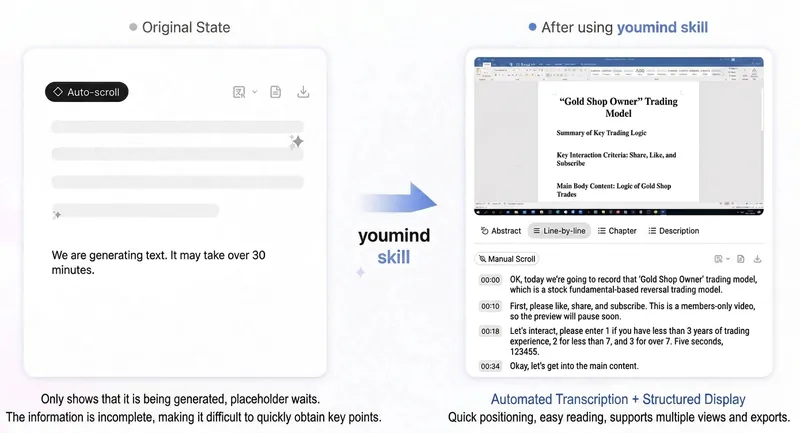
Bilibili SRT & Transcription
Under normal conditions where subtitles are successfully fetched and SRT files generated, the AUTO mode consumes a minimum of 77 credits. ---————————————————————————————————————————————————---- Currently, YouMind's transcription of Bilibili videos is not very good and tends to get stuck (see Figure 3). Until an official optimization is available, this Skill can obtain official AI subtitles from Bilibili videos (link/BV number/YouMind video file) via a logged-in browser, generate readable transcript documents, and optionally export standard SRT subtitle files (local .srt + YouMind document). It includes built-in CID calibration and subtitle consistency verification to avoid mismatched/expired subtitles. The operation process has been simplified as much as possible. Following the Skill prompts, when needed (as shown in the demo), manually click on AI subtitle recognition in the already opened Bilibili video page, select Chinese, and the subtitles can be fetched. This is currently the most reliable method; original subtitles attached to the video are generally not recognized. The file will be automatically downloaded to (~.download; macOS system; Windows unknown). In the thread view, click to upload. ---————————————————————————————————————————————————--- Currently, the following issues may occur (and are solvable): 1. When adding a Bilibili link to a YouMind file, fetching may fail. In this case, click the [...] button in the top right corner and select "Re-fetch". After that, the normal view will likely appear, but without the video mini window. Then add a new link again to successfully fetch. Or Close all pages and reopen / click on the Bilibili share link (instead of the web page link) to try. 2. During Skill execution, subtitle fetching errors may occasionally occur, possibly due to paid/free videos. Let the AI auto-fix the task; following the steps should prevent this issue. ---————————————————————————————————————————————————--- Official response records: 1. This Bilibili video itself has no subtitle file. When saving the Bilibili link, the system automatically tries to fetch the subtitle file but fails, so it shows empty. 2. The subtitle fetching task is initiated by the AI, which tries to pull the video stream for transcription, but Bilibili does not support this method. Hence the constant loading loop; it has actually failed. ------ Solution 1. Check if there are corresponding videos on YouTube or TikTok. These sites support pulling video streams for transcription, and using the second method mentioned above should succeed. ------ Future optimizations: 1. We will enhance the AI's grabFileTranscript behavior to avoid fetching Bilibili subtitles, so this situation will not occur. ———————————————————————————————————————————————————————————————— Looking forward to official adaptation in the future. Until then, this skill can serve as a transitional solution. Charging a small number of credits to cover costs. Thank you all. If you have questions, @火腿人肖恩 in the group.
Viral Pet Product Video Maker
Short-video creation assistant built for pet e-commerce, precisely turning product selling points into heartwarming storyboard scripts and video generation prompts. Whether it's cat treats or dog apparel, just provide the product details and pet type, and it will craft a script that follows the viral formula of major short-video platforms—including scene setups, subject descriptions, camera moves, and conversational voiceover copy. This skill is deeply tailored to mainstream video generation models, offering structured storyboard prompts that ensure a warm, bright, everyday feel. It automatically balances shot and voiceover density, adding narration-free transition shots to make the video feel more relaxed and natural. From the hook opening to detail showcases to cute-pet close-ups that spark desire, every shot is carefully arranged to highlight the product's core value. After the script is generated, you can directly access professional prompts for AI video production and, with one click, call a video model to generate high-quality vertical voiceover videos. It also ensures the pet's appearance stays consistent across multiple shots and automatically adds visual constraints to avoid distracting subtitles, helping you efficiently produce pet product content with a premium feel and strong conversion power.
Sales Video Script Generator
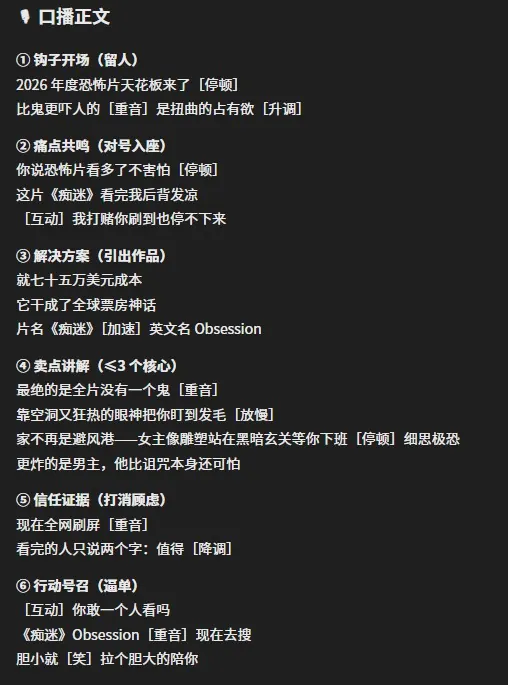
This short video sales script assistant transforms stiff written copy into highly compelling video scripts, specifically solving the problems of excessive 'reading aloud' feel and chaotic pacing in sales videos. It not only extracts core selling points from various documents using intelligent parsing technology, but also reworks dull text into an engaging golden six-part structure based on short video platform dissemination logic, ensuring the video grabs attention from the start and drives conversions at the end. Whether you are a sales influencer or content creator, you can easily get logically clear, rhythmically professional scripts. To enhance the performance of the final video, this skill automatically annotates detailed voice guidance suggestions in the generated scripts. Through intuitive markers for pauses, stresses, and intonation fluctuations, you can precisely control the rhythm and emotional intensity when reading aloud, making every line natural, fluent, and persuasive. It supports direct import of multiple file formats and has been deeply optimized for different product categories, helping you ditch formulaic approaches and present the most natural, professional sales state in front of the camera.
Native Subtitle Translation
Description
Recommended by
nene@YouMind
Why we love this skill
This skill transforms English subtitles into natural Chinese transcripts, eliminating translationese. It accurately conveys meaning, adapts to Chinese context, removes redundancy, and retains professional terms, delivering fluent, well-formatted content that reads like a native language—greatly enhancing reading experience.
A deep subtitle processing skill specifically designed for English videos. It goes beyond translation, offering a complete native-level content reconstruction. Accurately understands the original English meaning, preserves professional terminology, English names, and software names with accuracy, while deeply adapting to Chinese reading habits. Through intelligent polishing and layout optimization, it transforms stiff machine-translated subtitles into smooth, natural, and easy-to-understand high-quality Chinese content, suitable for video dissemination on platforms like YouTube.
Related Skills
View allBilibili SRT & Transcription
Under normal conditions where subtitles are successfully fetched and SRT files generated, the AUTO mode consumes a minimum of 77 credits. ---————————————————————————————————————————————————---- Currently, YouMind's transcription of Bilibili videos is not very good and tends to get stuck (see Figure 3). Until an official optimization is available, this Skill can obtain official AI subtitles from Bilibili videos (link/BV number/YouMind video file) via a logged-in browser, generate readable transcript documents, and optionally export standard SRT subtitle files (local .srt + YouMind document). It includes built-in CID calibration and subtitle consistency verification to avoid mismatched/expired subtitles. The operation process has been simplified as much as possible. Following the Skill prompts, when needed (as shown in the demo), manually click on AI subtitle recognition in the already opened Bilibili video page, select Chinese, and the subtitles can be fetched. This is currently the most reliable method; original subtitles attached to the video are generally not recognized. The file will be automatically downloaded to (~.download; macOS system; Windows unknown). In the thread view, click to upload. ---————————————————————————————————————————————————--- Currently, the following issues may occur (and are solvable): 1. When adding a Bilibili link to a YouMind file, fetching may fail. In this case, click the [...] button in the top right corner and select "Re-fetch". After that, the normal view will likely appear, but without the video mini window. Then add a new link again to successfully fetch. Or Close all pages and reopen / click on the Bilibili share link (instead of the web page link) to try. 2. During Skill execution, subtitle fetching errors may occasionally occur, possibly due to paid/free videos. Let the AI auto-fix the task; following the steps should prevent this issue. ---————————————————————————————————————————————————--- Official response records: 1. This Bilibili video itself has no subtitle file. When saving the Bilibili link, the system automatically tries to fetch the subtitle file but fails, so it shows empty. 2. The subtitle fetching task is initiated by the AI, which tries to pull the video stream for transcription, but Bilibili does not support this method. Hence the constant loading loop; it has actually failed. ------ Solution 1. Check if there are corresponding videos on YouTube or TikTok. These sites support pulling video streams for transcription, and using the second method mentioned above should succeed. ------ Future optimizations: 1. We will enhance the AI's grabFileTranscript behavior to avoid fetching Bilibili subtitles, so this situation will not occur. ———————————————————————————————————————————————————————————————— Looking forward to official adaptation in the future. Until then, this skill can serve as a transitional solution. Charging a small number of credits to cover costs. Thank you all. If you have questions, @火腿人肖恩 in the group.
Viral Pet Product Video Maker
Short-video creation assistant built for pet e-commerce, precisely turning product selling points into heartwarming storyboard scripts and video generation prompts. Whether it's cat treats or dog apparel, just provide the product details and pet type, and it will craft a script that follows the viral formula of major short-video platforms—including scene setups, subject descriptions, camera moves, and conversational voiceover copy. This skill is deeply tailored to mainstream video generation models, offering structured storyboard prompts that ensure a warm, bright, everyday feel. It automatically balances shot and voiceover density, adding narration-free transition shots to make the video feel more relaxed and natural. From the hook opening to detail showcases to cute-pet close-ups that spark desire, every shot is carefully arranged to highlight the product's core value. After the script is generated, you can directly access professional prompts for AI video production and, with one click, call a video model to generate high-quality vertical voiceover videos. It also ensures the pet's appearance stays consistent across multiple shots and automatically adds visual constraints to avoid distracting subtitles, helping you efficiently produce pet product content with a premium feel and strong conversion power.
Sales Video Script Generator
This short video sales script assistant transforms stiff written copy into highly compelling video scripts, specifically solving the problems of excessive 'reading aloud' feel and chaotic pacing in sales videos. It not only extracts core selling points from various documents using intelligent parsing technology, but also reworks dull text into an engaging golden six-part structure based on short video platform dissemination logic, ensuring the video grabs attention from the start and drives conversions at the end. Whether you are a sales influencer or content creator, you can easily get logically clear, rhythmically professional scripts. To enhance the performance of the final video, this skill automatically annotates detailed voice guidance suggestions in the generated scripts. Through intuitive markers for pauses, stresses, and intonation fluctuations, you can precisely control the rhythm and emotional intensity when reading aloud, making every line natural, fluent, and persuasive. It supports direct import of multiple file formats and has been deeply optimized for different product categories, helping you ditch formulaic approaches and present the most natural, professional sales state in front of the camera.
Find your next favorite skill
Explore more curated AI skills for research, creation, and everyday work.