
Efficient Reading Annotation
Create colorful highlighter knowledge poster
Efficient Reading Annotation
Create colorful highlighter knowledge poster
Showcase
Description
Generate a colorful highlighter-style knowledge organization poster from reading methods, learning processes, key annotation rules, and review checklists. Suitable for creating reading notes, study materials, lecture handouts, review cards, and knowledge infographics. It highlights core concepts, questions and doubts, action steps, examples and evidence, and common mistake reminders, making content clearer, easier to review, and more collectible.
Recommended by
Nico@YouMind
Why we love this skill
This skill is uniquely crafted, turning reading notes into rainbow-like efficient knowledge posters. The combination of highlighter annotations and handwritten notes makes the learning process fun and organized.
Related Skills
View all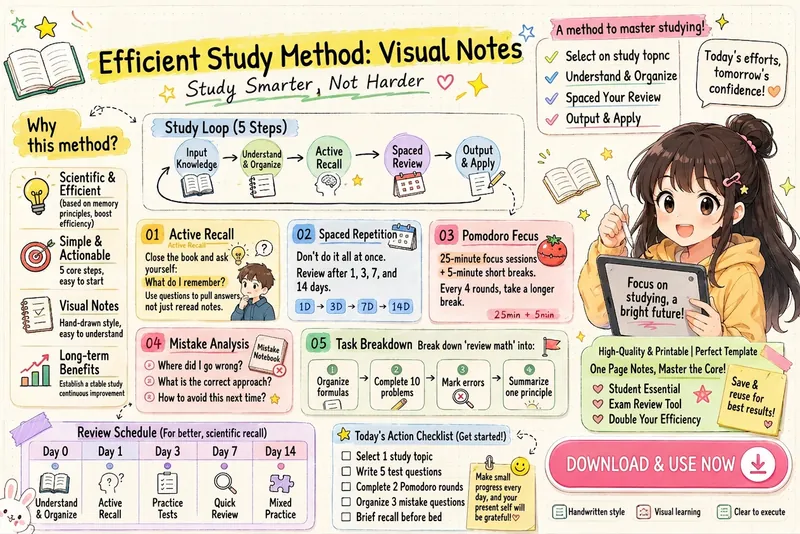 Image
ImageEfficient Study Planner
Transform your learning methods into clean and cute iPad handwritten illustrated notes. Automatically organize modules such as the learning loop, active recall, spaced repetition, Pomodoro timer, mistake review, task breakdown, review schedule, and action checklist. Generate highly readable infographics suitable for knowledge cards, study materials, Xiaohongshu notes, and course handouts.
 Image
ImageOne Text, One Visual
Have you saved lots of articles but still struggle to find the key points at a glance? Give it an article, note, or clearly defined topic that you have permission to use. It will organize the information around one question and present it as a hand-drawn-style diagram. The first version focuses on method steps and operational workflows. You’ll get: ① A knowledge diagram with clear steps, conditions, and reading order. ② Copyable text, including the title, nodes, and key explanations. ③ A source checklist that preserves the original evidence and items requiring confirmation. ④ Short sharing copy to make it easy to post with the image. It won’t depict parallel content as causal, omit key conditions, or invent performance data. When there is too much content, it will narrow the topic first while preserving readable type size and whitespace for mobile viewing. Creating the final image requires access to an image or drawing tool in the current environment. If no tool is available, it will clearly state that the image has not been generated and preserve the complete image-ready draft. Image-generation usage is subject to the platform’s rules at the time. Suitable for study organization, knowledge sharing, and adapting content for social media. It does not publish on your behalf or guarantee traffic. The sample image uses a newly created article and local drawing tools; it is not a YouMind runtime screenshot.
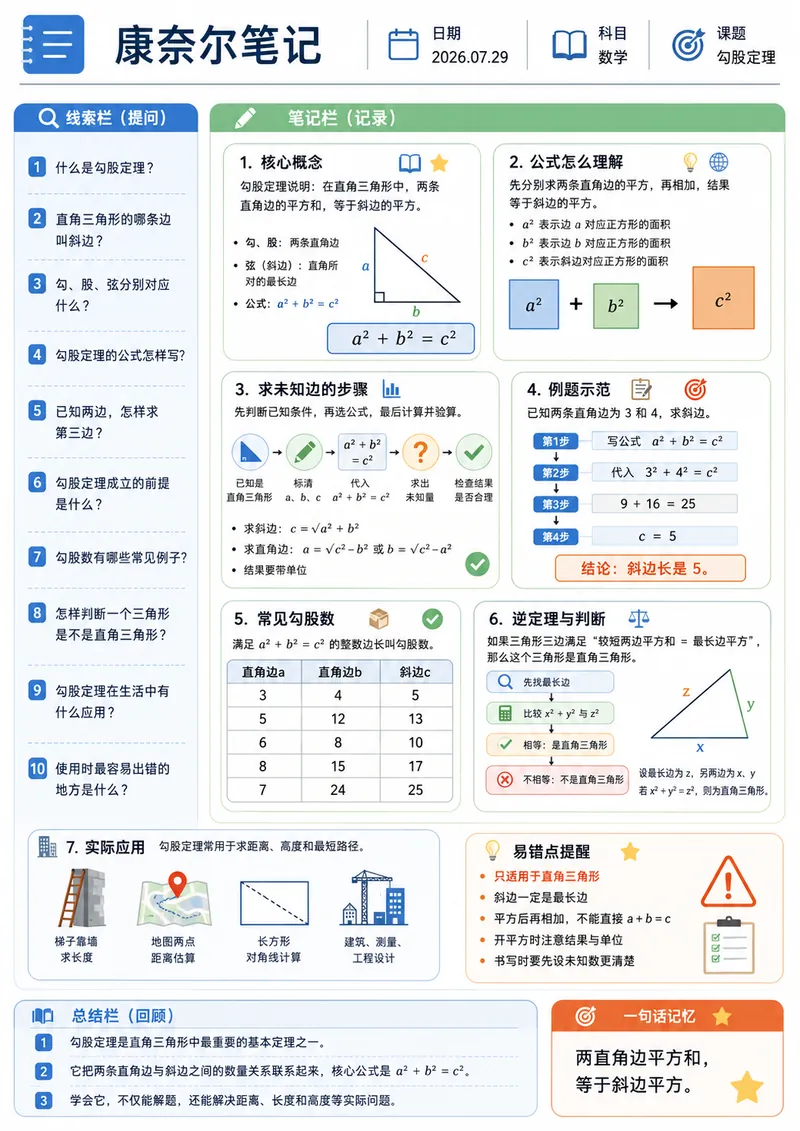
Cornell Notes Infographic
Enter a study topic, and the content will be organized into a Cornell note-style infographic. The layout uses A4 portrait orientation and includes a cue question column, modular note column, summary column, and a one-sentence memory aid, combined with flowcharts, tables, diagrams, and unified-style icons. Suitable for course preview, knowledge review, exam preparation, printed study, and digital note-taking.
Information
- Version
- v2
- Last updated
- Runtime credits
- Usage-based
- Models
- Auto
