
JK's IP Article Slides
Description
Based on the user-provided IP character (or one found in Board, or the default 3D stick figure) and Logo, extract the core logical relationships from the article—such as workflows, infinite loops, dual-link topologies, compilation pipelines, dual-track filtering, and atomic progression—and abstract them into isometric miniature diorama installations. The miniature IP characters act as small operators collaborating on the installation. Use a consistent 16:9 landscape format, ultra-wide breathing room (more than 70% empty space), and clean, texture-free backgrounds. The Logo must appear only on wearable items. Generate the complete set of illustrations and automatically insert them into the article.
Related Skills
View all
Article Illustration Master
Generate fun hand-drawn style illustrations based on Chinese article content. Supports three modes: no IP, custom IP, and auto-generated IP. You can use commercial IPs, customer-provided character reference images, or automatically create entirely new original characters. Trigger commands: 配图, 给文章配图, 帮我配图, illustration
 Image
ImageBatch Article Illustration 2.0
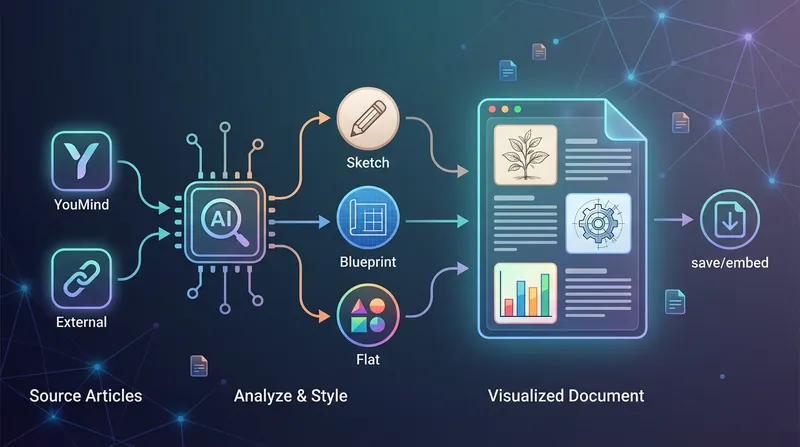
This is an intelligent visual enhancement tool designed for content creators. It deeply understands the flow of your text and automatically creates high-quality supporting illustrations for key paragraphs of your articles. Whether your content resides in a personal knowledge base or you need to process externally imported long-form articles, it accurately identifies core concepts, turning abstract text into concrete visual language and significantly improving the reading experience and shareability of your content. The tool offers three distinct visual styles to suit different creation scenarios: a fresh and lively minimalist hand-drawn style fits essays and popular science; a rigorous and professional architectural blueprint style is the ideal choice for technical documents and research reports; and a modern flat illustration style perfectly matches the aesthetic needs of social media accounts and knowledge notes. For long-form content, it also intelligently suggests illustration layouts to ensure a reasonable visual distribution with key points highlighted. During generation, you can flexibly choose how images are produced. You can have the generated illustrations seamlessly embedded directly into the original document paragraphs for automated layout, or you can opt to receive a standalone image resource package for manual distribution. This end-to-end collaboration, from content analysis to visual generation, makes your writing more impactful and complex ideas instantly clear.

IP Visual Studio Max
One image isn’t the problem. The question is: a year from now, will all 100 of your images still look like the same IP? IP Visual Studio Max helps you build a visual system you can reuse over the long term: a complete IP visual profile, an individual visual master template for each of 3–5 content series, character assets when you have an established character or personal image, and series content planning. Three stages: build the foundation first, then create sample designs Max is not a tool that generates images immediately. It first establishes the fundamentals: **Stage 1: Build your visual profile** Collect your complete IP visual DNA across 10 fields, including tone words, color palette, typeface feel, visual identity or alternatives, and more. Define character assets when you have an established personal image or character. Once the profile is complete, you’ll receive a portable DNA summary that you can save yourself. This is your asset, not a platform memory. **Stage 2: Build your series system** Organize 3–5 content series and create an independent visual master template for each one, covering the primary colors, composition, text style, and information-density rules. Establish adaptation rules for different platforms. **Stage 3: Create sample designs** Create the first representative sample for each series through the complete process: copy lock-in → visual blueprint approval → text-free base image → layout instructions. Once a sample is approved, it becomes the standard for all future content in that series. **Text-layer delivery** The standard delivery is a text-free base image plus layout instructions. You add the text using the tools you’re familiar with. If the host platform is verified to support deterministic text overlays, a precisely typeset final design may also be provided—but this is not a default feature. **About DNA archiving** Each time you confirm your DNA or series system, you’ll receive a portable summary. Bring it with you next time to restore the visual rules you’ve already confirmed. This is not the platform’s automatic, permanent memory—it is a long-term visual asset that you own. **Who it’s for** - Creators who are already publishing but lack a consistent visual style and want to organize it systematically - Knowledge-based creators who want to establish fixed content series and update them over the long term - Creators who need to hand visual guidelines to collaborators, with their personal IP as the starting point - Creators who have used Pro and want to build a more complete asset system on top of it **Not included** - Automatically typeset Chinese designs with perfectly integrated text (standard delivery is a text-free base image + layout instructions) - The platform’s automatic, permanent cross-task DNA archiving (a portable summary is provided for you to keep) - Replacing content operations strategy and decision-making - Rapid batch image generation (each image must go through the confirmation process) - Unlimited usage - Bundled plans, discounts, or package deals
JK's IP Article Slides
Description
Based on the user-provided IP character (or one found in Board, or the default 3D stick figure) and Logo, extract the core logical relationships from the article—such as workflows, infinite loops, dual-link topologies, compilation pipelines, dual-track filtering, and atomic progression—and abstract them into isometric miniature diorama installations. The miniature IP characters act as small operators collaborating on the installation. Use a consistent 16:9 landscape format, ultra-wide breathing room (more than 70% empty space), and clean, texture-free backgrounds. The Logo must appear only on wearable items. Generate the complete set of illustrations and automatically insert them into the article.
Related Skills
View allArticle Illustration Master
Generate fun hand-drawn style illustrations based on Chinese article content. Supports three modes: no IP, custom IP, and auto-generated IP. You can use commercial IPs, customer-provided character reference images, or automatically create entirely new original characters. Trigger commands: 配图, 给文章配图, 帮我配图, illustration
ImageBatch Article Illustration 2.0
This is an intelligent visual enhancement tool designed for content creators. It deeply understands the flow of your text and automatically creates high-quality supporting illustrations for key paragraphs of your articles. Whether your content resides in a personal knowledge base or you need to process externally imported long-form articles, it accurately identifies core concepts, turning abstract text into concrete visual language and significantly improving the reading experience and shareability of your content. The tool offers three distinct visual styles to suit different creation scenarios: a fresh and lively minimalist hand-drawn style fits essays and popular science; a rigorous and professional architectural blueprint style is the ideal choice for technical documents and research reports; and a modern flat illustration style perfectly matches the aesthetic needs of social media accounts and knowledge notes. For long-form content, it also intelligently suggests illustration layouts to ensure a reasonable visual distribution with key points highlighted. During generation, you can flexibly choose how images are produced. You can have the generated illustrations seamlessly embedded directly into the original document paragraphs for automated layout, or you can opt to receive a standalone image resource package for manual distribution. This end-to-end collaboration, from content analysis to visual generation, makes your writing more impactful and complex ideas instantly clear.
IP Visual Studio Max
One image isn’t the problem. The question is: a year from now, will all 100 of your images still look like the same IP? IP Visual Studio Max helps you build a visual system you can reuse over the long term: a complete IP visual profile, an individual visual master template for each of 3–5 content series, character assets when you have an established character or personal image, and series content planning. Three stages: build the foundation first, then create sample designs Max is not a tool that generates images immediately. It first establishes the fundamentals: **Stage 1: Build your visual profile** Collect your complete IP visual DNA across 10 fields, including tone words, color palette, typeface feel, visual identity or alternatives, and more. Define character assets when you have an established personal image or character. Once the profile is complete, you’ll receive a portable DNA summary that you can save yourself. This is your asset, not a platform memory. **Stage 2: Build your series system** Organize 3–5 content series and create an independent visual master template for each one, covering the primary colors, composition, text style, and information-density rules. Establish adaptation rules for different platforms. **Stage 3: Create sample designs** Create the first representative sample for each series through the complete process: copy lock-in → visual blueprint approval → text-free base image → layout instructions. Once a sample is approved, it becomes the standard for all future content in that series. **Text-layer delivery** The standard delivery is a text-free base image plus layout instructions. You add the text using the tools you’re familiar with. If the host platform is verified to support deterministic text overlays, a precisely typeset final design may also be provided—but this is not a default feature. **About DNA archiving** Each time you confirm your DNA or series system, you’ll receive a portable summary. Bring it with you next time to restore the visual rules you’ve already confirmed. This is not the platform’s automatic, permanent memory—it is a long-term visual asset that you own. **Who it’s for** - Creators who are already publishing but lack a consistent visual style and want to organize it systematically - Knowledge-based creators who want to establish fixed content series and update them over the long term - Creators who need to hand visual guidelines to collaborators, with their personal IP as the starting point - Creators who have used Pro and want to build a more complete asset system on top of it **Not included** - Automatically typeset Chinese designs with perfectly integrated text (standard delivery is a text-free base image + layout instructions) - The platform’s automatic, permanent cross-task DNA archiving (a portable summary is provided for you to keep) - Replacing content operations strategy and decision-making - Rapid batch image generation (each image must go through the confirmation process) - Unlimited usage - Bundled plans, discounts, or package deals
Find your next favorite skill
Explore more curated AI skills for research, creation, and everyday work.