
Document to Slides Script
Create a script for Claude Code Slides
Description
Upload a document to automatically extract its core content and generate a structured, page-by-page Markdown Slides script, including layout types, key points, formulas, charts, and speaker notes. After you review and revise it, the finalized script is saved for creating Slides later.
Related Skills
View all
PPT to Report
📋 **Formal presentation materials, from PPT to final draft in one step** Upload a PPT, automatically extract all content, and reorganize it into conversational presentation text using a standard five-section structure (Overview → Key Technology → Innovations → Practice → Project Summary). Page markers, time markers, and bolded innovation points are applied automatically. ✨ **Core Capabilities** - 🔍 **Smart Extraction**: Automatically reads titles, body text, tables, and notes from each slide - 📐 **Five-Section Restructuring**: Standard appraisal presentation framework for clear logic - 🗣️ **Conversational Rewriting**: Transforms PPT bullet points into coherent narrative, not verbatim copying - 🏷️ **Precise Markers**: Page markers + time markers for easy reference to the original PPT - ✍️ **Innovation Points in Bold**: Highlights key points so reviewers instantly see the highlights - 📄 **Dual Format Output**: Ready-to-use Markdown + Word document archive 👥 **Target Users** - Project leads → Presentation materials for appraisal/review meetings - Technical experts → Achievement appraisal/acceptance presentations - Anyone who needs to convert PPT into formal presentation text
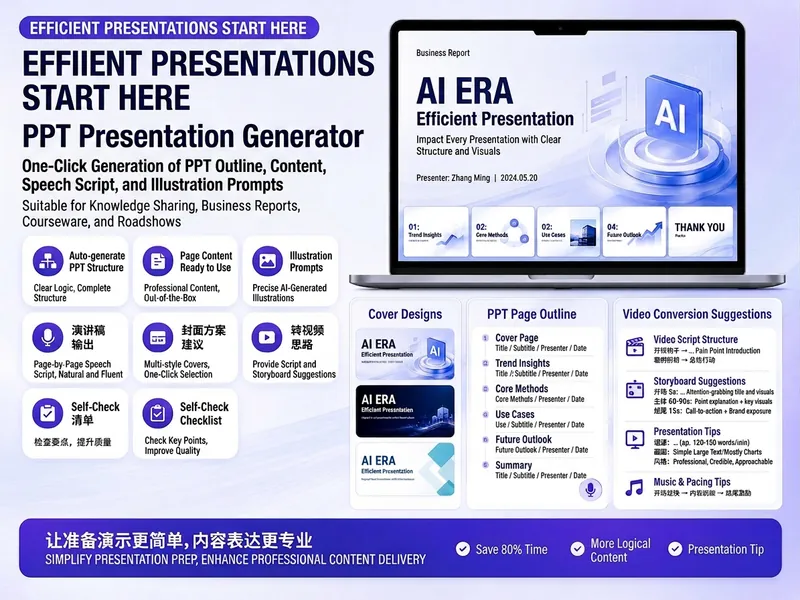
Trending PPT Slides Generator
Easily create engaging PPT Slides for knowledge sharing, business reports, course teaching, product introductions, or roadshows. Simply provide the topic, purpose, audience, duration, number of slides, or style preferences to get a customized PPT content plan. This skill provides a detailed PPT slides plan, including the PPT title, one-sentence theme, audience analysis, slide structure, titles for each slide, body text, and key points for your speech. It also offers specific visual suggestions and image prompts for each slide, even including cover design keywords to help you create a visually cohesive and attractive presentation. If you need to convert your PPT to a short video, this skill can also provide professional video conversion suggestions, covering key elements like rhythm, subtitles, voiceover, camera movements, and cover art to help your content perform well on multiple platforms. Say goodbye to vague outlines; every slide's content is ready to copy and use, ensuring your presentation is both substantive and impressive.

Training PPT Assistant Pro
A full-process skill focused on training course content design, from requirements gathering to page-by-page PPT script output. It integrates four classic training methodologies: the 4C method, GROW model, ORID focused discussion method, and Teaching Three Axes. It also includes an information-relationship-driven visual structure design system: first analyze the logical relationships between information, then select a matching visual structure, ensuring the layout itself becomes a visual representation of the information logic. Finally, it delivers a page-by-page Markdown draft with 8-dimension design annotations, ready to be used by any PPT production skill or designer.
Document to Slides Script
Create a script for Claude Code Slides
Description
Upload a document to automatically extract its core content and generate a structured, page-by-page Markdown Slides script, including layout types, key points, formulas, charts, and speaker notes. After you review and revise it, the finalized script is saved for creating Slides later.
Related Skills
View allPPT to Report
📋 **Formal presentation materials, from PPT to final draft in one step** Upload a PPT, automatically extract all content, and reorganize it into conversational presentation text using a standard five-section structure (Overview → Key Technology → Innovations → Practice → Project Summary). Page markers, time markers, and bolded innovation points are applied automatically. ✨ **Core Capabilities** - 🔍 **Smart Extraction**: Automatically reads titles, body text, tables, and notes from each slide - 📐 **Five-Section Restructuring**: Standard appraisal presentation framework for clear logic - 🗣️ **Conversational Rewriting**: Transforms PPT bullet points into coherent narrative, not verbatim copying - 🏷️ **Precise Markers**: Page markers + time markers for easy reference to the original PPT - ✍️ **Innovation Points in Bold**: Highlights key points so reviewers instantly see the highlights - 📄 **Dual Format Output**: Ready-to-use Markdown + Word document archive 👥 **Target Users** - Project leads → Presentation materials for appraisal/review meetings - Technical experts → Achievement appraisal/acceptance presentations - Anyone who needs to convert PPT into formal presentation text
Trending PPT Slides Generator
Easily create engaging PPT Slides for knowledge sharing, business reports, course teaching, product introductions, or roadshows. Simply provide the topic, purpose, audience, duration, number of slides, or style preferences to get a customized PPT content plan. This skill provides a detailed PPT slides plan, including the PPT title, one-sentence theme, audience analysis, slide structure, titles for each slide, body text, and key points for your speech. It also offers specific visual suggestions and image prompts for each slide, even including cover design keywords to help you create a visually cohesive and attractive presentation. If you need to convert your PPT to a short video, this skill can also provide professional video conversion suggestions, covering key elements like rhythm, subtitles, voiceover, camera movements, and cover art to help your content perform well on multiple platforms. Say goodbye to vague outlines; every slide's content is ready to copy and use, ensuring your presentation is both substantive and impressive.
Training PPT Assistant Pro
A full-process skill focused on training course content design, from requirements gathering to page-by-page PPT script output. It integrates four classic training methodologies: the 4C method, GROW model, ORID focused discussion method, and Teaching Three Axes. It also includes an information-relationship-driven visual structure design system: first analyze the logical relationships between information, then select a matching visual structure, ensuring the layout itself becomes a visual representation of the information logic. Finally, it delivers a page-by-page Markdown draft with 8-dimension design annotations, ready to be used by any PPT production skill or designer.
Find your next favorite skill
Explore more curated AI skills for research, creation, and everyday work.