Naive Doodle Avatar
Create fashion-chibi avatars from photos or text
Description
Recommended by
Shuting@YouMind
Why we love this skill
Turns photos or descriptions into recognizable fashion-chibi avatars with deliberately naive brushwork, graphic silhouettes, and playful asymmetry. Its identity-aware styling and consistent 12-avatar grid make it equally strong for personal portraits or cohesive fictional sets.
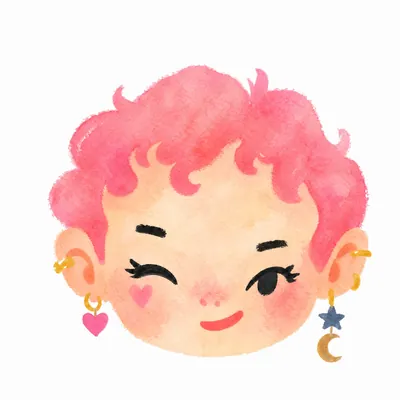
Turn a portrait, appearance description, or creative character idea into a distinctive naive doodle fashion-chibi avatar with a childlike yet cool editorial feel. The style emphasizes bold graphic hair shapes, rough marker or dry-brush edges, restrained watercolor-like color, and a clean white or warm-white background. Real photos guide recognizable cues such as hairstyle silhouette, face shape, expression, and attached accessories while remaining clearly transformed into an illustrated avatar rather than a realistic likeness. You can also start with a set of fresh fictional avatars when you want random inspiration instead of a photo-based transformation. The result stays flat, expressive, and fashion-forward, avoiding photographic skin, 3D rendering, heavy shading, detailed anatomy, distracting backgrounds, text, and watermarks.
Related Skills
View all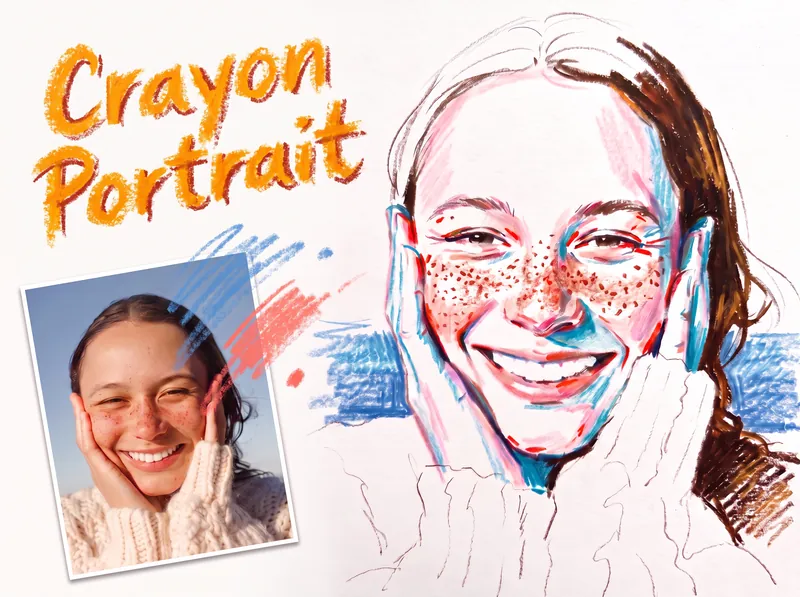 Image
ImageCrayon Portrait
Turn a portrait photo into a faithful colored crayon or oil pastel sketch that preserves the person’s identity, expression, pose, proportions, hairstyle, clothing, composition, and recognizable details. Freckles, dimples, glasses, earrings, loose strands, teeth, and fabric texture remain part of the likeness rather than being smoothed away or exaggerated. The finished image has the spontaneous character of a quick on-location drawing on white sketch paper, with visible grain, dry rubbing, broken strokes, and airy areas of untouched paper. Facial color stays restrained, using layered pink, coral, and brick-red accents along structural turns while keeping most of the face white; cool blue or peacock-green marks add transparent shadow notes, and yellow is excluded. Hair is rendered in warm brown tones with a deliberate balance between open, light areas and denser textured sections, while clothing and exposed shoulders remain mostly white with only a few expressive lines. A simple, single-hue background softly supports the figure from the sides near the shoulders without filling the page or competing with the portrait. Its uneven, open-edged crayon marks meet the silhouette cleanly and preserve broad white space around the head and lower composition. The result is a distinctive handmade portrait sketch rather than a photorealistic rendering, polished digital painting, or caricature.
create-avatar
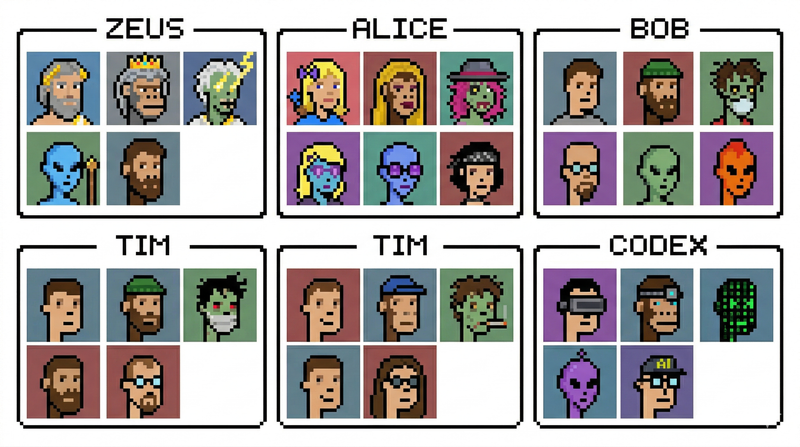
create-avatar generates a single 16:9 avatar contact sheet with exactly six named sections arranged in a 3×2 layout. Each section has a thin black border, a centered name tab, and a 3×2 grid of six portraits inside, for 36 portraits total. The skill is designed for quickly creating polished character boards, team avatar sheets, fictional profile collections, collectible-card layouts, or creative identity explorations. The user controls three main inputs: exactly six names, the visual style, and any special characters to include. The default style is photorealistic studio portraiture with a clean retro collectible-card aesthetic, but the style can be changed to pixel art, anime, cyberpunk, clay render, 3D toy, oil painting, noir photography, or other visual directions. The layout is intentionally fixed so the output remains consistent and reusable. Names always appear in order from left to right across the top row, then left to right across the bottom row. Each portrait uses a distinct solid-color background and the full sheet emphasizes character variety: different ages, ethnicities, skin tones, hairstyles, hats, glasses, facial expressions, tattoos, jewelry, and imaginative characters such as aliens, zombies, AI/robots, pandas, or monkeys. Use this skill when you want a clean, organized, highly visual avatar grid rather than a single portrait or a loose collage.
Rhinestone Smile Portrait
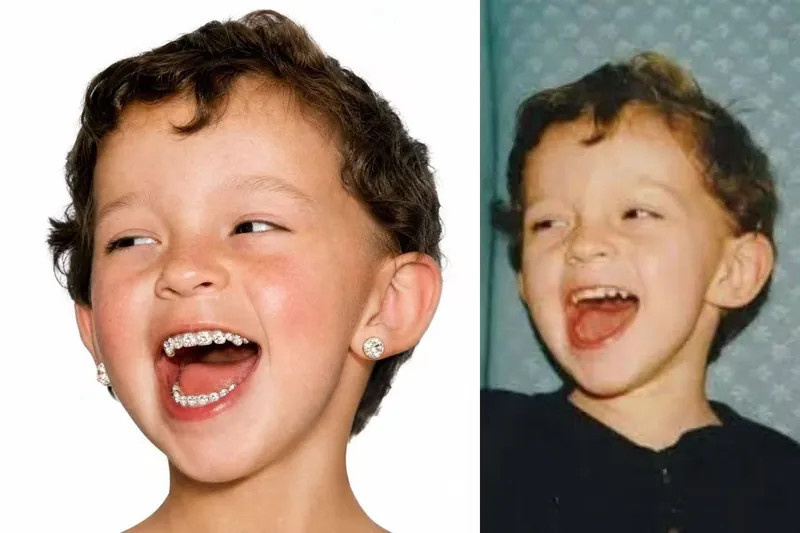
Turn a reference photo into a hyper-realistic square studio portrait that keeps the subject unmistakably recognizable while giving the image a playful, fashion-forward rhinestone smile. The portrait preserves the person’s facial structure, hairstyle, age, expression character, thick natural brows, and authentic skin detail, including visible pores, fine facial hairs, freckles, and natural tonal variation. A vivid high-altitude flush across the cheeks and nose adds distinctive color without making the skin look airbrushed or artificial. The defining feature is a joyful, open-mouth smile with every visible tooth densely covered in individually distinguishable, medium-sized white rhinestones. Each flat-back crystal has a visible circular outline, raised facets, crisp reflections, and tiny seams between neighboring stones, while the natural shape and separation of each tooth remain clear. This creates a granular pavé effect that reads as real nail-art crystals rather than glitter, metallic sparkle, or a continuous jeweled surface. The finished image places the centered head against a seamless pure-white background with soft, even frontal studio lighting and a clean commercial portrait composition. Oversized round desert-toned diamond studs in warm sand-gold, champagne-beige, and pale amber add a luxurious finishing detail, making the result suitable for distinctive editorial, beauty, fashion, or creative portrait concepts.
Naive Doodle Avatar
Create fashion-chibi avatars from photos or text
Description
Recommended by
Shuting@YouMind
Why we love this skill
Turns photos or descriptions into recognizable fashion-chibi avatars with deliberately naive brushwork, graphic silhouettes, and playful asymmetry. Its identity-aware styling and consistent 12-avatar grid make it equally strong for personal portraits or cohesive fictional sets.
Turn a portrait, appearance description, or creative character idea into a distinctive naive doodle fashion-chibi avatar with a childlike yet cool editorial feel. The style emphasizes bold graphic hair shapes, rough marker or dry-brush edges, restrained watercolor-like color, and a clean white or warm-white background. Real photos guide recognizable cues such as hairstyle silhouette, face shape, expression, and attached accessories while remaining clearly transformed into an illustrated avatar rather than a realistic likeness. You can also start with a set of fresh fictional avatars when you want random inspiration instead of a photo-based transformation. The result stays flat, expressive, and fashion-forward, avoiding photographic skin, 3D rendering, heavy shading, detailed anatomy, distracting backgrounds, text, and watermarks.
Related Skills
View allImageCrayon Portrait
Turn a portrait photo into a faithful colored crayon or oil pastel sketch that preserves the person’s identity, expression, pose, proportions, hairstyle, clothing, composition, and recognizable details. Freckles, dimples, glasses, earrings, loose strands, teeth, and fabric texture remain part of the likeness rather than being smoothed away or exaggerated. The finished image has the spontaneous character of a quick on-location drawing on white sketch paper, with visible grain, dry rubbing, broken strokes, and airy areas of untouched paper. Facial color stays restrained, using layered pink, coral, and brick-red accents along structural turns while keeping most of the face white; cool blue or peacock-green marks add transparent shadow notes, and yellow is excluded. Hair is rendered in warm brown tones with a deliberate balance between open, light areas and denser textured sections, while clothing and exposed shoulders remain mostly white with only a few expressive lines. A simple, single-hue background softly supports the figure from the sides near the shoulders without filling the page or competing with the portrait. Its uneven, open-edged crayon marks meet the silhouette cleanly and preserve broad white space around the head and lower composition. The result is a distinctive handmade portrait sketch rather than a photorealistic rendering, polished digital painting, or caricature.
create-avatar
create-avatar generates a single 16:9 avatar contact sheet with exactly six named sections arranged in a 3×2 layout. Each section has a thin black border, a centered name tab, and a 3×2 grid of six portraits inside, for 36 portraits total. The skill is designed for quickly creating polished character boards, team avatar sheets, fictional profile collections, collectible-card layouts, or creative identity explorations. The user controls three main inputs: exactly six names, the visual style, and any special characters to include. The default style is photorealistic studio portraiture with a clean retro collectible-card aesthetic, but the style can be changed to pixel art, anime, cyberpunk, clay render, 3D toy, oil painting, noir photography, or other visual directions. The layout is intentionally fixed so the output remains consistent and reusable. Names always appear in order from left to right across the top row, then left to right across the bottom row. Each portrait uses a distinct solid-color background and the full sheet emphasizes character variety: different ages, ethnicities, skin tones, hairstyles, hats, glasses, facial expressions, tattoos, jewelry, and imaginative characters such as aliens, zombies, AI/robots, pandas, or monkeys. Use this skill when you want a clean, organized, highly visual avatar grid rather than a single portrait or a loose collage.
Rhinestone Smile Portrait
Turn a reference photo into a hyper-realistic square studio portrait that keeps the subject unmistakably recognizable while giving the image a playful, fashion-forward rhinestone smile. The portrait preserves the person’s facial structure, hairstyle, age, expression character, thick natural brows, and authentic skin detail, including visible pores, fine facial hairs, freckles, and natural tonal variation. A vivid high-altitude flush across the cheeks and nose adds distinctive color without making the skin look airbrushed or artificial. The defining feature is a joyful, open-mouth smile with every visible tooth densely covered in individually distinguishable, medium-sized white rhinestones. Each flat-back crystal has a visible circular outline, raised facets, crisp reflections, and tiny seams between neighboring stones, while the natural shape and separation of each tooth remain clear. This creates a granular pavé effect that reads as real nail-art crystals rather than glitter, metallic sparkle, or a continuous jeweled surface. The finished image places the centered head against a seamless pure-white background with soft, even frontal studio lighting and a clean commercial portrait composition. Oversized round desert-toned diamond studs in warm sand-gold, champagne-beige, and pale amber add a luxurious finishing detail, making the result suitable for distinctive editorial, beauty, fashion, or creative portrait concepts.
Find your next favorite skill
Explore more curated AI skills for research, creation, and everyday work.