create-avatar
Create a 6-section avatar contact sheet.
Description
create-avatar generates a single 16:9 avatar contact sheet with exactly six named sections arranged in a 3×2 layout. Each section has a thin black border, a centered name tab, and a 3×2 grid of six portraits inside, for 36 portraits total. The skill is designed for quickly creating polished character boards, team avatar sheets, fictional profile collections, collectible-card layouts, or creative identity explorations. The user controls three main inputs: exactly six names, the visual style, and any special characters to include. The default style is photorealistic studio portraiture with a clean retro collectible-card aesthetic, but the style can be changed to pixel art, anime, cyberpunk, clay render, 3D toy, oil painting, noir photography, or other visual directions. The layout is intentionally fixed so the output remains consistent and reusable. Names always appear in order from left to right across the top row, then left to right across the bottom row. Each portrait uses a distinct solid-color background and the full sheet emphasizes character variety: different ages, ethnicities, skin tones, hairstyles, hats, glasses, facial expressions, tattoos, jewelry, and imaginative characters such as aliens, zombies, AI/robots, pandas, or monkeys. Use this skill when you want a clean, organized, highly visual avatar grid rather than a single portrait or a loose collage.
Related Skills
View all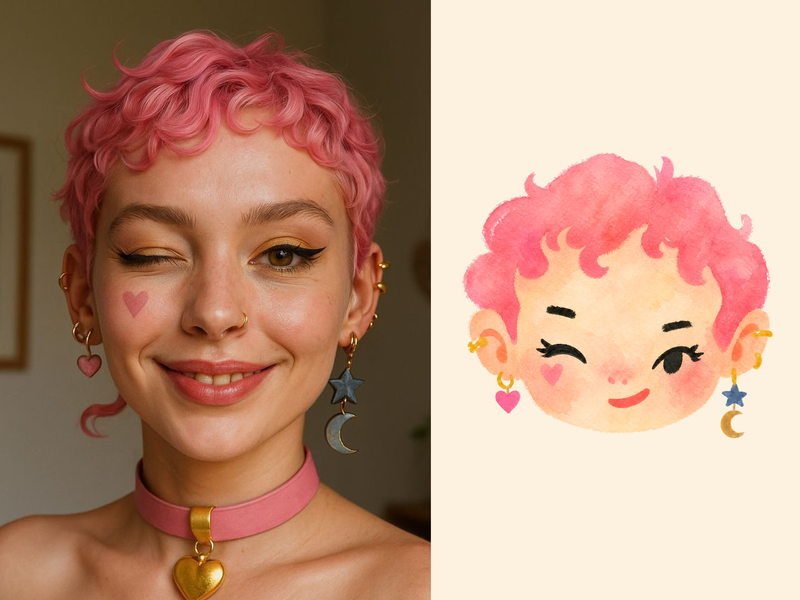 Image
ImageNaive Doodle Avatar
Turn a portrait, appearance description, or creative character idea into a distinctive naive doodle fashion-chibi avatar with a childlike yet cool editorial feel. The style emphasizes bold graphic hair shapes, rough marker or dry-brush edges, restrained watercolor-like color, and a clean white or warm-white background. Real photos guide recognizable cues such as hairstyle silhouette, face shape, expression, and attached accessories while remaining clearly transformed into an illustrated avatar rather than a realistic likeness. You can also start with a set of fresh fictional avatars when you want random inspiration instead of a photo-based transformation. The result stays flat, expressive, and fashion-forward, avoiding photographic skin, 3D rendering, heavy shading, detailed anatomy, distracting backgrounds, text, and watermarks.
Portrait Pose Sheet
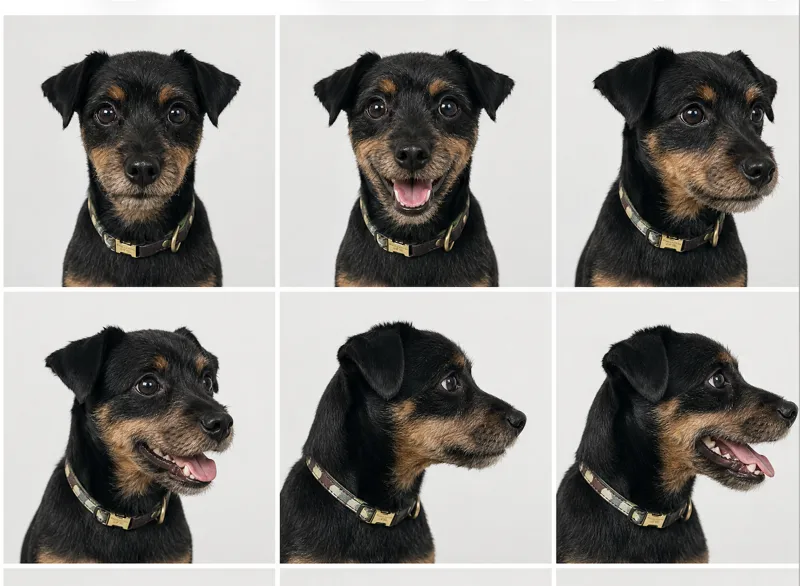
Create identity-consistent 2×2 core or 3×3 extended portrait pose sheets from one front-facing closed-mouth reference photo. Use for pose completion, talking-head assets, stop-motion portrait frames
 Image
ImageYouMind Landing Page Style Poster
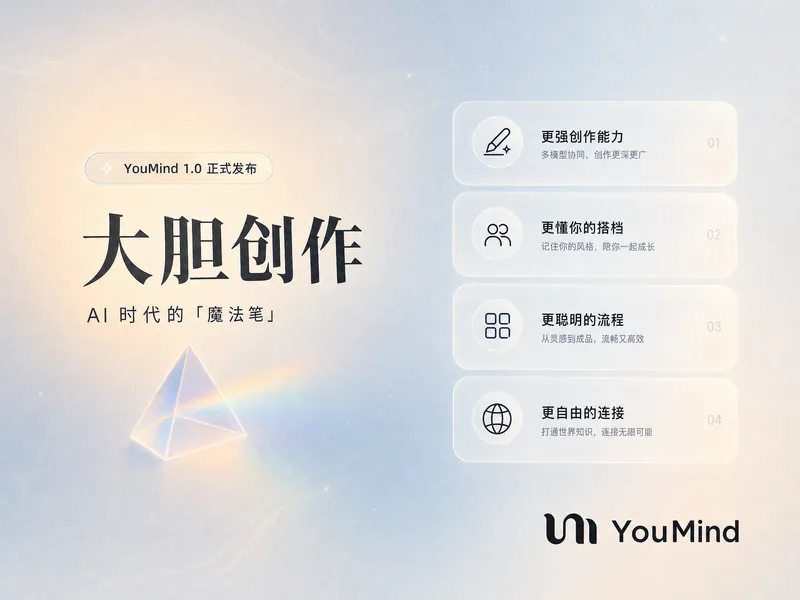
Transform your content into a stunning visual narrative with a YouMind Landing Page Style Poster. This skill crafts beautiful infographic posters that capture attention with a unique Natural Retro-Futurism aesthetic. Perfect for showcasing key data, project highlights, or product features, your information will be presented in a sophisticated and easily digestible format. Leveraging a balanced cool-warm color palette featuring a light gray-blue base with subtle beige-peach accents, each poster embodies a modern UI feel. Expect elegant typography, with authoritative Source Han Serif for titles and clean sans-serif for body text, ensuring readability. The layout utilizes a dynamic Bento grid, arranging your content into visually engaging, soft-edged cards with generous breathing room, avoiding cluttered designs. Beyond striking visuals, the skill integrates subtle design elements like a uniform fine film grain, impressionistic rendering, and optional frosted glass icons for your data points. A single, translucent triangular prism can be added for an elegant accent, while the YouMind official logo is always discreetly placed to maintain brand consistency. This results in a professional, airy, and modern infographic that effectively communicates your message.
create-avatar
Create a 6-section avatar contact sheet.
Description
create-avatar generates a single 16:9 avatar contact sheet with exactly six named sections arranged in a 3×2 layout. Each section has a thin black border, a centered name tab, and a 3×2 grid of six portraits inside, for 36 portraits total. The skill is designed for quickly creating polished character boards, team avatar sheets, fictional profile collections, collectible-card layouts, or creative identity explorations. The user controls three main inputs: exactly six names, the visual style, and any special characters to include. The default style is photorealistic studio portraiture with a clean retro collectible-card aesthetic, but the style can be changed to pixel art, anime, cyberpunk, clay render, 3D toy, oil painting, noir photography, or other visual directions. The layout is intentionally fixed so the output remains consistent and reusable. Names always appear in order from left to right across the top row, then left to right across the bottom row. Each portrait uses a distinct solid-color background and the full sheet emphasizes character variety: different ages, ethnicities, skin tones, hairstyles, hats, glasses, facial expressions, tattoos, jewelry, and imaginative characters such as aliens, zombies, AI/robots, pandas, or monkeys. Use this skill when you want a clean, organized, highly visual avatar grid rather than a single portrait or a loose collage.
Related Skills
View allImageNaive Doodle Avatar
Turn a portrait, appearance description, or creative character idea into a distinctive naive doodle fashion-chibi avatar with a childlike yet cool editorial feel. The style emphasizes bold graphic hair shapes, rough marker or dry-brush edges, restrained watercolor-like color, and a clean white or warm-white background. Real photos guide recognizable cues such as hairstyle silhouette, face shape, expression, and attached accessories while remaining clearly transformed into an illustrated avatar rather than a realistic likeness. You can also start with a set of fresh fictional avatars when you want random inspiration instead of a photo-based transformation. The result stays flat, expressive, and fashion-forward, avoiding photographic skin, 3D rendering, heavy shading, detailed anatomy, distracting backgrounds, text, and watermarks.
Portrait Pose Sheet
Create identity-consistent 2×2 core or 3×3 extended portrait pose sheets from one front-facing closed-mouth reference photo. Use for pose completion, talking-head assets, stop-motion portrait frames
ImageYouMind Landing Page Style Poster
Transform your content into a stunning visual narrative with a YouMind Landing Page Style Poster. This skill crafts beautiful infographic posters that capture attention with a unique Natural Retro-Futurism aesthetic. Perfect for showcasing key data, project highlights, or product features, your information will be presented in a sophisticated and easily digestible format. Leveraging a balanced cool-warm color palette featuring a light gray-blue base with subtle beige-peach accents, each poster embodies a modern UI feel. Expect elegant typography, with authoritative Source Han Serif for titles and clean sans-serif for body text, ensuring readability. The layout utilizes a dynamic Bento grid, arranging your content into visually engaging, soft-edged cards with generous breathing room, avoiding cluttered designs. Beyond striking visuals, the skill integrates subtle design elements like a uniform fine film grain, impressionistic rendering, and optional frosted glass icons for your data points. A single, translucent triangular prism can be added for an elegant accent, while the YouMind official logo is always discreetly placed to maintain brand consistency. This results in a professional, airy, and modern infographic that effectively communicates your message.
Find your next favorite skill
Explore more curated AI skills for research, creation, and everyday work.