
YouMind Skill Architect v2.0
Tell me your problem, I'll build the Skill.
Description
Turn a vague idea into a YouMind Skill that's ready to publish. You can use it even if you don't know how to write Skills, understand prompts, or break down workflows. It will help you: Identify the right positioning: determine your target users, core pain points, and use cases truly worth building Design the workflow: break your experience into a complete workflow of "input → judgment → steps → output" Generate the finished product: write out the Skill name, subtitle, description, input hint, and full instructions for you Check quality: automatically check whether it's too broad, the input is too complex, the output is unclear, the flow is broken, or it lacks value Finish the packaging: make the Skill easier to understand, install, use, and reuse Using it is simple: Just open it and tell me: "I want to make a Skill that helps XX people solve XX problem." Even if you only have a vague one-line idea, you can get started. You'll end up with a complete, finished Skill that you can copy directly into the YouMind creation page.
Related Skills
View all
Skill Designer
Can't write a Skill? Just describe it in a sentence. Skill Designer is a 'Skill that teaches you to write Skills' — it uses a 7-layer meta-framework (Intent Definition → Input Classification → Workflow Design → Tool Strategy → Output Specification → Constraints and Boundaries → Composability & Testing) to turn your vague idea into a well-structured, immediately executable YouMind Skill. It supports two paths: Design from Scratch (describe your idea, it automatically asks for missing info, runs through the 7 layers, and directly creates the Skill) and Review & Improve (send an existing Skill draft, and it diagnoses issues layer by layer with improvement suggestions). When information is insufficient, it asks follow-up questions and offers choices rather than open-ended questions, reducing the effort to respond. Finally, it directly calls createSkill to create a usable Skill, no manual instruction writing needed. Ideal for creators who want to turn their experience into skills but don't know where to start.
 Write
WriteAFP Skill Listing Arch v8.1
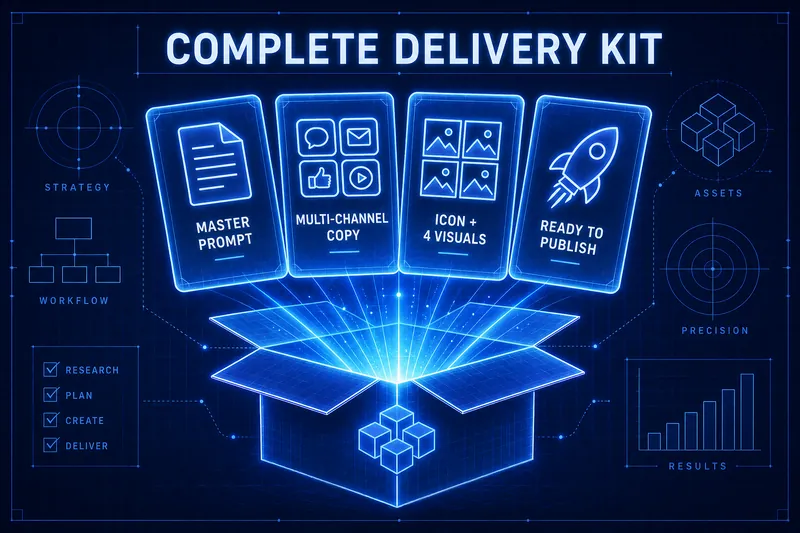
A single idea can create a complete Skill ready for listing. It doesn't just give you a prompt; it provides all the assets needed for listing in one go: 🔍 Automatic complexity diagnosis — first determines whether the task is light or heavy, then decides to go with the 3-stage lightweight version or the 6-stage heavy version, avoiding overkill. 🏗️ One-click AFP skeleton — operation protocol + numbered stages + forced stop points + status dashboard + stage inheritance protocol; industry-standard structure all set up at once, your Skill will never go off track. 🏷️ Easily name and write descriptions — apply viral naming formulas and golden description structures; names feel valuable and descriptions are instantly understandable. 📣 Four-channel promotional copy — Moments / Xiaohongshu / Community / Official Account; one set of themes automatically adapts to four tones, ready to post once done. How to use? After opening, just say 'I want to make a Skill that helps XX', and it will guide you step by step with an always-visible progress panel. At each step, just reply 'continue' or 'modify'. It includes a complete AFP methodology framework and a 15-item listing self-check list (including quality inspection and criticism rules).
AI Prompt Architect MAX
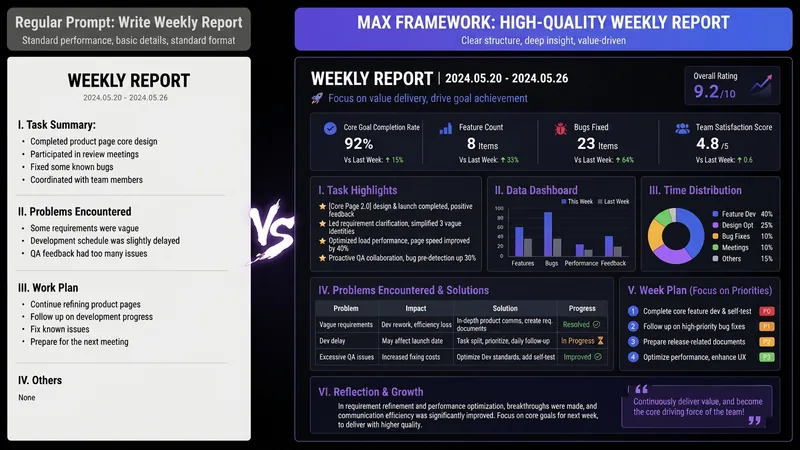
Have you ever had moments like these— You ask AI to write a weekly report, and it gives you a childish play-by-play; you ask it to revise a résumé, and it serves up “teamwork, diligence, and a strong sense of responsibility”; you ask it to analyze data, and it starts with, “As an AI, I’m happy to help you…” It’s not that AI is incapable—the problem is that your instructions are too amateurish. There are already plenty of Prompt templates teaching you how to write Prompts. But even after using them, you still can’t write your own—because what you’re missing isn’t a template. It’s the ability to compile requirements. This SKILL is my Prompt compiler: a condensed version of the Prompt architecture methodology I use every day as an AI OPC—someone working on the front lines of AI implementation—to write Prompts for teams. You explain what you need in plain language, and it gives you a top-tier architecture. Input: “Help me write a monthly report” Output: a complete eight-module Prompt architecture—role, task, audience, process, constraints, format, self-check, and examples, all locked in. Copy and paste it into ChatGPT / Claude / DeepSeek / Kimi, and the first output will be ready to use. Even better, it will tell you: ✓ Which model is best for this Prompt ✓ Which variables you can change directly next time (learn once, reuse repeatedly) ✓ Which one missing piece of information could take the output to the next level How is it different from an ordinary Prompt template SKILL? Other SKILLs give you a fish—one finished Prompt. This SKILL gives you a compiler—the ability to compile any requirement into a Prompt. Install it once, and every AI use case you have will improve—writing, reporting, analysis, translation, customer service, content creation, and more. Who should install it: People who use AI every day but are never satisfied with the output People who want to learn Prompt engineering without spending thousands on a course Team leaders who want to standardize AI use but don’t know where to start Content creators, researchers, students, job seekers, and side-hustle builders How well you use AI doesn’t depend on which model you choose. It depends on whether you can compile your requirements. Install it today, and the quality of your conversations with AI will take a dramatic leap forward.
YouMind Skill Architect v2.0
Tell me your problem, I'll build the Skill.
Description
Turn a vague idea into a YouMind Skill that's ready to publish. You can use it even if you don't know how to write Skills, understand prompts, or break down workflows. It will help you: Identify the right positioning: determine your target users, core pain points, and use cases truly worth building Design the workflow: break your experience into a complete workflow of "input → judgment → steps → output" Generate the finished product: write out the Skill name, subtitle, description, input hint, and full instructions for you Check quality: automatically check whether it's too broad, the input is too complex, the output is unclear, the flow is broken, or it lacks value Finish the packaging: make the Skill easier to understand, install, use, and reuse Using it is simple: Just open it and tell me: "I want to make a Skill that helps XX people solve XX problem." Even if you only have a vague one-line idea, you can get started. You'll end up with a complete, finished Skill that you can copy directly into the YouMind creation page.
Related Skills
View allSkill Designer
Can't write a Skill? Just describe it in a sentence. Skill Designer is a 'Skill that teaches you to write Skills' — it uses a 7-layer meta-framework (Intent Definition → Input Classification → Workflow Design → Tool Strategy → Output Specification → Constraints and Boundaries → Composability & Testing) to turn your vague idea into a well-structured, immediately executable YouMind Skill. It supports two paths: Design from Scratch (describe your idea, it automatically asks for missing info, runs through the 7 layers, and directly creates the Skill) and Review & Improve (send an existing Skill draft, and it diagnoses issues layer by layer with improvement suggestions). When information is insufficient, it asks follow-up questions and offers choices rather than open-ended questions, reducing the effort to respond. Finally, it directly calls createSkill to create a usable Skill, no manual instruction writing needed. Ideal for creators who want to turn their experience into skills but don't know where to start.
WriteAFP Skill Listing Arch v8.1
A single idea can create a complete Skill ready for listing. It doesn't just give you a prompt; it provides all the assets needed for listing in one go: 🔍 Automatic complexity diagnosis — first determines whether the task is light or heavy, then decides to go with the 3-stage lightweight version or the 6-stage heavy version, avoiding overkill. 🏗️ One-click AFP skeleton — operation protocol + numbered stages + forced stop points + status dashboard + stage inheritance protocol; industry-standard structure all set up at once, your Skill will never go off track. 🏷️ Easily name and write descriptions — apply viral naming formulas and golden description structures; names feel valuable and descriptions are instantly understandable. 📣 Four-channel promotional copy — Moments / Xiaohongshu / Community / Official Account; one set of themes automatically adapts to four tones, ready to post once done. How to use? After opening, just say 'I want to make a Skill that helps XX', and it will guide you step by step with an always-visible progress panel. At each step, just reply 'continue' or 'modify'. It includes a complete AFP methodology framework and a 15-item listing self-check list (including quality inspection and criticism rules).
AI Prompt Architect MAX
Have you ever had moments like these— You ask AI to write a weekly report, and it gives you a childish play-by-play; you ask it to revise a résumé, and it serves up “teamwork, diligence, and a strong sense of responsibility”; you ask it to analyze data, and it starts with, “As an AI, I’m happy to help you…” It’s not that AI is incapable—the problem is that your instructions are too amateurish. There are already plenty of Prompt templates teaching you how to write Prompts. But even after using them, you still can’t write your own—because what you’re missing isn’t a template. It’s the ability to compile requirements. This SKILL is my Prompt compiler: a condensed version of the Prompt architecture methodology I use every day as an AI OPC—someone working on the front lines of AI implementation—to write Prompts for teams. You explain what you need in plain language, and it gives you a top-tier architecture. Input: “Help me write a monthly report” Output: a complete eight-module Prompt architecture—role, task, audience, process, constraints, format, self-check, and examples, all locked in. Copy and paste it into ChatGPT / Claude / DeepSeek / Kimi, and the first output will be ready to use. Even better, it will tell you: ✓ Which model is best for this Prompt ✓ Which variables you can change directly next time (learn once, reuse repeatedly) ✓ Which one missing piece of information could take the output to the next level How is it different from an ordinary Prompt template SKILL? Other SKILLs give you a fish—one finished Prompt. This SKILL gives you a compiler—the ability to compile any requirement into a Prompt. Install it once, and every AI use case you have will improve—writing, reporting, analysis, translation, customer service, content creation, and more. Who should install it: People who use AI every day but are never satisfied with the output People who want to learn Prompt engineering without spending thousands on a course Team leaders who want to standardize AI use but don’t know where to start Content creators, researchers, students, job seekers, and side-hustle builders How well you use AI doesn’t depend on which model you choose. It depends on whether you can compile your requirements. Install it today, and the quality of your conversations with AI will take a dramatic leap forward.
Find your next favorite skill
Explore more curated AI skills for research, creation, and everyday work.