
Lesson Prep Script V1.0
Description
Helps instructors/knowledge IPs directly turn lesson preparation topics into a ready-to-use 30-minute spoken-word script—just pick it up and read, not secondary prompts. What it solves Traditional lesson preparation requires instructors to go through "ideation → break into modules → write script → mark pacing → design interactions", which is time-consuming and easy to miss details. This Skill compresses this process into a 5-step interaction. Instructors only need to provide the topic and key knowledge points, and the rest is automated. Core capabilities ① Five-step structured interaction: Select lesson type → Receive preparation content → Deep analysis with option presentation → Ask for style preference → Directly generate a complete spoken-word script. Each step waits for user confirmation before proceeding. ② CXO three-dimensional teaching verification: Each module is annotated with teaching dimensions — C (Content/Knowledge), X (Experience/Practice), O (Objective/Output), ensuring full coverage throughout. ③ Spoken-word script template: Each segment follows the framework of Hook → Key Point → Structure → Call to Action. The structure supports four modes: reason, method, situation/reaction, and chronological order. ④ Complete output includes: 7 modules totaling approximately 7,900 words of spoken text + tone cues (【Pause 2 seconds】【Emphasis】) + audience interaction instructions + CXO paragraph annotations + full statistics. ⑤ Seven-dimensional quality check: Word count deviation / Spoken style / Template completeness / CXO coverage / Logical coherence / Pacing / Reusability — each dimension is checked, and if any fails, it is corrected and regenerated.
Related Skills
View all
Automated Course Lesson Plans
One-line summary: Generate all lesson plans for an entire course in one go — not just one lesson, but a whole system of logically connected lesson plans. Detailed description: Still writing lesson plans one by one? This skill directly helps you batch-output all lesson plans for a full course (16 weeks/32 class hours or more) in your school's template format. 🔥 Core Capabilities 1. Cascading design for the entire course, not isolated pieces Each lesson plan is not standalone — the skill has a built-in OBE (Outcome-Based Education) logic engine that works backward from course objectives to each lesson's teaching goals, key/difficult points, activities, and assessment methods. Knowledge progression, ability scaffolding, and method rotation across units are all auto-planned. The result is a systematic set of lesson plans, not 16 unrelated documents. 2. Fully automated pipeline From template parsing → content source confirmation → first unit deep polishing → style locking → subsequent unit auto-generation → course summary matrix → batch file output — the entire pipeline runs automatically. You only need to confirm at key nodes; the repetitive work is all done by AI. 3. Two content sources, flexible adaptation With a textbook: Upload textbook/handouts/PPT, AI automatically extracts knowledge points and chapter structure to generate lesson plans directly. Without a textbook: Just provide the topic and outline, AI searches online for materials, organizes them into structured material packages, and generates after confirmation. Mixed mode: Some units have materials, others need to be gathered — switch flexibly per unit. 4. Template adaptation + style learning No matter what your school's lesson plan template looks like, upload it and AI automatically parses the fields. For the first unit, confirm field by field and edit until satisfied; then AI locks in your writing style (word choice, level of detail, formatting preferences) and automatically generates subsequent units in your style. 5. Professional quality assurance Teaching goals strictly use Bloom's action verbs, avoiding vague expressions like "understand" or "master." Each lesson plan undergoes automatic consistency checks (goals ↔ methods ↔ activities ↔ assessment fully aligned). Every 3 units, an automatic quality inspection (method diversity, knowledge progression, style consistency). Finally outputs a course objective coverage matrix, providing a clear view of the entire course's design logic. 📦 Final Deliverables 📁 A folder containing individual lesson plan documents for all units 📊 A course overview document (unit progression table + objective coverage matrix + method distribution statistics) 🎯 Each lesson plan strictly output in your school's template format, ready to submit 💡 Who Should Use It College/vocational teachers who need to write a full course's lesson plans for a new semester Teaching teams that need to batch-produce lesson plans for multiple courses Teachers preparing for teaching inspections or course evaluations who need to quickly complete a full set of lesson plans Teachers who want to write professional, standardized lesson plans that can pass OBE accreditation review One skill, complete lesson plans for an entire course. It doesn't just help you write one — it helps you design a complete course teaching system, then automatically outputs each one.
Backward Design for Lessons
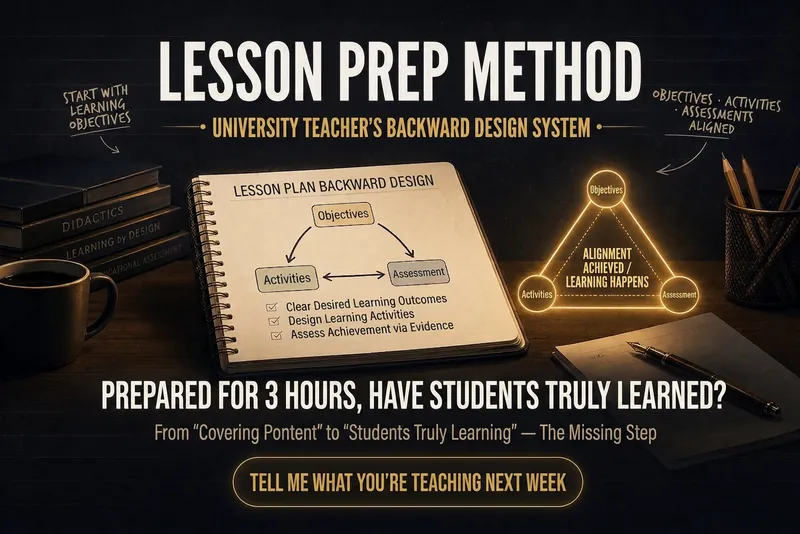
‼️ Have you ever had this feeling?— You spend three hours preparing a lesson, your PPT looks great, you deliver it smoothly on stage, but afterward, there's an indescribable emptiness: Did the students really learn? It's not that you didn't try hard enough. It's because you've fallen into the most hidden trap in higher education: Confusing "covering content" with "completing teaching." Why does more preparation sometimes lead to worse results? Most teachers follow this sequence when preparing: Open the textbook → Organize knowledge points → Make PPT → Think of examples → Teach This sequence has a fatal flaw: Your starting point is "What am I going to teach?" rather than "What can students do after class?" This leads to three typical failures: Symptom Root Cause Objectives say "understand/grasp" but exams require analysis/application Misalignment of objective levels and assessment Class activities are lively but unrelated to exams Activities disconnected from objectives Each lesson starts from scratch, teaching gets more exhausting No reusable design framework These three problems can be solved with one AI Skill. What is "Backward Design for Lessons"? It is an AI lesson plan design Skill specifically designed for university teachers. Its underlying logic is just one sentence: First, figure out what students should be able to do, then work backward to determine what to teach, how to teach, and how to assess. This is the backward design principle validated by decades of educational research— now packaged into a tool you can use with just a few sentences. How easy is it to use? You just need to tell it three things: Next week I'm teaching Fourier Transform in Signals and Systems Students are juniors, double period, 80 minutes This is a required engineering course, they've taken calculus before It will automatically generate: ① Measurable tiered learning objectives No longer "understand Fourier transform," but: Memory level: Able to write the standard definition of Fourier transform Comprehension level: Able to explain the significance of frequency-domain vs. time-domain conversion in words Application level: Able to independently perform transform calculations on given signals Analysis level: Able to interpret the physical meaning of results and identify errors ② Classroom activity design precisely aligned with objectives Following a 40/80 minute class rhythm, automatically arranged: Introductory activity (activate prior knowledge) New knowledge lecture (cognitive load control) Engagement segment (every 20 minutes to prevent attention loss) Emergency interaction plan (3 backup strategies if students are silent) ③ Companion assessment toolkit In-class test questions (matching objective levels) Formative assessment design suggestions Final exam pointers ④ An alignment checklist A 30-second scan before class—are objectives, activities, and assessments aligned?

One-Click Script & Cover Gen
The biggest hurdle in talking-head videos isn't being on camera—it's writing the script. You agonize over a topic, the opening hook gets swiped away, you spend all night polishing a word-for-word script, and then you still need to find a cover template. Before you've even posted a single video, you're already burnt out from the prep work. Feed in a topic and get a complete ready-to-shoot package: hook opening + word-for-word script + scene breakdown + title and description + matching cover image. ✨ Core Capabilities 1. Golden 3-second hook: 4 opening formulas—suspense/pain point/counter-intuitive/benefit—designed to beat high swipe rates. 2. Word-for-word script: Written in a conversational rhythm, with clear sentence breaks, pauses, and emphasis markers—just read it aloud. 3. Scene breakdown: Each segment includes visual, camera movement, and subtitle suggestions, plus BGM style. 4. Title and description set: 3 title options + description + hashtags. 5. Cover image generated directly: Large hook text + anti-AI-style layout, with 9:16, 3:4, or 16:9 aspect ratios selectable per platform. 6. Compatible with Douyin, WeChat Channels, Bilibili, and Xiaohongshu videos at different lengths (15s, 60s, 3min). 📱 Use Cases Talking-head creators, paid knowledge instructors, brand short videos, personal IP. One-stop solution for scripts and covers on Douyin, WeChat Channels, Bilibili, and Xiaohongshu. Topic in, shoot out—give the late-night writing hours back to sleep.
Lesson Prep Script V1.0
Description
Helps instructors/knowledge IPs directly turn lesson preparation topics into a ready-to-use 30-minute spoken-word script—just pick it up and read, not secondary prompts. What it solves Traditional lesson preparation requires instructors to go through "ideation → break into modules → write script → mark pacing → design interactions", which is time-consuming and easy to miss details. This Skill compresses this process into a 5-step interaction. Instructors only need to provide the topic and key knowledge points, and the rest is automated. Core capabilities ① Five-step structured interaction: Select lesson type → Receive preparation content → Deep analysis with option presentation → Ask for style preference → Directly generate a complete spoken-word script. Each step waits for user confirmation before proceeding. ② CXO three-dimensional teaching verification: Each module is annotated with teaching dimensions — C (Content/Knowledge), X (Experience/Practice), O (Objective/Output), ensuring full coverage throughout. ③ Spoken-word script template: Each segment follows the framework of Hook → Key Point → Structure → Call to Action. The structure supports four modes: reason, method, situation/reaction, and chronological order. ④ Complete output includes: 7 modules totaling approximately 7,900 words of spoken text + tone cues (【Pause 2 seconds】【Emphasis】) + audience interaction instructions + CXO paragraph annotations + full statistics. ⑤ Seven-dimensional quality check: Word count deviation / Spoken style / Template completeness / CXO coverage / Logical coherence / Pacing / Reusability — each dimension is checked, and if any fails, it is corrected and regenerated.
Related Skills
View allAutomated Course Lesson Plans
One-line summary: Generate all lesson plans for an entire course in one go — not just one lesson, but a whole system of logically connected lesson plans. Detailed description: Still writing lesson plans one by one? This skill directly helps you batch-output all lesson plans for a full course (16 weeks/32 class hours or more) in your school's template format. 🔥 Core Capabilities 1. Cascading design for the entire course, not isolated pieces Each lesson plan is not standalone — the skill has a built-in OBE (Outcome-Based Education) logic engine that works backward from course objectives to each lesson's teaching goals, key/difficult points, activities, and assessment methods. Knowledge progression, ability scaffolding, and method rotation across units are all auto-planned. The result is a systematic set of lesson plans, not 16 unrelated documents. 2. Fully automated pipeline From template parsing → content source confirmation → first unit deep polishing → style locking → subsequent unit auto-generation → course summary matrix → batch file output — the entire pipeline runs automatically. You only need to confirm at key nodes; the repetitive work is all done by AI. 3. Two content sources, flexible adaptation With a textbook: Upload textbook/handouts/PPT, AI automatically extracts knowledge points and chapter structure to generate lesson plans directly. Without a textbook: Just provide the topic and outline, AI searches online for materials, organizes them into structured material packages, and generates after confirmation. Mixed mode: Some units have materials, others need to be gathered — switch flexibly per unit. 4. Template adaptation + style learning No matter what your school's lesson plan template looks like, upload it and AI automatically parses the fields. For the first unit, confirm field by field and edit until satisfied; then AI locks in your writing style (word choice, level of detail, formatting preferences) and automatically generates subsequent units in your style. 5. Professional quality assurance Teaching goals strictly use Bloom's action verbs, avoiding vague expressions like "understand" or "master." Each lesson plan undergoes automatic consistency checks (goals ↔ methods ↔ activities ↔ assessment fully aligned). Every 3 units, an automatic quality inspection (method diversity, knowledge progression, style consistency). Finally outputs a course objective coverage matrix, providing a clear view of the entire course's design logic. 📦 Final Deliverables 📁 A folder containing individual lesson plan documents for all units 📊 A course overview document (unit progression table + objective coverage matrix + method distribution statistics) 🎯 Each lesson plan strictly output in your school's template format, ready to submit 💡 Who Should Use It College/vocational teachers who need to write a full course's lesson plans for a new semester Teaching teams that need to batch-produce lesson plans for multiple courses Teachers preparing for teaching inspections or course evaluations who need to quickly complete a full set of lesson plans Teachers who want to write professional, standardized lesson plans that can pass OBE accreditation review One skill, complete lesson plans for an entire course. It doesn't just help you write one — it helps you design a complete course teaching system, then automatically outputs each one.
Backward Design for Lessons
‼️ Have you ever had this feeling?— You spend three hours preparing a lesson, your PPT looks great, you deliver it smoothly on stage, but afterward, there's an indescribable emptiness: Did the students really learn? It's not that you didn't try hard enough. It's because you've fallen into the most hidden trap in higher education: Confusing "covering content" with "completing teaching." Why does more preparation sometimes lead to worse results? Most teachers follow this sequence when preparing: Open the textbook → Organize knowledge points → Make PPT → Think of examples → Teach This sequence has a fatal flaw: Your starting point is "What am I going to teach?" rather than "What can students do after class?" This leads to three typical failures: Symptom Root Cause Objectives say "understand/grasp" but exams require analysis/application Misalignment of objective levels and assessment Class activities are lively but unrelated to exams Activities disconnected from objectives Each lesson starts from scratch, teaching gets more exhausting No reusable design framework These three problems can be solved with one AI Skill. What is "Backward Design for Lessons"? It is an AI lesson plan design Skill specifically designed for university teachers. Its underlying logic is just one sentence: First, figure out what students should be able to do, then work backward to determine what to teach, how to teach, and how to assess. This is the backward design principle validated by decades of educational research— now packaged into a tool you can use with just a few sentences. How easy is it to use? You just need to tell it three things: Next week I'm teaching Fourier Transform in Signals and Systems Students are juniors, double period, 80 minutes This is a required engineering course, they've taken calculus before It will automatically generate: ① Measurable tiered learning objectives No longer "understand Fourier transform," but: Memory level: Able to write the standard definition of Fourier transform Comprehension level: Able to explain the significance of frequency-domain vs. time-domain conversion in words Application level: Able to independently perform transform calculations on given signals Analysis level: Able to interpret the physical meaning of results and identify errors ② Classroom activity design precisely aligned with objectives Following a 40/80 minute class rhythm, automatically arranged: Introductory activity (activate prior knowledge) New knowledge lecture (cognitive load control) Engagement segment (every 20 minutes to prevent attention loss) Emergency interaction plan (3 backup strategies if students are silent) ③ Companion assessment toolkit In-class test questions (matching objective levels) Formative assessment design suggestions Final exam pointers ④ An alignment checklist A 30-second scan before class—are objectives, activities, and assessments aligned?
One-Click Script & Cover Gen
The biggest hurdle in talking-head videos isn't being on camera—it's writing the script. You agonize over a topic, the opening hook gets swiped away, you spend all night polishing a word-for-word script, and then you still need to find a cover template. Before you've even posted a single video, you're already burnt out from the prep work. Feed in a topic and get a complete ready-to-shoot package: hook opening + word-for-word script + scene breakdown + title and description + matching cover image. ✨ Core Capabilities 1. Golden 3-second hook: 4 opening formulas—suspense/pain point/counter-intuitive/benefit—designed to beat high swipe rates. 2. Word-for-word script: Written in a conversational rhythm, with clear sentence breaks, pauses, and emphasis markers—just read it aloud. 3. Scene breakdown: Each segment includes visual, camera movement, and subtitle suggestions, plus BGM style. 4. Title and description set: 3 title options + description + hashtags. 5. Cover image generated directly: Large hook text + anti-AI-style layout, with 9:16, 3:4, or 16:9 aspect ratios selectable per platform. 6. Compatible with Douyin, WeChat Channels, Bilibili, and Xiaohongshu videos at different lengths (15s, 60s, 3min). 📱 Use Cases Talking-head creators, paid knowledge instructors, brand short videos, personal IP. One-stop solution for scripts and covers on Douyin, WeChat Channels, Bilibili, and Xiaohongshu. Topic in, shoot out—give the late-night writing hours back to sleep.
Find your next favorite skill
Explore more curated AI skills for research, creation, and everyday work.