
Professional Course Topology Diagram and Curriculum Program Material Generator
Input the professional course schedule, automatically sort out the competency line and prerequisite relationship, code draws high-definition topology diagrams and generates training program description materials; fact anchored with zero fabrication, proofread before drawing.
Description
Input a professional course schedule, and the system automatically identifies competency lines and prerequisite relationships, generates a high-definition topology diagram using code, and produces training program description materials; it is fact-anchored with zero fabrication, and the diagram is created only after verification. Input the professional course offerings in any university's talent training program (PDF/image/text table are all acceptable), and the system automatically identifies the topological relationships between courses—grouping them by professional competency lines, identifying strong prerequisite dependencies and competency responses, locating core hub nodes, handling limited elective/specialized courses, and connecting them to the internship in the 5th/6th semester; then, it uses HTML/SVG code to accurately render a high-definition course topology diagram with clear Chinese characters and unblurred lines (not an AI-generated diagram), and finally produces a talent training program curriculum system description material that conforms to the style of teaching documents and includes diagrams. Built-in fact-anchoring and manual verification gate control: course names/nature/class hours are strictly faithful to the original table with zero fabrication; prerequisite relationships are clearly marked as teaching logical inferences and are verified by the user before diagram creation; information such as unfounded curriculum standard adjustments is never fabricated.
Related Skills
View all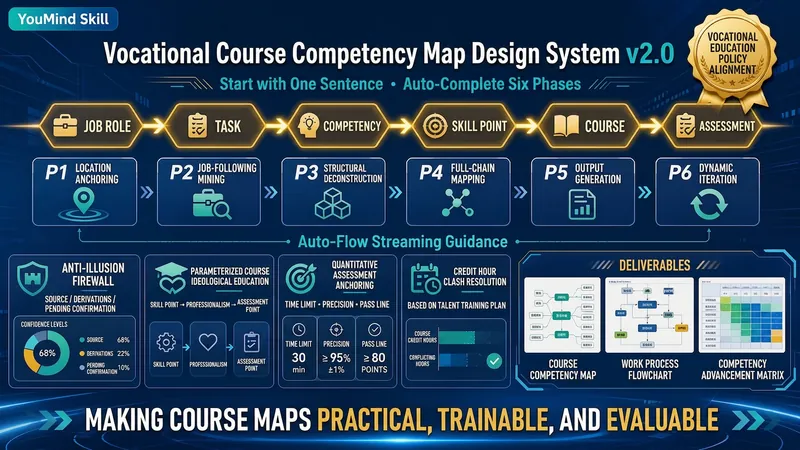
Course Competency Mapper v2.0
An automated system for generating higher vocational course competency maps aligned with Document No. 1 of Vocational Education (Jiaozhicheng [2026] No. 1). Following the reverse design logic of 'Position → Task → Competency → Skill Point → Course → Assessment', it guides through six stages to produce review-level competency maps: position anchors, typical work tasks, five-level structure breakdown, full-chain mapping matrix of position-competency-course-assessment-certification, quantified passing lines, credit hour validation, and red-line self-checks. Built-in anti-hallucination firewall (three-option source tags, no fabrication, source coverage self-check) and parameterized ideological-political mapping (skill points → professional qualities → observable assessment points), automatically handle conflicts in credit hour standards from multiple materials and consolidate with talent cultivation plans.

Research, Course & Media
Research, Teaching Reform, Course Development & Media Visual Generator is a visual design Skill for research and teaching reform charts, social media visuals, and course development diagrams. It first identifies the visual type, offers options from suitable structure or style libraries, and then presents a complete design plan. It generates the visual only after receiving the user's explicit approval, and checks the content, relationships, Chinese text, composition, people, and visual quality before delivery. Research, Teaching Reform, Course Development & Media Visual Generator can turn research materials, course content, and social media topics into clear, polished visual concepts that match your personal aesthetic. It supports technical roadmaps, theoretical mechanism diagrams, research framework diagrams, course system diagrams, role–competency–course mapping diagrams, WeChat Official Account header images, knowledge infographics, scene illustrations, and multipage graphic cards. The Skill first translates the content into “topic—nodes—relationships—hierarchy—capacity—medium,” then recommends 3–5 suitable structures or styles and presents the composition, color palette, materials, lighting, text treatment, rendering method, and risks. It does not generate images without user approval. After the user changes the content, structure, style, color palette, or dimensions, it updates the plan and waits for approval again. Research and course diagrams prioritize editable, deterministic rendering with accurate relationships. Social media and scene visuals use text-free image generation with reliable text overlays.

Automated Course Lesson Plans
One-line summary: Generate all lesson plans for an entire course in one go — not just one lesson, but a whole system of logically connected lesson plans. Detailed description: Still writing lesson plans one by one? This skill directly helps you batch-output all lesson plans for a full course (16 weeks/32 class hours or more) in your school's template format. 🔥 Core Capabilities 1. Cascading design for the entire course, not isolated pieces Each lesson plan is not standalone — the skill has a built-in OBE (Outcome-Based Education) logic engine that works backward from course objectives to each lesson's teaching goals, key/difficult points, activities, and assessment methods. Knowledge progression, ability scaffolding, and method rotation across units are all auto-planned. The result is a systematic set of lesson plans, not 16 unrelated documents. 2. Fully automated pipeline From template parsing → content source confirmation → first unit deep polishing → style locking → subsequent unit auto-generation → course summary matrix → batch file output — the entire pipeline runs automatically. You only need to confirm at key nodes; the repetitive work is all done by AI. 3. Two content sources, flexible adaptation With a textbook: Upload textbook/handouts/PPT, AI automatically extracts knowledge points and chapter structure to generate lesson plans directly. Without a textbook: Just provide the topic and outline, AI searches online for materials, organizes them into structured material packages, and generates after confirmation. Mixed mode: Some units have materials, others need to be gathered — switch flexibly per unit. 4. Template adaptation + style learning No matter what your school's lesson plan template looks like, upload it and AI automatically parses the fields. For the first unit, confirm field by field and edit until satisfied; then AI locks in your writing style (word choice, level of detail, formatting preferences) and automatically generates subsequent units in your style. 5. Professional quality assurance Teaching goals strictly use Bloom's action verbs, avoiding vague expressions like "understand" or "master." Each lesson plan undergoes automatic consistency checks (goals ↔ methods ↔ activities ↔ assessment fully aligned). Every 3 units, an automatic quality inspection (method diversity, knowledge progression, style consistency). Finally outputs a course objective coverage matrix, providing a clear view of the entire course's design logic. 📦 Final Deliverables 📁 A folder containing individual lesson plan documents for all units 📊 A course overview document (unit progression table + objective coverage matrix + method distribution statistics) 🎯 Each lesson plan strictly output in your school's template format, ready to submit 💡 Who Should Use It College/vocational teachers who need to write a full course's lesson plans for a new semester Teaching teams that need to batch-produce lesson plans for multiple courses Teachers preparing for teaching inspections or course evaluations who need to quickly complete a full set of lesson plans Teachers who want to write professional, standardized lesson plans that can pass OBE accreditation review One skill, complete lesson plans for an entire course. It doesn't just help you write one — it helps you design a complete course teaching system, then automatically outputs each one.
Professional Course Topology Diagram and Curriculum Program Material Generator
Input the professional course schedule, automatically sort out the competency line and prerequisite relationship, code draws high-definition topology diagrams and generates training program description materials; fact anchored with zero fabrication, proofread before drawing.
Description
Input a professional course schedule, and the system automatically identifies competency lines and prerequisite relationships, generates a high-definition topology diagram using code, and produces training program description materials; it is fact-anchored with zero fabrication, and the diagram is created only after verification. Input the professional course offerings in any university's talent training program (PDF/image/text table are all acceptable), and the system automatically identifies the topological relationships between courses—grouping them by professional competency lines, identifying strong prerequisite dependencies and competency responses, locating core hub nodes, handling limited elective/specialized courses, and connecting them to the internship in the 5th/6th semester; then, it uses HTML/SVG code to accurately render a high-definition course topology diagram with clear Chinese characters and unblurred lines (not an AI-generated diagram), and finally produces a talent training program curriculum system description material that conforms to the style of teaching documents and includes diagrams. Built-in fact-anchoring and manual verification gate control: course names/nature/class hours are strictly faithful to the original table with zero fabrication; prerequisite relationships are clearly marked as teaching logical inferences and are verified by the user before diagram creation; information such as unfounded curriculum standard adjustments is never fabricated.
Related Skills
View allCourse Competency Mapper v2.0
An automated system for generating higher vocational course competency maps aligned with Document No. 1 of Vocational Education (Jiaozhicheng [2026] No. 1). Following the reverse design logic of 'Position → Task → Competency → Skill Point → Course → Assessment', it guides through six stages to produce review-level competency maps: position anchors, typical work tasks, five-level structure breakdown, full-chain mapping matrix of position-competency-course-assessment-certification, quantified passing lines, credit hour validation, and red-line self-checks. Built-in anti-hallucination firewall (three-option source tags, no fabrication, source coverage self-check) and parameterized ideological-political mapping (skill points → professional qualities → observable assessment points), automatically handle conflicts in credit hour standards from multiple materials and consolidate with talent cultivation plans.
Research, Course & Media
Research, Teaching Reform, Course Development & Media Visual Generator is a visual design Skill for research and teaching reform charts, social media visuals, and course development diagrams. It first identifies the visual type, offers options from suitable structure or style libraries, and then presents a complete design plan. It generates the visual only after receiving the user's explicit approval, and checks the content, relationships, Chinese text, composition, people, and visual quality before delivery. Research, Teaching Reform, Course Development & Media Visual Generator can turn research materials, course content, and social media topics into clear, polished visual concepts that match your personal aesthetic. It supports technical roadmaps, theoretical mechanism diagrams, research framework diagrams, course system diagrams, role–competency–course mapping diagrams, WeChat Official Account header images, knowledge infographics, scene illustrations, and multipage graphic cards. The Skill first translates the content into “topic—nodes—relationships—hierarchy—capacity—medium,” then recommends 3–5 suitable structures or styles and presents the composition, color palette, materials, lighting, text treatment, rendering method, and risks. It does not generate images without user approval. After the user changes the content, structure, style, color palette, or dimensions, it updates the plan and waits for approval again. Research and course diagrams prioritize editable, deterministic rendering with accurate relationships. Social media and scene visuals use text-free image generation with reliable text overlays.
Automated Course Lesson Plans
One-line summary: Generate all lesson plans for an entire course in one go — not just one lesson, but a whole system of logically connected lesson plans. Detailed description: Still writing lesson plans one by one? This skill directly helps you batch-output all lesson plans for a full course (16 weeks/32 class hours or more) in your school's template format. 🔥 Core Capabilities 1. Cascading design for the entire course, not isolated pieces Each lesson plan is not standalone — the skill has a built-in OBE (Outcome-Based Education) logic engine that works backward from course objectives to each lesson's teaching goals, key/difficult points, activities, and assessment methods. Knowledge progression, ability scaffolding, and method rotation across units are all auto-planned. The result is a systematic set of lesson plans, not 16 unrelated documents. 2. Fully automated pipeline From template parsing → content source confirmation → first unit deep polishing → style locking → subsequent unit auto-generation → course summary matrix → batch file output — the entire pipeline runs automatically. You only need to confirm at key nodes; the repetitive work is all done by AI. 3. Two content sources, flexible adaptation With a textbook: Upload textbook/handouts/PPT, AI automatically extracts knowledge points and chapter structure to generate lesson plans directly. Without a textbook: Just provide the topic and outline, AI searches online for materials, organizes them into structured material packages, and generates after confirmation. Mixed mode: Some units have materials, others need to be gathered — switch flexibly per unit. 4. Template adaptation + style learning No matter what your school's lesson plan template looks like, upload it and AI automatically parses the fields. For the first unit, confirm field by field and edit until satisfied; then AI locks in your writing style (word choice, level of detail, formatting preferences) and automatically generates subsequent units in your style. 5. Professional quality assurance Teaching goals strictly use Bloom's action verbs, avoiding vague expressions like "understand" or "master." Each lesson plan undergoes automatic consistency checks (goals ↔ methods ↔ activities ↔ assessment fully aligned). Every 3 units, an automatic quality inspection (method diversity, knowledge progression, style consistency). Finally outputs a course objective coverage matrix, providing a clear view of the entire course's design logic. 📦 Final Deliverables 📁 A folder containing individual lesson plan documents for all units 📊 A course overview document (unit progression table + objective coverage matrix + method distribution statistics) 🎯 Each lesson plan strictly output in your school's template format, ready to submit 💡 Who Should Use It College/vocational teachers who need to write a full course's lesson plans for a new semester Teaching teams that need to batch-produce lesson plans for multiple courses Teachers preparing for teaching inspections or course evaluations who need to quickly complete a full set of lesson plans Teachers who want to write professional, standardized lesson plans that can pass OBE accreditation review One skill, complete lesson plans for an entire course. It doesn't just help you write one — it helps you design a complete course teaching system, then automatically outputs each one.
Find your next favorite skill
Explore more curated AI skills for research, creation, and everyday work.