
Work Report Slides
Card-style layout for quick key point extraction in work reports
Description
Why we love this skill
This skill excels at converting complex text into card-style work report slides, strictly following professional layout and visual norms, ensuring each page focuses on the core for three-second scan readability, greatly improving report efficiency.
Automatically convert work report text into editable Slides with a minimalist business report style. Supports two modes: structured input and free-text speech drafts. First confirm the structure, then generate page by page, outputting only one slide at a time. Example: Input a slide speech script to output multiple Slide versions. No exaggeration, no flashy techniques—consistent, high-quality output that makes it easy to produce a series of uniformly styled Slide versions. Example image generation prompt: In the current complex employment environment, resume padding and false academic credentials are increasingly common. Verifying the authenticity of academic degrees is a necessary compliance procedure for hiring, serving as the bottom line for guarding the entry gate and protecting talent quality. This is not only responsible for the company but also a reflection of the professionalism of every HR worker. So, how to do a good job of academic credential verification? First, we must keep in mind three basic verification principles: First, independent verification, using official public channels; second, verify original documents, focusing on authenticity of anti-counterfeiting features, embossed seals, and official stamps; third, strict confidentiality, compare and archive verification information.
Related Skills
View all Slides
Consulting-Style Slides
This Skill helps you create high-quality business Slides to the professional standards of top-tier consulting firms. It strictly follows the Pyramid Principle and applies the core ideas of leading with conclusions, progressing logically, and using data to turn scattered business insights into structured, coherent presentations. Whether you are developing a strategy, proposing a project, or conducting a business analysis, it helps you quickly build a framework based on the MECE principle, ensuring that points are mutually exclusive and collectively exhaustive. During content development, this Skill automatically distills insightful slide titles and recommends the most suitable visualizations based on your data, such as waterfall charts, funnel charts, and stacked bar charts. It provides structured design guidance and can also generate a professional Slides file with title slides, content slides, comparison slides, and chart placeholders. The generated document uses a classic dark blue and orange business color palette, with clean, professional layouts and clear visual hierarchy, helping your presentation demonstrate a high level of professionalism in both design and content.
 Slides
White Space | Minimalist PPT
"White Space" is a Skill specifically designed to generate minimalist research report slides. Upload Word, PDF, web pages, data tables, research materials, or old PPTs, and it will convert them into an editable PPT with a cool white background, black-gray text, generous white space, thin line separators, and a touch of deep red accents. It automatically completes: · Reading and organizing raw materials · Extracting core conclusions from the report · Building a complete presentation storyline · Generating conclusion-style titles with one point per page · Redrawing native editable data charts · Unifying fonts, colors, margins, and page grids · Controlling text and chart density per page · Adding page numbers, dates, and data sources · Outputting actually editable Slides By default, it uses a 16:9 aspect ratio, with visual features including: · Cool white background · Black-gray text · Single deep red accent color · All left-aligned · Generous white space · Minimalist architectural geometry · At most two fonts throughout · Charts and shapes are fully editable Suitable for industry research, market analysis, business presentations, strategic plans, course reports, graduation defenses, and management reports. Simply upload your materials and describe the presentation scenario to generate a clean, professional, directly editable and presentable minimalist PPT.
Trending PPT Slides Generator
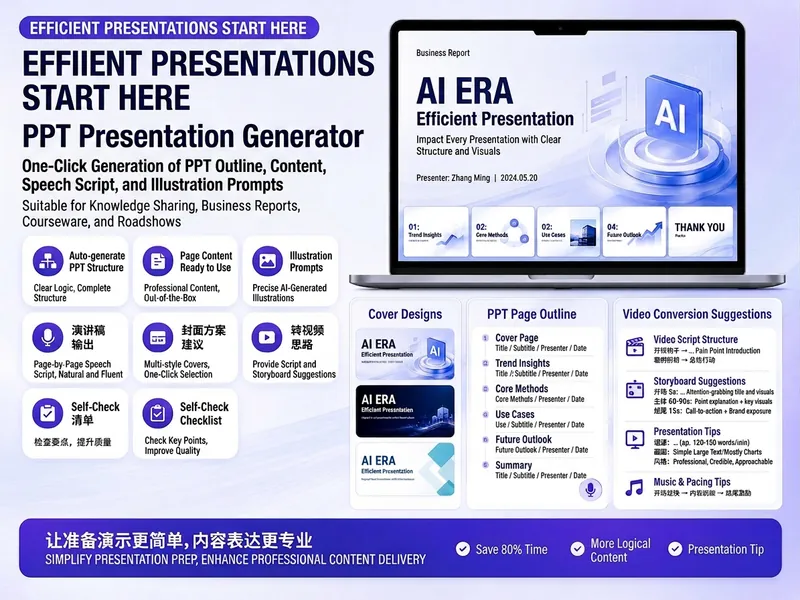
Easily create engaging PPT Slides for knowledge sharing, business reports, course teaching, product introductions, or roadshows. Simply provide the topic, purpose, audience, duration, number of slides, or style preferences to get a customized PPT content plan. This skill provides a detailed PPT slides plan, including the PPT title, one-sentence theme, audience analysis, slide structure, titles for each slide, body text, and key points for your speech. It also offers specific visual suggestions and image prompts for each slide, even including cover design keywords to help you create a visually cohesive and attractive presentation. If you need to convert your PPT to a short video, this skill can also provide professional video conversion suggestions, covering key elements like rhythm, subtitles, voiceover, camera movements, and cover art to help your content perform well on multiple platforms. Say goodbye to vague outlines; every slide's content is ready to copy and use, ensuring your presentation is both substantive and impressive.
Work Report Slides
Card-style layout for quick key point extraction in work reports
Description
Why we love this skill
This skill excels at converting complex text into card-style work report slides, strictly following professional layout and visual norms, ensuring each page focuses on the core for three-second scan readability, greatly improving report efficiency.
Automatically convert work report text into editable Slides with a minimalist business report style. Supports two modes: structured input and free-text speech drafts. First confirm the structure, then generate page by page, outputting only one slide at a time. Example: Input a slide speech script to output multiple Slide versions. No exaggeration, no flashy techniques—consistent, high-quality output that makes it easy to produce a series of uniformly styled Slide versions. Example image generation prompt: In the current complex employment environment, resume padding and false academic credentials are increasingly common. Verifying the authenticity of academic degrees is a necessary compliance procedure for hiring, serving as the bottom line for guarding the entry gate and protecting talent quality. This is not only responsible for the company but also a reflection of the professionalism of every HR worker. So, how to do a good job of academic credential verification? First, we must keep in mind three basic verification principles: First, independent verification, using official public channels; second, verify original documents, focusing on authenticity of anti-counterfeiting features, embossed seals, and official stamps; third, strict confidentiality, compare and archive verification information.
Related Skills
View allSlidesConsulting-Style Slides
This Skill helps you create high-quality business Slides to the professional standards of top-tier consulting firms. It strictly follows the Pyramid Principle and applies the core ideas of leading with conclusions, progressing logically, and using data to turn scattered business insights into structured, coherent presentations. Whether you are developing a strategy, proposing a project, or conducting a business analysis, it helps you quickly build a framework based on the MECE principle, ensuring that points are mutually exclusive and collectively exhaustive. During content development, this Skill automatically distills insightful slide titles and recommends the most suitable visualizations based on your data, such as waterfall charts, funnel charts, and stacked bar charts. It provides structured design guidance and can also generate a professional Slides file with title slides, content slides, comparison slides, and chart placeholders. The generated document uses a classic dark blue and orange business color palette, with clean, professional layouts and clear visual hierarchy, helping your presentation demonstrate a high level of professionalism in both design and content.
SlidesWhite Space | Minimalist PPT
"White Space" is a Skill specifically designed to generate minimalist research report slides. Upload Word, PDF, web pages, data tables, research materials, or old PPTs, and it will convert them into an editable PPT with a cool white background, black-gray text, generous white space, thin line separators, and a touch of deep red accents. It automatically completes: · Reading and organizing raw materials · Extracting core conclusions from the report · Building a complete presentation storyline · Generating conclusion-style titles with one point per page · Redrawing native editable data charts · Unifying fonts, colors, margins, and page grids · Controlling text and chart density per page · Adding page numbers, dates, and data sources · Outputting actually editable Slides By default, it uses a 16:9 aspect ratio, with visual features including: · Cool white background · Black-gray text · Single deep red accent color · All left-aligned · Generous white space · Minimalist architectural geometry · At most two fonts throughout · Charts and shapes are fully editable Suitable for industry research, market analysis, business presentations, strategic plans, course reports, graduation defenses, and management reports. Simply upload your materials and describe the presentation scenario to generate a clean, professional, directly editable and presentable minimalist PPT.
Trending PPT Slides Generator
Easily create engaging PPT Slides for knowledge sharing, business reports, course teaching, product introductions, or roadshows. Simply provide the topic, purpose, audience, duration, number of slides, or style preferences to get a customized PPT content plan. This skill provides a detailed PPT slides plan, including the PPT title, one-sentence theme, audience analysis, slide structure, titles for each slide, body text, and key points for your speech. It also offers specific visual suggestions and image prompts for each slide, even including cover design keywords to help you create a visually cohesive and attractive presentation. If you need to convert your PPT to a short video, this skill can also provide professional video conversion suggestions, covering key elements like rhythm, subtitles, voiceover, camera movements, and cover art to help your content perform well on multiple platforms. Say goodbye to vague outlines; every slide's content is ready to copy and use, ensuring your presentation is both substantive and impressive.
Find your next favorite skill
Explore more curated AI skills for research, creation, and everyday work.