
HTML Page Review System
Team Collaboration · Zero Config · AI Assist
Description
Recommended by
Nico@YouMind
Why we love this skill
This skill stands out, transforming any web page into a complete team review system with AI-assisted suggestions and zero-config automatic element recognition, making collaboration and iteration more efficient than ever.
What is this? Add a complete team review system for any HTML web page and HTML-based presentations (PPT), supporting multi-user collaborative annotations, AI smart suggestions, data persistence, and export. Core Features - Zero-configuration startup: automatically identifies all reviewable elements (web content, PPT slides, page-flip interactions, UX animations) in 30 seconds - Dual scenario support: Web review - landing pages, marketing pages, product pages, official websites; PPT review - HTML presentations, online slides, product launches, course handouts - Team collaboration: 5 preset roles (Product, Design, Frontend, Editor, Operations) with clear color-coded identification - AI smart suggestions: automatically generates improvement suggestions and related attributes based on comment content - Data never lost: IndexedDB auto-save, no loss on refresh - Import/Export: supports JSON format export, allows multiple rounds of iterative review - Structured data: export includes full metadata, AI can directly understand and process Use Cases - Web projects: team review of landing pages, marketing pages, product pages - HTML presentations: content and interaction review for product launches, online courses, marketing demos - Page-flip interaction optimization: review slide transitions, animations, UX experience - Compatible with mainstream tools: reveal.js, Slides.com, Google Slides exported HTML Technical Highlights - Shortcut support: Ctrl+E to enter review, Ctrl+S to export, Ctrl+I to import - Smart rule engine: automatically recommends improvement plans - Version history: supports multiple rounds of iterative review - Safe and reliable: local storage, no data upload
Related Skills
View all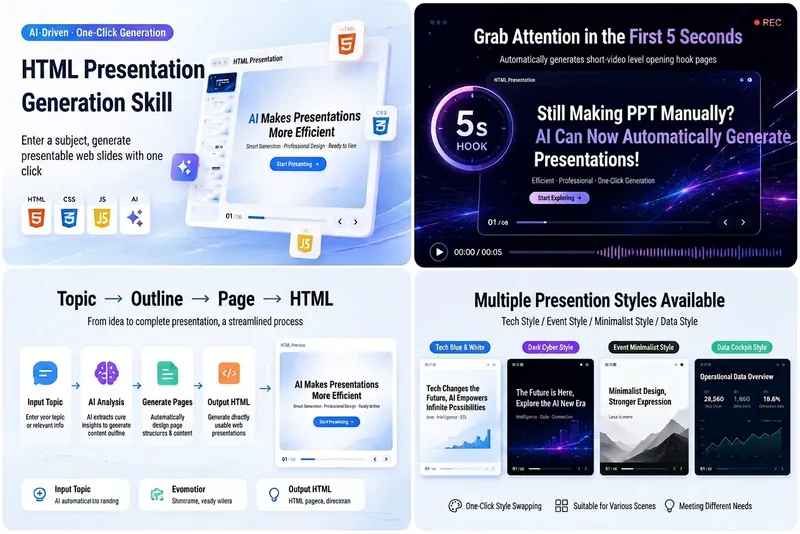
HTML Slides Generator
Easily turn your ideas, materials, or scripts into professional-grade HTML slides, designed for screen recording and pitch presentations. Whether you need AI tech sharing for platforms like Douyin, WeChat Video Channel, Xiaohongshu, or Bilibili, or product pitches, course demos, or business reports, this tool helps you quickly generate a visually refined, well-structured web slideshow. It automatically builds a complete slide structure, including an eye-catching opening hook in the first 5 seconds, titles and body text for each page, along with visual design suggestions. You'll get a standalone `index.html` file containing HTML, CSS, and JavaScript, supporting keyboard navigation, button navigation, progress bar, page numbers, and animations—perfectly optimized for 16:9 landscape screen recording. From AI tech blue-white to dark cyberpunk, to Apple keynote or Notion minimal style, you can choose or customize the visual theme to match your topic. Each slide is carefully designed to keep the content focused and easy to understand, with a reserved safe area in the lower right corner for video commentary, making your presentation more expressive and professional.
 Webpage
Webpage Quality Assessment
This skill is designed to provide users with professional evaluation and optimization services for webpage content. Whether you are a website designer, developer, or content creator, you can use this tool to conduct in-depth analysis of your own or others' webpages and obtain actionable improvement suggestions. The skill can comprehensively evaluate the design quality, originality, craftsmanship, and functionality of a webpage. It provides detailed scoring across multiple dimensions such as color matching, typography layout, visual theme, interactive effects, and responsive design, and identifies potential AI-generated traces or templated designs. After evaluation, you will receive a detailed report containing specific strengths, issues, improvement suggestions, and even directions for code modifications in CSS, HTML, and JavaScript. After generating the evaluation report, you can also choose to let the AI immediately optimize the webpage based on the recommendations in the report. The optimization process follows the priority order of design quality, originality, craftsmanship, and functionality. Finally, you will receive an optimization completion report that clearly shows the score comparison across all dimensions before and after optimization, as well as the key improvements.
 Webpage
One-Click Courseware to Web
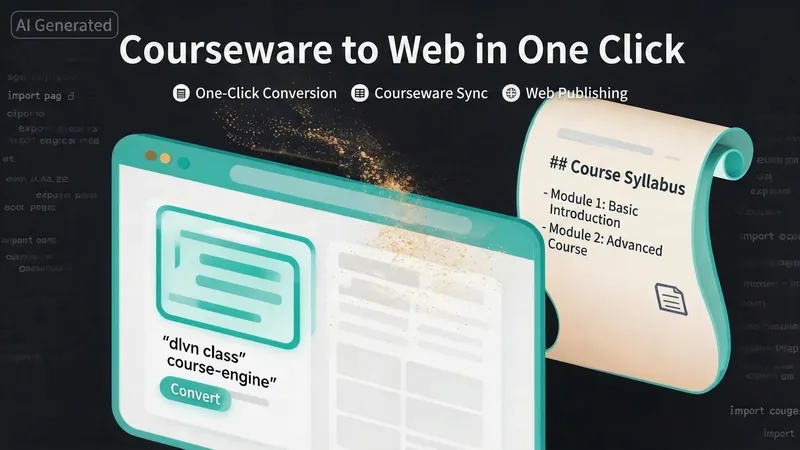
Turn your courseware into a viewable website. Whether you have a Markdown note, a PDF paper, a PPT slides, or a plain text script, or even a public account link, One-Click Courseware to Web can automatically convert it into a clear, beautifully designed online course display webpage. You don't need to write a single line of code—just provide the content. Two display styles: - Course training content → generates a scrolling long page, like flipping through a book. - Paper/report content → generates a PPT-style page-turning website, like browsing slides one by one. Responsive design adapts to mobile and desktop. What you need to do: Just one step: provide your courseware content. Supported formats: .md Markdown files, .pdf PDF documents, .pptx PPT presentations, .txt plain text. You can also paste course content directly in the conversation. Example commands: "Turn these lecture notes into a webpage" "Make this PDF paper into a PPT-style website" "Here is my courseware content, generate an online display page" What you get: A directly accessible online course display website, with the display mode automatically determined. Your content automatically selects the effect: - Course outlines, training handouts, textbooks → scrolling long pages, modules naturally connected, scroll to browse. - Academic papers, research reports → PPT-style slide flipping, each page focuses on one point. - Speeches, meeting reports → PPT-style page-by-page display, supports keyboard/click navigation. If you explicitly request "scrolling" or "PPT", your request is respected. Content extraction capability: For information-dense papers and long texts, the skill automatically performs: - Structure decomposition: splits continuous discourse into independent chapters/slides. - Information condensation: condenses three paragraphs into three key points, each within 20 characters. - Thesis-first: each page gives the conclusion first, then supporting arguments. - Framework visualization: models and classification systems are presented with charts instead of plain text. - Data highlighting: key numbers and metrics are displayed on separate pages prominently. Subsequent modifications: After the website is generated, you can request adjustments at any time: "Update the content of module three" "Change the color scheme to warm tones" "Add a course roadmap" "Change this module to a timeline layout" Modifications only affect the corresponding part; you don't need to regenerate the entire website. What it does not do: This skill currently focuses on course content display and does not include the following LMS (Learning Management System) features: - User login/registration - Learning progress tracking - File download - Online quizzes/practice If you need these features, they are separate extensions.
HTML Page Review System
Team Collaboration · Zero Config · AI Assist
Description
Recommended by
Nico@YouMind
Why we love this skill
This skill stands out, transforming any web page into a complete team review system with AI-assisted suggestions and zero-config automatic element recognition, making collaboration and iteration more efficient than ever.
What is this? Add a complete team review system for any HTML web page and HTML-based presentations (PPT), supporting multi-user collaborative annotations, AI smart suggestions, data persistence, and export. Core Features - Zero-configuration startup: automatically identifies all reviewable elements (web content, PPT slides, page-flip interactions, UX animations) in 30 seconds - Dual scenario support: Web review - landing pages, marketing pages, product pages, official websites; PPT review - HTML presentations, online slides, product launches, course handouts - Team collaboration: 5 preset roles (Product, Design, Frontend, Editor, Operations) with clear color-coded identification - AI smart suggestions: automatically generates improvement suggestions and related attributes based on comment content - Data never lost: IndexedDB auto-save, no loss on refresh - Import/Export: supports JSON format export, allows multiple rounds of iterative review - Structured data: export includes full metadata, AI can directly understand and process Use Cases - Web projects: team review of landing pages, marketing pages, product pages - HTML presentations: content and interaction review for product launches, online courses, marketing demos - Page-flip interaction optimization: review slide transitions, animations, UX experience - Compatible with mainstream tools: reveal.js, Slides.com, Google Slides exported HTML Technical Highlights - Shortcut support: Ctrl+E to enter review, Ctrl+S to export, Ctrl+I to import - Smart rule engine: automatically recommends improvement plans - Version history: supports multiple rounds of iterative review - Safe and reliable: local storage, no data upload
Related Skills
View allHTML Slides Generator
Easily turn your ideas, materials, or scripts into professional-grade HTML slides, designed for screen recording and pitch presentations. Whether you need AI tech sharing for platforms like Douyin, WeChat Video Channel, Xiaohongshu, or Bilibili, or product pitches, course demos, or business reports, this tool helps you quickly generate a visually refined, well-structured web slideshow. It automatically builds a complete slide structure, including an eye-catching opening hook in the first 5 seconds, titles and body text for each page, along with visual design suggestions. You'll get a standalone `index.html` file containing HTML, CSS, and JavaScript, supporting keyboard navigation, button navigation, progress bar, page numbers, and animations—perfectly optimized for 16:9 landscape screen recording. From AI tech blue-white to dark cyberpunk, to Apple keynote or Notion minimal style, you can choose or customize the visual theme to match your topic. Each slide is carefully designed to keep the content focused and easy to understand, with a reserved safe area in the lower right corner for video commentary, making your presentation more expressive and professional.
WebpageWebpage Quality Assessment
This skill is designed to provide users with professional evaluation and optimization services for webpage content. Whether you are a website designer, developer, or content creator, you can use this tool to conduct in-depth analysis of your own or others' webpages and obtain actionable improvement suggestions. The skill can comprehensively evaluate the design quality, originality, craftsmanship, and functionality of a webpage. It provides detailed scoring across multiple dimensions such as color matching, typography layout, visual theme, interactive effects, and responsive design, and identifies potential AI-generated traces or templated designs. After evaluation, you will receive a detailed report containing specific strengths, issues, improvement suggestions, and even directions for code modifications in CSS, HTML, and JavaScript. After generating the evaluation report, you can also choose to let the AI immediately optimize the webpage based on the recommendations in the report. The optimization process follows the priority order of design quality, originality, craftsmanship, and functionality. Finally, you will receive an optimization completion report that clearly shows the score comparison across all dimensions before and after optimization, as well as the key improvements.
WebpageOne-Click Courseware to Web
Turn your courseware into a viewable website. Whether you have a Markdown note, a PDF paper, a PPT slides, or a plain text script, or even a public account link, One-Click Courseware to Web can automatically convert it into a clear, beautifully designed online course display webpage. You don't need to write a single line of code—just provide the content. Two display styles: - Course training content → generates a scrolling long page, like flipping through a book. - Paper/report content → generates a PPT-style page-turning website, like browsing slides one by one. Responsive design adapts to mobile and desktop. What you need to do: Just one step: provide your courseware content. Supported formats: .md Markdown files, .pdf PDF documents, .pptx PPT presentations, .txt plain text. You can also paste course content directly in the conversation. Example commands: "Turn these lecture notes into a webpage" "Make this PDF paper into a PPT-style website" "Here is my courseware content, generate an online display page" What you get: A directly accessible online course display website, with the display mode automatically determined. Your content automatically selects the effect: - Course outlines, training handouts, textbooks → scrolling long pages, modules naturally connected, scroll to browse. - Academic papers, research reports → PPT-style slide flipping, each page focuses on one point. - Speeches, meeting reports → PPT-style page-by-page display, supports keyboard/click navigation. If you explicitly request "scrolling" or "PPT", your request is respected. Content extraction capability: For information-dense papers and long texts, the skill automatically performs: - Structure decomposition: splits continuous discourse into independent chapters/slides. - Information condensation: condenses three paragraphs into three key points, each within 20 characters. - Thesis-first: each page gives the conclusion first, then supporting arguments. - Framework visualization: models and classification systems are presented with charts instead of plain text. - Data highlighting: key numbers and metrics are displayed on separate pages prominently. Subsequent modifications: After the website is generated, you can request adjustments at any time: "Update the content of module three" "Change the color scheme to warm tones" "Add a course roadmap" "Change this module to a timeline layout" Modifications only affect the corresponding part; you don't need to regenerate the entire website. What it does not do: This skill currently focuses on course content display and does not include the following LMS (Learning Management System) features: - User login/registration - Learning progress tracking - File download - Online quizzes/practice If you need these features, they are separate extensions.
Find your next favorite skill
Explore more curated AI skills for research, creation, and everyday work.