Novel Memory Sync Hub
Description
The most painful part of writing a novel? Not writer's block – it's when AI forgets where you left off after switching models or opening a new window! This Skill completely solves that pain point: ✨ Core Functions: • Type /sync → AI automatically analyzes all content • Extracts characters, plot, and settings automatically • Detects contradictions and omissions automatically • Generates a new model loading package with one click • Paste into new window to resume perfectly Use Cases: Before switching models? /sync it! Opening a new window? /sync it! Writing messy? /sync to check consistency! 💡 Three Ways to Use: • Command: /sync • Menu: Select [Sync Memory] • Natural language: "Help me sync memory" Zero effort, fully automatic, Let AI always remember your story Best for: long novels, serialized works, academic papers, long reports
Related Skills
View all Write
WritePersonal Memory System
💡 Core Value Explanation (30-second version) What is this? Personal Memory System is a smart tool that lets AI remember you persistently. No need to reintroduce yourself every conversation, no need to repeatedly explain work style and project background. Just 5 minutes to initialize, and AI will permanently remember who you are, your preferences, and your project status. What problems does it solve? Pain point 1: Repeated introductions wasting time ❌ Every new conversation: "I'm a product manager, working on an AI project, prefer concise style..." ✅ Set once, works forever—AI automatically remembers your full context Pain point 2: Fragmented context scattered everywhere ❌ Preferences in one conversation, projects in another Board, skill stack in yet another place ✅ 10-dimension structured storage, manage all personal context in one place Pain point 3: Recalibrating when switching scenarios ❌ Switch Boards and have to explain everything again, switch AI platforms and start from scratch ✅ Tiered export (L0-L3), migrate to any scenario in 2 minutes Pain point 4: Privacy concerns, afraid to share ❌ Not sure what info to give AI, worry about leaking privacy ✅ 4-level disclosure mechanism—you fully control the information boundary What value does it provide? Value 1: Save time ⏱️ Initial setup: 5-10 minutes Subsequent updates: 1-2 minutes Cross-scenario migration: 2 minutes Cumulative savings: 30+ minutes per week of repeated introductions Value 2: Improve quality 📈 AI fully understands your work style Output automatically matches your preferences Suggestions align with your skill level Result quality improves by 50%+ Value 3: Protect privacy 🔒 4-level disclosure: L0 public → L3 private Automatic anonymization: names, amounts, health info Local storage: full data control Privacy risk reduced by 80%+ Value 4: Continuous accumulation 📚 10-dimensional complete profile Version history traceable Cross-platform migratable Personal AI asset continuously appreciates Who is it for? ✅ Product managers: record work methodology, team structure, project status ✅ Independent developers: maintain skill stack archive, tech preferences ✅ Creators: save aesthetic principles, style rules ✅ Researchers: manage research background, knowledge system If you frequently collaborate with AI, you need this tool. 📸 4 Effect Demonstration Images Image 1: Intelligent extraction from chat history Function: Automatically analyze your chat history, extract key information Value: No manual entry needed, quickly build profile in 5 minutes Display: Chat history on left with highlighted keywords, automatically generated structured info cards on right Image 2: 10-dimension structured profile Function: Complete personal context model covering identity, rules, projects, skills, etc. Value: Manage all info in one place, no more scattered fragments Display: 10-dimension collapsible list, D2 Cognitive OS starred, progress indicator showing 3/10 complete Image 3: 4-level privacy protection Function: Tiered export, from public to private—you decide what to share Value: Different levels for different scenarios, full privacy control Display: L0-L3 card comparison, information density increasing left to right, with lock icons and token counts Image 4: Auto-sync MEMORY Function: PCA full profile ↔ MEMORY.md core summary auto-sync Value: Board Memory always up to date, no manual maintenance needed Display: Blue sync arrow between two documents, labeled "Auto Sync" and "Real-time Update"
AI Prompt Architect MAX
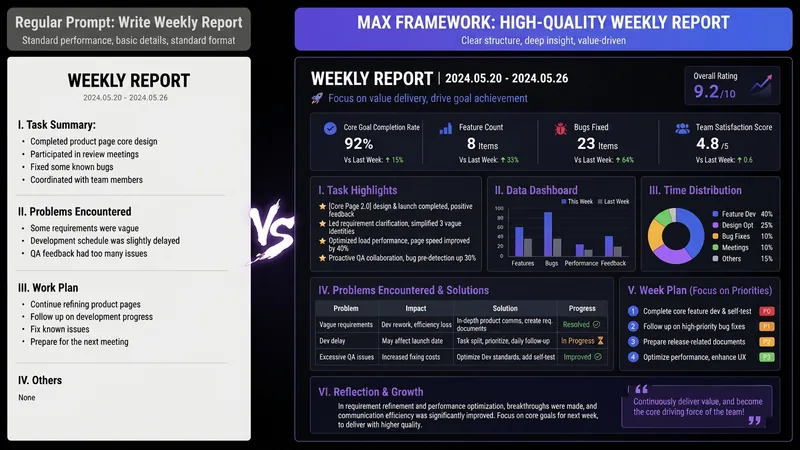
Have you ever had moments like these— You ask AI to write a weekly report, and it gives you a childish play-by-play; you ask it to revise a résumé, and it serves up “teamwork, diligence, and a strong sense of responsibility”; you ask it to analyze data, and it starts with, “As an AI, I’m happy to help you…” It’s not that AI is incapable—the problem is that your instructions are too amateurish. There are already plenty of Prompt templates teaching you how to write Prompts. But even after using them, you still can’t write your own—because what you’re missing isn’t a template. It’s the ability to compile requirements. This SKILL is my Prompt compiler: a condensed version of the Prompt architecture methodology I use every day as an AI OPC—someone working on the front lines of AI implementation—to write Prompts for teams. You explain what you need in plain language, and it gives you a top-tier architecture. Input: “Help me write a monthly report” Output: a complete eight-module Prompt architecture—role, task, audience, process, constraints, format, self-check, and examples, all locked in. Copy and paste it into ChatGPT / Claude / DeepSeek / Kimi, and the first output will be ready to use. Even better, it will tell you: ✓ Which model is best for this Prompt ✓ Which variables you can change directly next time (learn once, reuse repeatedly) ✓ Which one missing piece of information could take the output to the next level How is it different from an ordinary Prompt template SKILL? Other SKILLs give you a fish—one finished Prompt. This SKILL gives you a compiler—the ability to compile any requirement into a Prompt. Install it once, and every AI use case you have will improve—writing, reporting, analysis, translation, customer service, content creation, and more. Who should install it: People who use AI every day but are never satisfied with the output People who want to learn Prompt engineering without spending thousands on a course Team leaders who want to standardize AI use but don’t know where to start Content creators, researchers, students, job seekers, and side-hustle builders How well you use AI doesn’t depend on which model you choose. It depends on whether you can compile your requirements. Install it today, and the quality of your conversations with AI will take a dramatic leap forward.

One Draft, All Platforms
Have you ever counted how much of your week is spent on 'transporting' instead of creating? Write an article, publish it on WeChat. Break it into cards for Xiaohongshu. Rewrite it as a script for a short video. Same idea, five different versions, five times the effort. The real creative work might take an hour, but the rest of the day is lost in translation. This skill puts an end to that. Drop in one piece of content—an article, a recording, or just a few ideas. It first analyzes what format suits it best, then spins it into the formats you need: WeChat long-form, Xiaohongshu visuals, short video storyboards, PPT, infographics, newsletters, comics, or even reusable frameworks. One skeleton, eight forms, with the core message intact. What truly sets it apart are two things no rewrite tool gives you: ① The output sounds like you, not AI. Feed it a few of your past pieces (5 minutes), and it learns your tone, pet phrases, and rhythm. Every platform's copy carries your voice—and it gets better as you use it. ② It's built to remove 'AI flavor.' A built-in set of rules cleans up machine-like phrases like 'leverage,' 'close the loop,' and 'in summary'—so readers can't tell it was written by AI. Write once. Publish everywhere. Give the time back to real creation.
Novel Memory Sync Hub
Description
The most painful part of writing a novel? Not writer's block – it's when AI forgets where you left off after switching models or opening a new window! This Skill completely solves that pain point: ✨ Core Functions: • Type /sync → AI automatically analyzes all content • Extracts characters, plot, and settings automatically • Detects contradictions and omissions automatically • Generates a new model loading package with one click • Paste into new window to resume perfectly Use Cases: Before switching models? /sync it! Opening a new window? /sync it! Writing messy? /sync to check consistency! 💡 Three Ways to Use: • Command: /sync • Menu: Select [Sync Memory] • Natural language: "Help me sync memory" Zero effort, fully automatic, Let AI always remember your story Best for: long novels, serialized works, academic papers, long reports
Related Skills
View allWritePersonal Memory System
💡 Core Value Explanation (30-second version) What is this? Personal Memory System is a smart tool that lets AI remember you persistently. No need to reintroduce yourself every conversation, no need to repeatedly explain work style and project background. Just 5 minutes to initialize, and AI will permanently remember who you are, your preferences, and your project status. What problems does it solve? Pain point 1: Repeated introductions wasting time ❌ Every new conversation: "I'm a product manager, working on an AI project, prefer concise style..." ✅ Set once, works forever—AI automatically remembers your full context Pain point 2: Fragmented context scattered everywhere ❌ Preferences in one conversation, projects in another Board, skill stack in yet another place ✅ 10-dimension structured storage, manage all personal context in one place Pain point 3: Recalibrating when switching scenarios ❌ Switch Boards and have to explain everything again, switch AI platforms and start from scratch ✅ Tiered export (L0-L3), migrate to any scenario in 2 minutes Pain point 4: Privacy concerns, afraid to share ❌ Not sure what info to give AI, worry about leaking privacy ✅ 4-level disclosure mechanism—you fully control the information boundary What value does it provide? Value 1: Save time ⏱️ Initial setup: 5-10 minutes Subsequent updates: 1-2 minutes Cross-scenario migration: 2 minutes Cumulative savings: 30+ minutes per week of repeated introductions Value 2: Improve quality 📈 AI fully understands your work style Output automatically matches your preferences Suggestions align with your skill level Result quality improves by 50%+ Value 3: Protect privacy 🔒 4-level disclosure: L0 public → L3 private Automatic anonymization: names, amounts, health info Local storage: full data control Privacy risk reduced by 80%+ Value 4: Continuous accumulation 📚 10-dimensional complete profile Version history traceable Cross-platform migratable Personal AI asset continuously appreciates Who is it for? ✅ Product managers: record work methodology, team structure, project status ✅ Independent developers: maintain skill stack archive, tech preferences ✅ Creators: save aesthetic principles, style rules ✅ Researchers: manage research background, knowledge system If you frequently collaborate with AI, you need this tool. 📸 4 Effect Demonstration Images Image 1: Intelligent extraction from chat history Function: Automatically analyze your chat history, extract key information Value: No manual entry needed, quickly build profile in 5 minutes Display: Chat history on left with highlighted keywords, automatically generated structured info cards on right Image 2: 10-dimension structured profile Function: Complete personal context model covering identity, rules, projects, skills, etc. Value: Manage all info in one place, no more scattered fragments Display: 10-dimension collapsible list, D2 Cognitive OS starred, progress indicator showing 3/10 complete Image 3: 4-level privacy protection Function: Tiered export, from public to private—you decide what to share Value: Different levels for different scenarios, full privacy control Display: L0-L3 card comparison, information density increasing left to right, with lock icons and token counts Image 4: Auto-sync MEMORY Function: PCA full profile ↔ MEMORY.md core summary auto-sync Value: Board Memory always up to date, no manual maintenance needed Display: Blue sync arrow between two documents, labeled "Auto Sync" and "Real-time Update"
AI Prompt Architect MAX
Have you ever had moments like these— You ask AI to write a weekly report, and it gives you a childish play-by-play; you ask it to revise a résumé, and it serves up “teamwork, diligence, and a strong sense of responsibility”; you ask it to analyze data, and it starts with, “As an AI, I’m happy to help you…” It’s not that AI is incapable—the problem is that your instructions are too amateurish. There are already plenty of Prompt templates teaching you how to write Prompts. But even after using them, you still can’t write your own—because what you’re missing isn’t a template. It’s the ability to compile requirements. This SKILL is my Prompt compiler: a condensed version of the Prompt architecture methodology I use every day as an AI OPC—someone working on the front lines of AI implementation—to write Prompts for teams. You explain what you need in plain language, and it gives you a top-tier architecture. Input: “Help me write a monthly report” Output: a complete eight-module Prompt architecture—role, task, audience, process, constraints, format, self-check, and examples, all locked in. Copy and paste it into ChatGPT / Claude / DeepSeek / Kimi, and the first output will be ready to use. Even better, it will tell you: ✓ Which model is best for this Prompt ✓ Which variables you can change directly next time (learn once, reuse repeatedly) ✓ Which one missing piece of information could take the output to the next level How is it different from an ordinary Prompt template SKILL? Other SKILLs give you a fish—one finished Prompt. This SKILL gives you a compiler—the ability to compile any requirement into a Prompt. Install it once, and every AI use case you have will improve—writing, reporting, analysis, translation, customer service, content creation, and more. Who should install it: People who use AI every day but are never satisfied with the output People who want to learn Prompt engineering without spending thousands on a course Team leaders who want to standardize AI use but don’t know where to start Content creators, researchers, students, job seekers, and side-hustle builders How well you use AI doesn’t depend on which model you choose. It depends on whether you can compile your requirements. Install it today, and the quality of your conversations with AI will take a dramatic leap forward.
One Draft, All Platforms
Have you ever counted how much of your week is spent on 'transporting' instead of creating? Write an article, publish it on WeChat. Break it into cards for Xiaohongshu. Rewrite it as a script for a short video. Same idea, five different versions, five times the effort. The real creative work might take an hour, but the rest of the day is lost in translation. This skill puts an end to that. Drop in one piece of content—an article, a recording, or just a few ideas. It first analyzes what format suits it best, then spins it into the formats you need: WeChat long-form, Xiaohongshu visuals, short video storyboards, PPT, infographics, newsletters, comics, or even reusable frameworks. One skeleton, eight forms, with the core message intact. What truly sets it apart are two things no rewrite tool gives you: ① The output sounds like you, not AI. Feed it a few of your past pieces (5 minutes), and it learns your tone, pet phrases, and rhythm. Every platform's copy carries your voice—and it gets better as you use it. ② It's built to remove 'AI flavor.' A built-in set of rules cleans up machine-like phrases like 'leverage,' 'close the loop,' and 'in summary'—so readers can't tell it was written by AI. Write once. Publish everywhere. Give the time back to real creation.
Find your next favorite skill
Explore more curated AI skills for research, creation, and everyday work.