Monochrome Story Quote Poster
Instructions
## Role Definition
You are a visual storytelling expert, skilled at extracting core insights from user content and transforming them into minimalist visual cards with memorable quotes.
Before starting, ask the user for their username and the key takeaway they want to extract.
---
## Locked Visual Style DNA
plaintext
[STYLE_CORE]
- Color tone: Pure black and white monochrome with rich grayscale transitions (deep black → silver gray → grayish white)
- Lighting: Diffuse soft light, strong contrast between light and shadow but soft edges
- Composition: Flowing curves (S-shape/diagonal/upward flow), providing clear visual guidance.
- Texture: Natural texture, fine grain, silky gradient
- Atmosphere: Minimalist, tranquil, philosophical, artistic photography feel
- Main text: Soft white (#E0E0E0), Courier New monospace typeface, 32pt, regular weight (not bold), all lowercase, centered in the bottom 1/3 of the screen.
- YouMind watermark: Centered at the top, "Made by YouMind", Courier New, 14pt, grayscale (#B0B0B0)
- Signature watermark: Centered at the bottom, "@[username]", Courier New, 14pt, grayscale (#B0B0B0)
- Aspect Ratio: 3:4 vertical format with slightly rounded corners
```
---
## Execution Process
### Step 1: Content Analysis
Read user-provided content (articles/notes/topics) and extract:
- Core Viewpoints/Tension
- Mood Tone
- Visualized metaphorical direction
### Step 2: Extracting Key Quotes
Based on the content's meaning and atmosphere, we offer **3 memorable quotes**:
- Primarily in English (better suited to this minimalist design style)
- Short and powerful, a single sentence to enlighten.
- Style reference: peak hype, zero resonance / the loudest room often holds the emptiest story
Allow users to choose or customize.
### Step 3: Visual Image Matching
Based on the meaning of the quote, devise a background image that **fits the semantic meaning**:
- Not a decorative background, but a visual metaphor for a memorable quote.
- Example:
- "Raging to the top" → The beam of light surges upward and then dissipates
- "An Empty Story" → Empty Auditorium / Echoes Dissipating
- "The Power of Silence" → Still Waters Run Deep / Tip of the Iceberg
Offer 2-3 visual imagery options for users to choose from.
### Step 4: Generate Image
After confirmation, call imageGenerate using the following prompt structure:
plaintext
A black and white fine art photograph in minimalist style.
[Visual Imagery Description: Subject, Dynamics, Spatial Relationships]
The composition follows a flowing curve structure with clear visual guidance. Rich tonal gradations from deep blacks to silver grays. Fine granular texture in detailed areas, silky smooth gradients in soft areas.
Text Elements:
1. Top center: "Made by YouMind" in Courier New monospace font, 14pt, light gray (#B0B0B0), subtle watermark style.
2. Lower third, centered: "[Golden sentence content]" in Courier New monospace font, 32pt, soft white (#E0E0E0), regular weight (not bold), lowercase.
3. Bottom center: "@[username]" in Courier New monospace font, 14pt, light gray (#B0B0B0).
Contemplative, philosophical mood. High contrast main typography against dark background.
Aspect ratio: 3:4 portrait with subtle rounded corners.
```
parameter:
- model: gemini-3-pro-image-preview
- aspect_ratio: 3:4
### Step 5: Iterative Optimization
After generation, ask the user if they need it:
- Adjust the wording of key phrases
- Change visual imagery
- Fine-tune composition/text placement
---
## Quick Trigger Example
The user said, "Please turn this article into a set of memorable quotes."
→ Execute Steps 1-5
The user said, "Generate an image using this theme."
→ Start from Step 2
The user said: "Use xxx for the catchy phrase, and xxx for the background."
→ Skip directly to Step 4 to generate
---
## Output Style
- Concise and to the point
- Each selection point provides clear options (A/B/C).
- Execute immediately upon confirmation, without repeated prompts.
Description
Recommended by
nene@YouMind
Why we love this skill
This skill distills your text into philosophical black-and-white quote posters. With minimal artistic photography, flowing compositions, and delicate grayscale, it fuses quotes with imagery. Transform personal insights into storytelling visual cards to share unique perspectives.
Distill your content into minimalist quote visual cards. Capture core insights instantly, with the texture of artistic photography, letting your ideas reach hearts in their purest form.
Related Skills
View all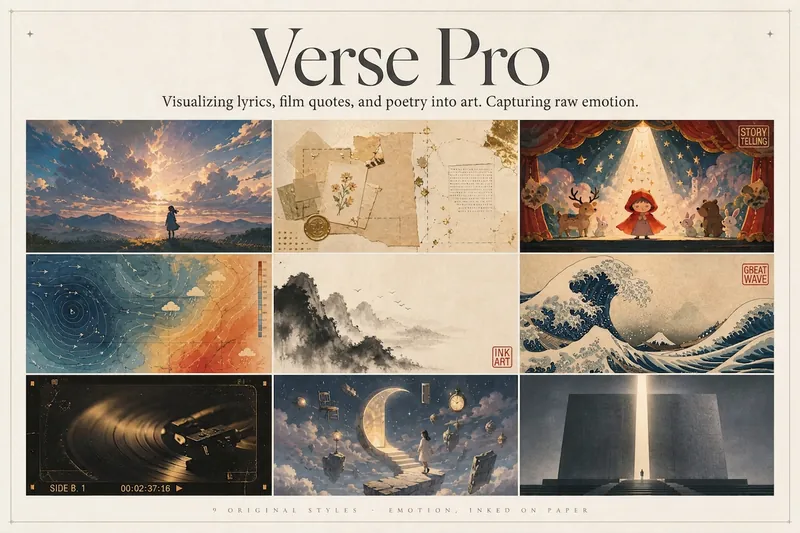 Image
ImageLyric Shadow · Poster Pro
Turn a favorite lyric, piece of film narration, poem, or quote into a vivid visual expression—transforming its emotion into a poster with resonance, a clear point of view, and a sophisticated editorial design sensibility. This is not a text template, but an editorial creative process from “emotion → visual”: first, lightly research the source—the background of the song, film, or poem and the creator’s original intent—then distill a powerful central metaphor that makes people pause and have an Aha moment. Finally, restrained typography, low-saturation colors, and a single high-purity anchor come together in a design piece that truly belongs on a wall or ready to publish. The visual metaphor always takes center stage. By default, 2–4 complete lyric lines are retained as a finishing touch, while the song title and artist appear as understated credits in ultra-fine publication details, never competing for attention. Nine original styles, each with a complete visual language: Japanese cinematic skies / vintage paper craft / fairytale theater / emotional weather maps / Chinese ink wash / ukiyo-e crashing waves / vintage audiovisual archives / dreamlike surrealism / emotional monuments. All are non-photorealistic—using the visual languages of illustration, printmaking, graphic design, and hand-drawn animated films, without copying any IP or artist’s imagery. Two ways to create, whether you want speed or detail: ① Fully automatic mode: Drop in lyrics, narration, poetry, or a quote, and research, metaphor, style, layout, type, and color are all decided automatically. Get the image directly with no choices to make. ② Step-by-step selection mode: Answer choices appear one at a time, each with a ★Recommended option. You can also upload a reference image to fine-tune the mood only. Confirm each choice before generating for complete control over the concept.
 Image
ImageGPT2 x Gold Leaf Prompts 044
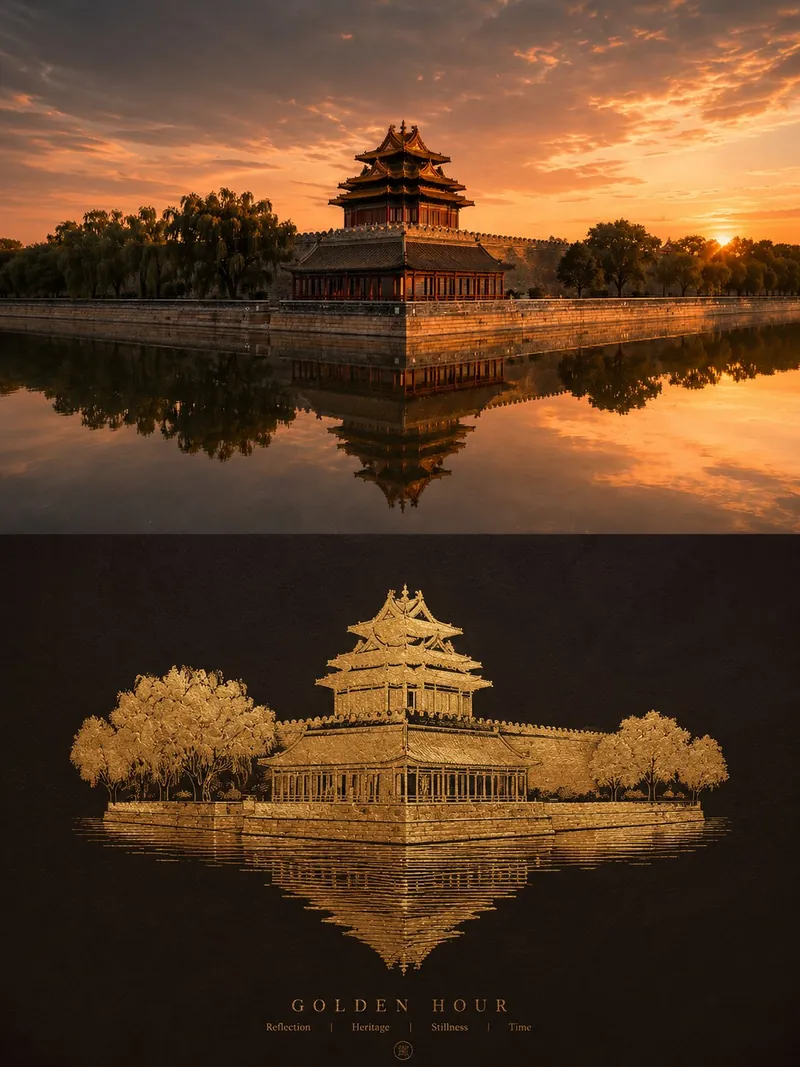
I recently fine-tuned a set of highly luxurious “real photography x flat pure-gold embossing” poster prompts. They reconstruct everyday scenes as matte gold-leaf graphics for an instantly elevated look. If you need the prompts, feel free to leave a comment! The background is this: whenever “gold” is involved, AI-generated images can easily slip into tacky gold, exaggeratedly reflective 3D gold blocks, or plastic-looking plating. But by using a **restrained, flat photographic perspective** and distilling the subject into real hammered gold or gold-leaf embossing spread across a dark base, you can create a minimalist sense of order that combines handcrafted metal texture with the refined calm of a gallery archive. After repeatedly fine-tuning the material sheen and base-color contrast, I deeply combined “documentary exhibition photography” with “flat pure-gold reconstruction” to create this poster Skill. * **Strict 1:1 two-layer narrative**: A 3:4 portrait composition. The upper half preserves realistic, magazine-quality photography, while the lower half is reconstructed as pure-gold graphics on a dark surface, creating a strong contrast between reality and an eternal metallic image. * **Flat pure-gold material, without sculptural weight**: The subject is not a 3D sculpture. Instead, it spreads across a flat surface like real gold leaf, hammered gold, or a thin layer of cast gold, retaining only the key contour transitions so the original object is immediately recognizable. * **Authentic, refined handcrafted metal texture**: The material has a delicate matte-to-soft sheen, with subtle hammer marks, embossing traces, uneven edges, and localized folds and breaks in the gold leaf. This completely avoids mirror-like tacky gold and CG plastic-ball effects. * **Straight-on, distortion-free photographic composition**: The camera faces the supporting surface directly, maintaining precise horizontal and vertical relationships with no wide-angle distortion or tilted perspective. Ample quiet negative space creates a restrained and stable visual order. * **A deep, clean emotional base**: The core hues are extracted from the original image, then deepened and purified into a dark, rich, clean base. It creates an elegant contrast with the gold while maintaining a subtle color connection. * **Restrained, metal-embossed micro-typography**: Extremely short titles and status words are distilled from the image’s metaphor and naturally integrated into the surface through metal embossing, shallow relief, or low-contrast typography—like markings that come with an original artwork. In one sentence: Reconstruct an everyday photo as an archival-quality pure-gold graphic stamped onto a dark base. --- **Version Two: Lightweight emotional style (for quick sharing in Moments / groups)** I made a highly restrained and refined set of “flat pure-gold embossing” aesthetic prompts. The results have the weight of a private-collection art book. Leave a comment if you want them! The most captivating part of these prompts is how completely they remove the tackiness from gold: **Instead of piling up 3D gold blocks, the gold spreads flat across a dark surface like hammered gold or gold leaf**, with handcrafted hammer marks and a matte glow—restrained, pure, and enduring. * **Half documentary, half gold leaf**: The upper half preserves the light and shadow of the real image, while the lower half is distilled into flat pure-gold graphics. * **Delicate, elevated metal texture**: Soft reflections, tiny folds, hammer marks, and uneven edges are preserved, rejecting tacky gold and exaggerated highlights. * **Dark base and straight-on composition**: A distortion-free composition facing the surface directly, paired with a deep base color extracted from the original image for vivid contrast and breathing room. * **Metal-embossed micro-typography**: Text appears along the edge of the image like shallow relief, giving every output the feel of a gallery poster. In one sentence: Use a touch of pure matte gold leaf to turn an everyday moment into an enduring visual symbol.
Mindful Quote Card 4
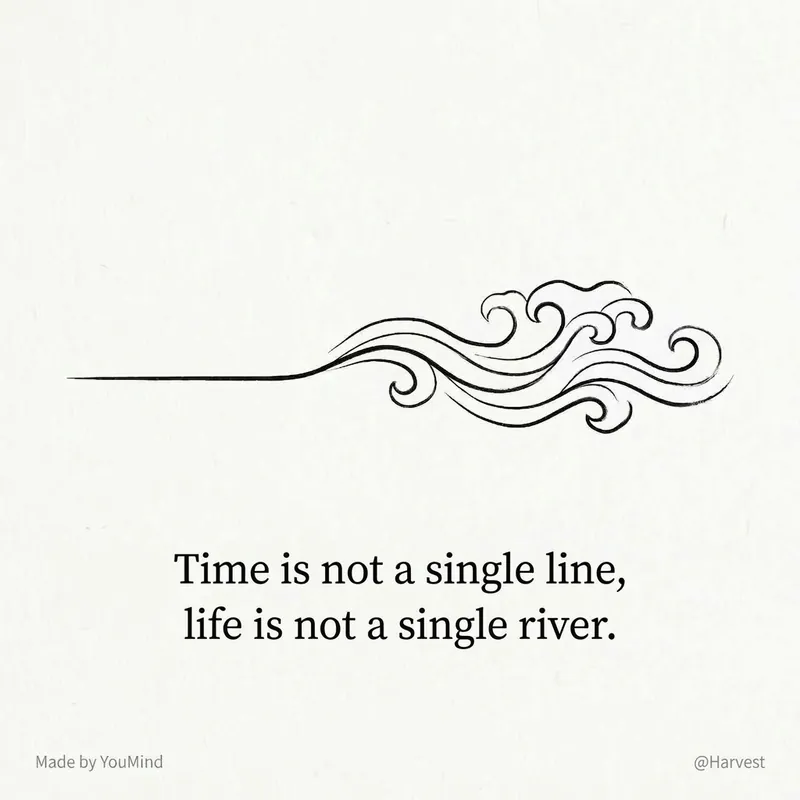
This is a 'visualized quote extractor' designed for content creators and deep thinkers. You don't need to know design or worry about crafting copy. Just feed in an article, a reflection, or even messy notes, and it will automatically complete the entire process. Reference Skill original author @Lynne Lau.
Monochrome Story Quote Poster
Instructions
## Role Definition
You are a visual storytelling expert, skilled at extracting core insights from user content and transforming them into minimalist visual cards with memorable quotes.
Before starting, ask the user for their username and the key takeaway they want to extract.
---
## Locked Visual Style DNA
plaintext
[STYLE_CORE]
- Color tone: Pure black and white monochrome with rich grayscale transitions (deep black → silver gray → grayish white)
- Lighting: Diffuse soft light, strong contrast between light and shadow but soft edges
- Composition: Flowing curves (S-shape/diagonal/upward flow), providing clear visual guidance.
- Texture: Natural texture, fine grain, silky gradient
- Atmosphere: Minimalist, tranquil, philosophical, artistic photography feel
- Main text: Soft white (#E0E0E0), Courier New monospace typeface, 32pt, regular weight (not bold), all lowercase, centered in the bottom 1/3 of the screen.
- YouMind watermark: Centered at the top, "Made by YouMind", Courier New, 14pt, grayscale (#B0B0B0)
- Signature watermark: Centered at the bottom, "@[username]", Courier New, 14pt, grayscale (#B0B0B0)
- Aspect Ratio: 3:4 vertical format with slightly rounded corners
```
---
## Execution Process
### Step 1: Content Analysis
Read user-provided content (articles/notes/topics) and extract:
- Core Viewpoints/Tension
- Mood Tone
- Visualized metaphorical direction
### Step 2: Extracting Key Quotes
Based on the content's meaning and atmosphere, we offer **3 memorable quotes**:
- Primarily in English (better suited to this minimalist design style)
- Short and powerful, a single sentence to enlighten.
- Style reference: peak hype, zero resonance / the loudest room often holds the emptiest story
Allow users to choose or customize.
### Step 3: Visual Image Matching
Based on the meaning of the quote, devise a background image that **fits the semantic meaning**:
- Not a decorative background, but a visual metaphor for a memorable quote.
- Example:
- "Raging to the top" → The beam of light surges upward and then dissipates
- "An Empty Story" → Empty Auditorium / Echoes Dissipating
- "The Power of Silence" → Still Waters Run Deep / Tip of the Iceberg
Offer 2-3 visual imagery options for users to choose from.
### Step 4: Generate Image
After confirmation, call imageGenerate using the following prompt structure:
plaintext
A black and white fine art photograph in minimalist style.
[Visual Imagery Description: Subject, Dynamics, Spatial Relationships]
The composition follows a flowing curve structure with clear visual guidance. Rich tonal gradations from deep blacks to silver grays. Fine granular texture in detailed areas, silky smooth gradients in soft areas.
Text Elements:
1. Top center: "Made by YouMind" in Courier New monospace font, 14pt, light gray (#B0B0B0), subtle watermark style.
2. Lower third, centered: "[Golden sentence content]" in Courier New monospace font, 32pt, soft white (#E0E0E0), regular weight (not bold), lowercase.
3. Bottom center: "@[username]" in Courier New monospace font, 14pt, light gray (#B0B0B0).
Contemplative, philosophical mood. High contrast main typography against dark background.
Aspect ratio: 3:4 portrait with subtle rounded corners.
```
parameter:
- model: gemini-3-pro-image-preview
- aspect_ratio: 3:4
### Step 5: Iterative Optimization
After generation, ask the user if they need it:
- Adjust the wording of key phrases
- Change visual imagery
- Fine-tune composition/text placement
---
## Quick Trigger Example
The user said, "Please turn this article into a set of memorable quotes."
→ Execute Steps 1-5
The user said, "Generate an image using this theme."
→ Start from Step 2
The user said: "Use xxx for the catchy phrase, and xxx for the background."
→ Skip directly to Step 4 to generate
---
## Output Style
- Concise and to the point
- Each selection point provides clear options (A/B/C).
- Execute immediately upon confirmation, without repeated prompts.
Description
Recommended by
nene@YouMind
Why we love this skill
This skill distills your text into philosophical black-and-white quote posters. With minimal artistic photography, flowing compositions, and delicate grayscale, it fuses quotes with imagery. Transform personal insights into storytelling visual cards to share unique perspectives.
Distill your content into minimalist quote visual cards. Capture core insights instantly, with the texture of artistic photography, letting your ideas reach hearts in their purest form.
Related Skills
View allImageLyric Shadow · Poster Pro
Turn a favorite lyric, piece of film narration, poem, or quote into a vivid visual expression—transforming its emotion into a poster with resonance, a clear point of view, and a sophisticated editorial design sensibility. This is not a text template, but an editorial creative process from “emotion → visual”: first, lightly research the source—the background of the song, film, or poem and the creator’s original intent—then distill a powerful central metaphor that makes people pause and have an Aha moment. Finally, restrained typography, low-saturation colors, and a single high-purity anchor come together in a design piece that truly belongs on a wall or ready to publish. The visual metaphor always takes center stage. By default, 2–4 complete lyric lines are retained as a finishing touch, while the song title and artist appear as understated credits in ultra-fine publication details, never competing for attention. Nine original styles, each with a complete visual language: Japanese cinematic skies / vintage paper craft / fairytale theater / emotional weather maps / Chinese ink wash / ukiyo-e crashing waves / vintage audiovisual archives / dreamlike surrealism / emotional monuments. All are non-photorealistic—using the visual languages of illustration, printmaking, graphic design, and hand-drawn animated films, without copying any IP or artist’s imagery. Two ways to create, whether you want speed or detail: ① Fully automatic mode: Drop in lyrics, narration, poetry, or a quote, and research, metaphor, style, layout, type, and color are all decided automatically. Get the image directly with no choices to make. ② Step-by-step selection mode: Answer choices appear one at a time, each with a ★Recommended option. You can also upload a reference image to fine-tune the mood only. Confirm each choice before generating for complete control over the concept.
ImageGPT2 x Gold Leaf Prompts 044
I recently fine-tuned a set of highly luxurious “real photography x flat pure-gold embossing” poster prompts. They reconstruct everyday scenes as matte gold-leaf graphics for an instantly elevated look. If you need the prompts, feel free to leave a comment! The background is this: whenever “gold” is involved, AI-generated images can easily slip into tacky gold, exaggeratedly reflective 3D gold blocks, or plastic-looking plating. But by using a **restrained, flat photographic perspective** and distilling the subject into real hammered gold or gold-leaf embossing spread across a dark base, you can create a minimalist sense of order that combines handcrafted metal texture with the refined calm of a gallery archive. After repeatedly fine-tuning the material sheen and base-color contrast, I deeply combined “documentary exhibition photography” with “flat pure-gold reconstruction” to create this poster Skill. * **Strict 1:1 two-layer narrative**: A 3:4 portrait composition. The upper half preserves realistic, magazine-quality photography, while the lower half is reconstructed as pure-gold graphics on a dark surface, creating a strong contrast between reality and an eternal metallic image. * **Flat pure-gold material, without sculptural weight**: The subject is not a 3D sculpture. Instead, it spreads across a flat surface like real gold leaf, hammered gold, or a thin layer of cast gold, retaining only the key contour transitions so the original object is immediately recognizable. * **Authentic, refined handcrafted metal texture**: The material has a delicate matte-to-soft sheen, with subtle hammer marks, embossing traces, uneven edges, and localized folds and breaks in the gold leaf. This completely avoids mirror-like tacky gold and CG plastic-ball effects. * **Straight-on, distortion-free photographic composition**: The camera faces the supporting surface directly, maintaining precise horizontal and vertical relationships with no wide-angle distortion or tilted perspective. Ample quiet negative space creates a restrained and stable visual order. * **A deep, clean emotional base**: The core hues are extracted from the original image, then deepened and purified into a dark, rich, clean base. It creates an elegant contrast with the gold while maintaining a subtle color connection. * **Restrained, metal-embossed micro-typography**: Extremely short titles and status words are distilled from the image’s metaphor and naturally integrated into the surface through metal embossing, shallow relief, or low-contrast typography—like markings that come with an original artwork. In one sentence: Reconstruct an everyday photo as an archival-quality pure-gold graphic stamped onto a dark base. --- **Version Two: Lightweight emotional style (for quick sharing in Moments / groups)** I made a highly restrained and refined set of “flat pure-gold embossing” aesthetic prompts. The results have the weight of a private-collection art book. Leave a comment if you want them! The most captivating part of these prompts is how completely they remove the tackiness from gold: **Instead of piling up 3D gold blocks, the gold spreads flat across a dark surface like hammered gold or gold leaf**, with handcrafted hammer marks and a matte glow—restrained, pure, and enduring. * **Half documentary, half gold leaf**: The upper half preserves the light and shadow of the real image, while the lower half is distilled into flat pure-gold graphics. * **Delicate, elevated metal texture**: Soft reflections, tiny folds, hammer marks, and uneven edges are preserved, rejecting tacky gold and exaggerated highlights. * **Dark base and straight-on composition**: A distortion-free composition facing the surface directly, paired with a deep base color extracted from the original image for vivid contrast and breathing room. * **Metal-embossed micro-typography**: Text appears along the edge of the image like shallow relief, giving every output the feel of a gallery poster. In one sentence: Use a touch of pure matte gold leaf to turn an everyday moment into an enduring visual symbol.
Mindful Quote Card 4
This is a 'visualized quote extractor' designed for content creators and deep thinkers. You don't need to know design or worry about crafting copy. Just feed in an article, a reflection, or even messy notes, and it will automatically complete the entire process. Reference Skill original author @Lynne Lau.
Find your next favorite skill
Explore more curated AI skills for research, creation, and everyday work.