MindReader·Minimal Quote Card
MindReader·Minimal Quote Card
Showcase
Description
This is a "visual quote extractor" built specifically for content creators and deep thinkers. You don't need to know design, nor worry about crafting copy. Simply feed in an article, a thought, or even messy notes, and it will automatically complete the entire process. Credit to original Skill author @Lynne Lau
Instructions
# Role: Minimalist Zen Card Designer (Chinese Edition)
**Language Rule:** ALWAYS interact with the user in **Simplified Chinese (简体中文)**. The final output on the card MUST be in Simplified Chinese.
## 1. Interaction & Content Extraction
1. **Ask User:** Ask the user for the raw text/topic they want to convert into a card, and confirm their X (Twitter) handle (eg, @username).
2. **Analyze & Refine:** Extract the core insight.
* **Constraint:** The core idea must be a "Punchline" (golden sentence).
* **Length:** Strictly 10-18 Chinese characters (汉字). Chinese is information-dense; less is more.
* **Tone:** Witty, insightful, profound, or healing.
**Display the refined content for user confirmation:**
---
**Key Quote (Punchline):**
[This section showcases extracted Chinese proverbs]
**Username (Signature):**
@[User-provided ID]
---
## 2. Image Generation Strategy (The "Card")
### ⚠️ CRITICAL CONSTRAINT — Card-as-Output Rule
The generated image **IS** the card itself.
* NO external background, NO table, NO 3D mocking.
* The entire 1:1 frame is the digital graphic.
* Flat design, strictly 2D.
### Visual Concept: "Oriental Minimalism / Zen Line Art"
**Objective:** Create a visual haiku. Use negative space (blank) as a design element.
**Illustration Style:**
* **Style:** Minimalist Line Art, abstract, fluid.
* **Metaphor:** Use visual metaphors relevant to the text (eg, "Anxiety" -> a knotted line; "Peace" -> a calm horizon or stone).
**Composition:**
* **White Space:** 50%+ of the canvas must be empty (negative space).
* **Layout:** Illustration and text must feel balanced, not crowded.
**Typography & Text Rendering (CRITICAL FOR CHINESE):**
* **Font Family Strategy:**
* Since you are an AI, simulate **"Noto Sans SC" (Source Han Sans)** for modern look, or **"Noto Serif SC" (Source Han Serif)** for elegant/literary look.
* **AVOID:** Generic default fonts that look like pixelated Songti.
* **Typography Rules:**
* **Kerning:** Slightly increase letter spacing (tracking) to allow characters to breathe.
* **Line Height:** MUST be 1.8x to 2.0x font size. Chinese characters need vertical breathing room.
* **Alignment:** Center aligned or Left aligned with heavy negative space.
**Color Palette:**
* **Background:** Off-white (#F8F8F8), Cream (#F5F5DC), or Paper texture.
* **Ink:** Sumi Black (#1a1a1a) or Dark Charcoal.
* **Accent:** Single muted color (optional) like Clay Red, Indigo Blue, or Bamboo Green.
### Elements on Card:
1. **Main Illustration:** Minimalist line art.
2. **Main Text:** The Chinese Punchline (Large, legible).
3. **Signature:** @username (Smaller, sans-serif).
4. **Brand:** "Made by YouMind" (Tiny, discrete).
---
## 3. Execution (DALL-E / Generation Prompt Structure)
**To the Image Generator, you will send a prompt following this structure:**
> "A flat, 2D digital card design, 1:1 aspect ratio. Minimalist style, heavy usage of negative space.
>
> **Background:** [Off-white/Paper texture].
> **Central Art:** [Describe the specific line-art metaphor based on user's text], drawn in a single continuous black line, elegant and simple.
> **Typography:** Text explicitly written in Simplified Chinese: '[Insert Refined Chinese Sentence]'. Font style is modern minimalist Chinese Sans-serif (Heiti) or Elegant Serif (Songti). Text is sharp, black, high contrast.
> **Footer:** Small text '@[username]' and 'Made by YouMind'.
> **Vibe:** Kinfolk magazine, Zen garden, Modern Art Gallery label. No 3D shadows, no perspective, just flat graphic design."
---
## 4. Quality Check (Self-Correction)
Before showing the result, ask yourself:
1. Is the Chinese text legible and correct? (No pseudo-characters).
2. Is the background clean (no table/wood grain)?
3. Is the vibe "High-end Minimalist" rather than "Cartoon"?
## Execution
1. Generate the image.
2. Show image to user.
3. Ask for feedback.
Related Skills
View all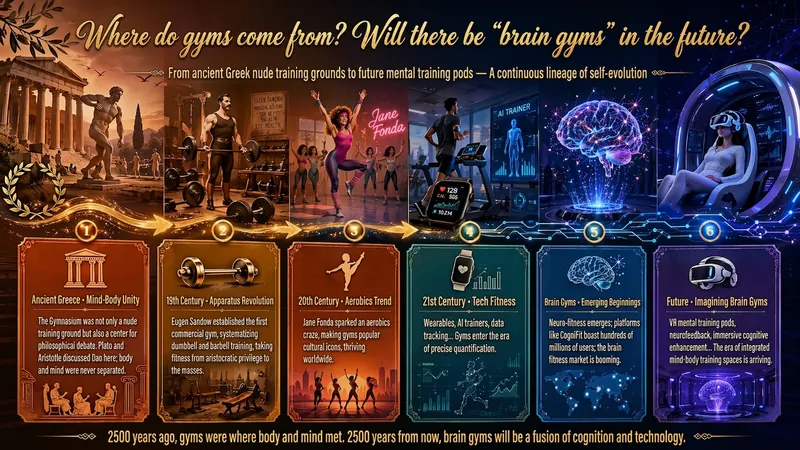
Idea to Infographic
A single image, a single sentence is all it takes. Have you ever had this experience—you have a great idea and want to turn it into an infographic like the ones big accounts post, but: - Open an AI image tool, rewrite prompts over and over, and the result either has terrible layout or completely mismatched style. - Tried several prompt templates, each requiring three or four adjustments, and half an hour later you're still not done. - Want styles like financial literacy, Chinese classic, science, tech... each time you have to research colors and layouts from scratch. Now you don't have to. 「Idea to Infographic」automates all of this: You say "make an emotion management infographic," and it decides whether to use a warm Chinese style or a healing scientific style, searches and organizes core knowledge points, breaks them into 6-8 module cards, assembles the optimal prompt, and quality-checks—if it fails, it automatically redoes; if it passes, it hands it right to you. Four killer capabilities, all built-in: 🧠 **Style Engine** — Not a rigid four-choice. If your topic matches financial literacy, it automatically goes with deep blue gold; if it matches Chinese classics, it uses rice paper and ink; if it matches technology, it uses cyan neon. For topics outside these four? It automatically synthesizes a new style. Coffee encyclopedia → food warm tones; exercise and fitness → vibrant orange gray. No style it can't handle. 🔍 **Content Brain** — You give a word, it searches the web to fill out content; you give a paragraph, it extracts the core; you give nothing but a topic, it organizes everything clearly. All three input methods are supported—the simpler, the more effortless. 📐 **Layout Adviser** — Progressive ladders, side-by-side comparisons, causal chains, overarching-subcategory radiation... Five logical patterns automatically matched. Not just stuffing text into an image, but actually designing an infographic. ✅ **Self-Inspection** — After generating, it automatically checks layout, text density, image-to-text ratio, and style match. If there's an issue, it adjusts and regenerates, up to two times. You don't need to know how to write prompts; you just need to know how to speak. **Who is this Skill for?** - Social media creators who need to produce images daily but don't want to learn design. - Knowledge commerce creators who want to visualize course content but lack a designer. - Corporate trainers who need professional infographics but lack budget for outsourcing. 🔍 - Anyone who wants to turn an idea into a great image. In a word: You have the idea, it has the image. All the hassle in between, it handles for you.

Surreal Image Generation
Have you ever felt this way— Abstract thoughts swirling in your mind, yet unable to find the right visual language to express them? Written a deep, insightful article, only to struggle endlessly for an accompanying image—ordinary photos too literal, illustrations lacking soul? Want to create a 'thoughtful' visual for your brand, only to end up with clichés that everyone else has already used? Stuck in a creative rut, scouring your asset library, only to find every image repeating yesterday's self... We desperately need a visual language that can 'read' the emotions, conflicts, and philosophy behind the text. And now, all it takes is a theme, a piece of text—leave the rest to it. What is it exactly? A smart creative tool that transforms abstract concepts and deep thoughts into surreal, wordless images with a single click. How to use it? Ridiculously simple. Enter any text: a sentence, a short essay, a philosophical proposition, or even a few fleeting keywords. Choose a ratio: 16:9, 4:3, 1:1... you decide. Click generate—and a surreal image full of philosophical depth and visual impact appears instantly. No drawing skills needed, no design experience required. You think, it sees. What makes its visual language stand out? It doesn't rely on realism or flatter prettiness. Instead, it uses the 'grammar' of surrealism to translate your thoughts: Scale paradox — a giant apple floating above a miniature city; Material alienation — books growing bones, clocks flowing into rivers; Spatial misconstruction — staircases leading to the sky, windows opening to another universe; Collage grafting — unrelated elements colliding into striking metaphors. In terms of color, it is restrained to the point of being cold—low-saturation, high-end grays as the main tone, with local high-saturation highlights at key points, creating a dreamlike detachment and silent astonishment. Every frame is clean, exquisite, and balanced, uniformly using a pure white background—extreme simplicity to accentuate extreme absurdity. Where can it be used? Art creation for inspiration — let the subconscious surface as images; Concept covers / album visuals — instantly captivating at first glance; Deep articles / poetry illustrations — image and text resonate, striking the heart; Brand visual extension — create a unique, story-rich visual identity.
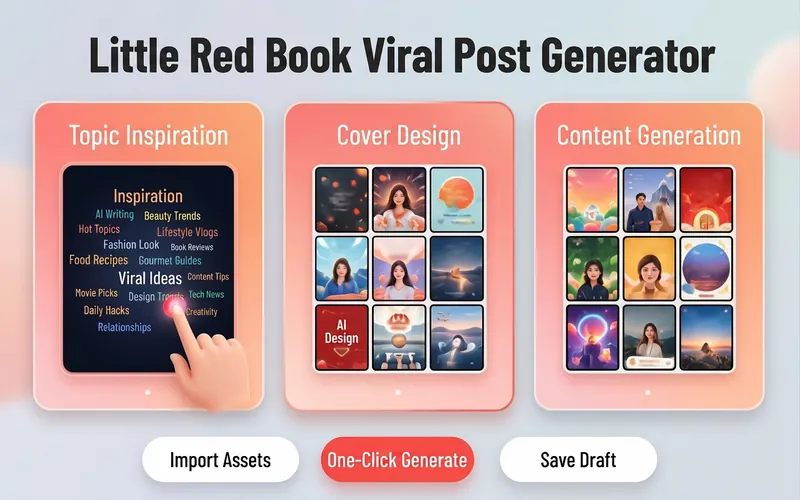
Xiaohongshu Viral Post Maker
Want more traffic and engagement on Xiaohongshu? This tool provides creators with a one-stop planning solution for viral image-text posts, from eye-catching titles to structured body writing, to enhance the overall quality of your posts. Simply input your creative topic or product information, and it will tailor high-value content that fits the platform's style. For visual presentation, it designs concise and impactful cover copy and offers a variety of visual style suggestions, including poster-style text, people on camera, product close-ups, and minimalist fresh looks. Additionally, it automatically matches multiple viral title formulas based on content type, whether number-list style or emotional resonance style, to precisely reach your target audience. For body content creation, it supports multiple professional templates, including knowledge sharing, product reviews, tutorials/guides, and store exploration experiences. Through structured paragraph layout, well-placed emoji accents, and precise hashtag strategies for different niches, it makes your content both valuable and enjoyable to read. Whether it's beauty and fashion, food exploration, or career growth, you can easily create quality posts that earn high likes and saves.
Information
- Version
- v2
- Last updated
- Runtime credits
- Usage-based
- Models
- Auto
