
Vox-Style History Material Gen
Vox-style scripts & visuals for history shorts
Description
Recommended by
nene@YouMind
Why we love this skill
This tool transforms historical topics into Vox-style short video materials, generating scripts, storyboard prompts, and video prompts in one click—a powerful assistant for history content creators.
Want to create engaging Vox-style content for history popular science short videos? The "Vox-Style History Material Generator" can turn any historical topic (such as figures, events, dynasties, reforms, wars, or systems) into a complete set of short video production materials. Just provide a historical topic, and it will generate an approximately 270-word, 45-second explainer script, along with 9 vertical 9:16 paper-cut collage style storyboard image generation prompts. The unique aspect of this skill is that it not only provides image generation prompts but also accurately matches 9 Seedance 2.0 image-to-video generation prompts for each storyboard frame. This means you can easily create historical explainer shorts with a "paper-cut collage" and "stop-motion animation" visual effect. Whether you're making history popular science animations, designing historical storyboards, or creating paper-cut collage keyframes for dynasties, reforms, wars, or historical figures, it offers an all-in-one solution. Through compact conversational copy and rich visual elements such as maps, coins, seals, and silhouettes, this tool ensures your video content is both informative and fun. The generated prompts strictly follow the principle that "video actions must correspond one-to-one with scene elements," ensuring smooth and natural image-to-video effects and avoiding disconnection between scene elements and animation effects. Make your historical short videos more visually impactful and content engaging.
Related Skills
View all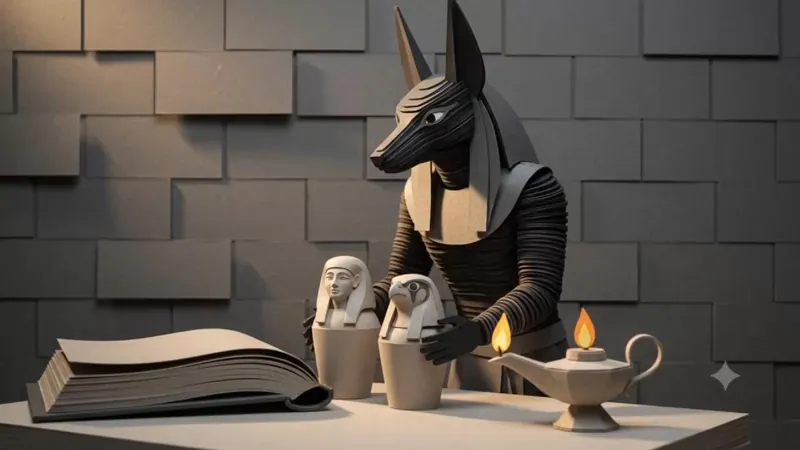
Vox Paper Stop-Motion Free
This tool can transform any theme into a highly textured paper stop-motion animation. It is not just a prompt generator, but a seasoned visual narrative director, skilled at breaking down complex historical stories, business cases, or scientific knowledge into artistic paper sculpture storyboards. Whether exploring the rise and fall of ancient Egyptian civilization or analyzing the rise of tech giants, it can plan a professional-level commentary script for you. Every line of narration is carefully designed to ensure a smooth narrative rhythm and vivid imagery. In visual presentation, it pursues high-end editorial paper art aesthetics. Each set of generated prompts includes precise paper engineering details: from the layered texture of thick cardstock, the marks of laser-cut edges, to the shadows of hand-glued seams, ensuring the image presents a real handcrafted feel like a museum art piece. It guides you to configure a unique hero subject and harmonious color scheme for each frame, avoiding the cheap feel of digital painting, and instead pursuing a minimalist and high-end stop-motion visual style. This tool provides complete end-to-end workflow support. First, it writes a complete narrative script based on the video duration you choose. Then, it converts each sentence in the script into an independent paper sculpture image prompt and exports it as a document for batch generation. Finally, it also provides general video dynamic prompts, giving static images the stop-motion vitality of layered assembly and delicate breathing. Whether making science shorts, business presentations, or creative videos, it helps you create stunning paper art visual masterpieces. This skill only generates prompts. For the complete workflow, refer below: 🔥 Free credit workflow: 1️⃣ Claude / GPT Generate script and shot-by-shot storyboard 2️⃣ Google Flow + ZAPI FLOW browser plugin Use Nano Banana 2 to batch generate images Only send key shots to Omni flash to generate video (suggested 6s, costs 10 credits) 3️⃣ ElevenLabs Generate emotional human-like narration Free plan: 10,000 credits per month 4️⃣ Suno Generate cinematic BGM Note: free version only for non-commercial projects 5️⃣ CapCut Auto-recognize subtitles and finish video Google Flow free account gives 50 credits per day.
 Video
VideoIdiom & Fable Video Maker
Quickly turn an idiom, historical anecdote, or fable into a continuous narrative storyboard script ready for video generation. Whether it’s “Waiting by a Tree Stump for a Rabbit,” “Plugging One’s Ears While Stealing a Bell,” “Sima Guang Smashes the Vat,” or an idiom you enter yourself, the Skill reconstructs the story’s setting, character relationships, key actions, and moral, then organizes them into a clear, tightly paced short-video plot. Two versions are provided by default: 15 seconds and 30 seconds. The 15-second version is ideal for quickly presenting the core plot, while the 30-second version adds environmental setup, character reactions, and climactic actions for a more complete and dramatic story. Each shot clearly specifies the emotion, framing, camera movement, and any necessary narration. Characters are given consistent visual traits to help maintain continuity across shots and work with common video generation models. All narration is written in a voiceover format—off-screen narration or spoken character dialogue—so the video model actually speaks the lines instead of rendering them as on-screen text. The default style is cartoon animation, but you can also request ink wash, paper cut, shadow puppetry, realistic, or other visual styles, or ask for only one duration. The final script is written entirely in Chinese and includes the scene atmosphere, character designs, shot descriptions, and continuity requirements. It is suitable for idiom animations, fable stories, Chinese-style short films, and traditional culture videos for children or general audiences.
 Image
ImageBatch Article Illustration 2.0
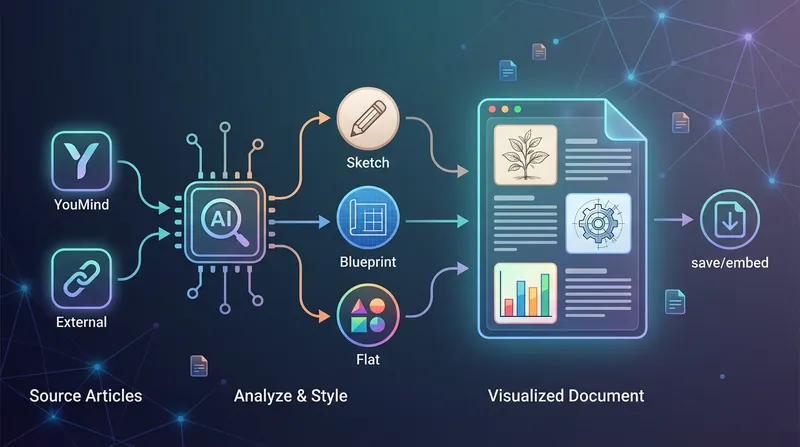
This is an intelligent visual enhancement tool designed for content creators. It deeply understands the flow of your text and automatically creates high-quality supporting illustrations for key paragraphs of your articles. Whether your content resides in a personal knowledge base or you need to process externally imported long-form articles, it accurately identifies core concepts, turning abstract text into concrete visual language and significantly improving the reading experience and shareability of your content. The tool offers three distinct visual styles to suit different creation scenarios: a fresh and lively minimalist hand-drawn style fits essays and popular science; a rigorous and professional architectural blueprint style is the ideal choice for technical documents and research reports; and a modern flat illustration style perfectly matches the aesthetic needs of social media accounts and knowledge notes. For long-form content, it also intelligently suggests illustration layouts to ensure a reasonable visual distribution with key points highlighted. During generation, you can flexibly choose how images are produced. You can have the generated illustrations seamlessly embedded directly into the original document paragraphs for automated layout, or you can opt to receive a standalone image resource package for manual distribution. This end-to-end collaboration, from content analysis to visual generation, makes your writing more impactful and complex ideas instantly clear.
Vox-Style History Material Gen
Vox-style scripts & visuals for history shorts
Description
Recommended by
nene@YouMind
Why we love this skill
This tool transforms historical topics into Vox-style short video materials, generating scripts, storyboard prompts, and video prompts in one click—a powerful assistant for history content creators.
Want to create engaging Vox-style content for history popular science short videos? The "Vox-Style History Material Generator" can turn any historical topic (such as figures, events, dynasties, reforms, wars, or systems) into a complete set of short video production materials. Just provide a historical topic, and it will generate an approximately 270-word, 45-second explainer script, along with 9 vertical 9:16 paper-cut collage style storyboard image generation prompts. The unique aspect of this skill is that it not only provides image generation prompts but also accurately matches 9 Seedance 2.0 image-to-video generation prompts for each storyboard frame. This means you can easily create historical explainer shorts with a "paper-cut collage" and "stop-motion animation" visual effect. Whether you're making history popular science animations, designing historical storyboards, or creating paper-cut collage keyframes for dynasties, reforms, wars, or historical figures, it offers an all-in-one solution. Through compact conversational copy and rich visual elements such as maps, coins, seals, and silhouettes, this tool ensures your video content is both informative and fun. The generated prompts strictly follow the principle that "video actions must correspond one-to-one with scene elements," ensuring smooth and natural image-to-video effects and avoiding disconnection between scene elements and animation effects. Make your historical short videos more visually impactful and content engaging.
Related Skills
View allVox Paper Stop-Motion Free
This tool can transform any theme into a highly textured paper stop-motion animation. It is not just a prompt generator, but a seasoned visual narrative director, skilled at breaking down complex historical stories, business cases, or scientific knowledge into artistic paper sculpture storyboards. Whether exploring the rise and fall of ancient Egyptian civilization or analyzing the rise of tech giants, it can plan a professional-level commentary script for you. Every line of narration is carefully designed to ensure a smooth narrative rhythm and vivid imagery. In visual presentation, it pursues high-end editorial paper art aesthetics. Each set of generated prompts includes precise paper engineering details: from the layered texture of thick cardstock, the marks of laser-cut edges, to the shadows of hand-glued seams, ensuring the image presents a real handcrafted feel like a museum art piece. It guides you to configure a unique hero subject and harmonious color scheme for each frame, avoiding the cheap feel of digital painting, and instead pursuing a minimalist and high-end stop-motion visual style. This tool provides complete end-to-end workflow support. First, it writes a complete narrative script based on the video duration you choose. Then, it converts each sentence in the script into an independent paper sculpture image prompt and exports it as a document for batch generation. Finally, it also provides general video dynamic prompts, giving static images the stop-motion vitality of layered assembly and delicate breathing. Whether making science shorts, business presentations, or creative videos, it helps you create stunning paper art visual masterpieces. This skill only generates prompts. For the complete workflow, refer below: 🔥 Free credit workflow: 1️⃣ Claude / GPT Generate script and shot-by-shot storyboard 2️⃣ Google Flow + ZAPI FLOW browser plugin Use Nano Banana 2 to batch generate images Only send key shots to Omni flash to generate video (suggested 6s, costs 10 credits) 3️⃣ ElevenLabs Generate emotional human-like narration Free plan: 10,000 credits per month 4️⃣ Suno Generate cinematic BGM Note: free version only for non-commercial projects 5️⃣ CapCut Auto-recognize subtitles and finish video Google Flow free account gives 50 credits per day.
VideoIdiom & Fable Video Maker
Quickly turn an idiom, historical anecdote, or fable into a continuous narrative storyboard script ready for video generation. Whether it’s “Waiting by a Tree Stump for a Rabbit,” “Plugging One’s Ears While Stealing a Bell,” “Sima Guang Smashes the Vat,” or an idiom you enter yourself, the Skill reconstructs the story’s setting, character relationships, key actions, and moral, then organizes them into a clear, tightly paced short-video plot. Two versions are provided by default: 15 seconds and 30 seconds. The 15-second version is ideal for quickly presenting the core plot, while the 30-second version adds environmental setup, character reactions, and climactic actions for a more complete and dramatic story. Each shot clearly specifies the emotion, framing, camera movement, and any necessary narration. Characters are given consistent visual traits to help maintain continuity across shots and work with common video generation models. All narration is written in a voiceover format—off-screen narration or spoken character dialogue—so the video model actually speaks the lines instead of rendering them as on-screen text. The default style is cartoon animation, but you can also request ink wash, paper cut, shadow puppetry, realistic, or other visual styles, or ask for only one duration. The final script is written entirely in Chinese and includes the scene atmosphere, character designs, shot descriptions, and continuity requirements. It is suitable for idiom animations, fable stories, Chinese-style short films, and traditional culture videos for children or general audiences.
ImageBatch Article Illustration 2.0
This is an intelligent visual enhancement tool designed for content creators. It deeply understands the flow of your text and automatically creates high-quality supporting illustrations for key paragraphs of your articles. Whether your content resides in a personal knowledge base or you need to process externally imported long-form articles, it accurately identifies core concepts, turning abstract text into concrete visual language and significantly improving the reading experience and shareability of your content. The tool offers three distinct visual styles to suit different creation scenarios: a fresh and lively minimalist hand-drawn style fits essays and popular science; a rigorous and professional architectural blueprint style is the ideal choice for technical documents and research reports; and a modern flat illustration style perfectly matches the aesthetic needs of social media accounts and knowledge notes. For long-form content, it also intelligently suggests illustration layouts to ensure a reasonable visual distribution with key points highlighted. During generation, you can flexibly choose how images are produced. You can have the generated illustrations seamlessly embedded directly into the original document paragraphs for automated layout, or you can opt to receive a standalone image resource package for manual distribution. This end-to-end collaboration, from content analysis to visual generation, makes your writing more impactful and complex ideas instantly clear.
Find your next favorite skill
Explore more curated AI skills for research, creation, and everyday work.