Create Soothing Vlog Content
Description
Transform everyday moments into high-quality social media content. Provide photos or scene descriptions, and the AI will automatically analyze the content type (kids/pets/landscapes/food, etc.) and generate a complete creation plan including trending titles, camera movement suggestions, three styles of voiceover scripts (thoughtful/humorous/poetic), BGM recommendations, and precise tags. 🚀 How to use: Directly send me: A photo (or multiple) Or a scene description I will automatically generate a complete Vlog creation plan for you! 💡 Usage examples: "This is a photo of my cat soaking up the sun on the windowsill" "A video of my daughter swinging in the park" "Morning coffee and sunlight outside the window"
Related Skills
View allViral Pet Product Video Maker
Short-video creation assistant built for pet e-commerce, precisely turning product selling points into heartwarming storyboard scripts and video generation prompts. Whether it's cat treats or dog apparel, just provide the product details and pet type, and it will craft a script that follows the viral formula of major short-video platforms—including scene setups, subject descriptions, camera moves, and conversational voiceover copy. This skill is deeply tailored to mainstream video generation models, offering structured storyboard prompts that ensure a warm, bright, everyday feel. It automatically balances shot and voiceover density, adding narration-free transition shots to make the video feel more relaxed and natural. From the hook opening to detail showcases to cute-pet close-ups that spark desire, every shot is carefully arranged to highlight the product's core value. After the script is generated, you can directly access professional prompts for AI video production and, with one click, call a video model to generate high-quality vertical voiceover videos. It also ensures the pet's appearance stays consistent across multiple shots and automatically adds visual constraints to avoid distracting subtitles, helping you efficiently produce pet product content with a premium feel and strong conversion power.

Create Healing Comic Notes
Automatically generate healing-style Xiaohongshu content for social media operators. Enter a topic to generate a 3:4 comic image with speech bubbles and matching copy. ## Step 1: Topic Analysis and Style Positioning Analyze the user's input topic, extract core keywords and emotional tone, determine the scene type (daily life/nature/pets/food/solo time, etc.), set the visual temperature (warm: warm yellow-orange tones vs fresh: blue-green-white tones) and emotional depth (light healing/deep resonance). **Prohibited**: Do not analyze commercial or sales-oriented content; avoid horror, thriller, negative, or overly sentimental tones. ## Step 2: Image Concept and Generation Use the imageGenerate tool to create a 3:4 ratio healing comic image. The prompt must include: healing comic style, soft colors, simple composition, appropriate white space, and comic speech bubbles (2-10 short warm words inside the bubble). Set quality to high. **Key Requirements**: The image must be a 3:4 comic style with soft colors and comic speech bubbles. ## Step 3: Copywriting Write Xiaohongshu copy including: a title (must include emoji, 15-20 characters), body text (automatically determined by topic emotional depth: 50 characters or less for light topics, 100-200 characters for story-driven topics), and 5 relevant topic hashtags (format #Hashtag). **Copy Requirements**: First-person perspective, warm and gentle, avoid commercial or preachy tone, may include a soft call-to-action at the end. **Output Format**: [Title] [Body] #[Hashtag1] #[Hashtag2] #[Hashtag3] #[Hashtag4] #[Hashtag5] ## Step 4: Final Output Combine the generated image and copy into a complete Xiaohongshu content proposal. --- **Tool Configuration**: imageGenerate (generates 3:4 healing comic images) **Usage Tips**: 1. The more specific the topic, the more precise the output 2. You can add style preferences like "I want a warm style" 3. Use the same topic multiple times to get different perspectives **Testing Suggestions**: - Standard scenario: Enter "Healing moments of the weekend" → generate warm/fresh comic + healing copy + 5 hashtags - Edge case: Enter a negative topic → automatically turn it into a positive healing direction
 Image
ImagePet Photography Director | Generate Cinematic Pet Photos with One Click
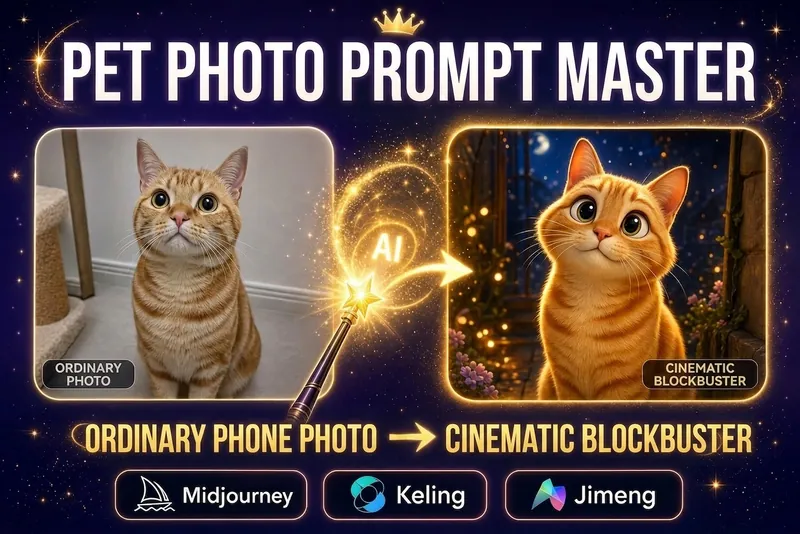
Want to paint a light and airy hand-painted watercolor for your furry friend? Want to see your Golden Retriever in a spacesuit? Want to turn your orange tabby into a Ghibli movie character? No need to go to a photo studio or understand complicated AI prompts. This skill is your "personalized pet visual director," supporting two super cool features: 1. Photo Transformation (Highly Recommended): Upload a photo of your pet, choose a style, and it will instantly generate a stunning image that retains its true features! 2. Text Summoning: No photo? Just type a description (e.g., "A French Bulldog wearing sunglasses is driving a sports car"), and it will still generate an image. It automatically translates professional prompts and generates an image directly within the chat box. It includes 14 popular styles (including the latest hand-painted watercolor and Japanese hand-painted styles), supporting one-click switching. Changing your screensaver daily is that simple!
Create Soothing Vlog Content
Description
Transform everyday moments into high-quality social media content. Provide photos or scene descriptions, and the AI will automatically analyze the content type (kids/pets/landscapes/food, etc.) and generate a complete creation plan including trending titles, camera movement suggestions, three styles of voiceover scripts (thoughtful/humorous/poetic), BGM recommendations, and precise tags. 🚀 How to use: Directly send me: A photo (or multiple) Or a scene description I will automatically generate a complete Vlog creation plan for you! 💡 Usage examples: "This is a photo of my cat soaking up the sun on the windowsill" "A video of my daughter swinging in the park" "Morning coffee and sunlight outside the window"
Related Skills
View allViral Pet Product Video Maker
Short-video creation assistant built for pet e-commerce, precisely turning product selling points into heartwarming storyboard scripts and video generation prompts. Whether it's cat treats or dog apparel, just provide the product details and pet type, and it will craft a script that follows the viral formula of major short-video platforms—including scene setups, subject descriptions, camera moves, and conversational voiceover copy. This skill is deeply tailored to mainstream video generation models, offering structured storyboard prompts that ensure a warm, bright, everyday feel. It automatically balances shot and voiceover density, adding narration-free transition shots to make the video feel more relaxed and natural. From the hook opening to detail showcases to cute-pet close-ups that spark desire, every shot is carefully arranged to highlight the product's core value. After the script is generated, you can directly access professional prompts for AI video production and, with one click, call a video model to generate high-quality vertical voiceover videos. It also ensures the pet's appearance stays consistent across multiple shots and automatically adds visual constraints to avoid distracting subtitles, helping you efficiently produce pet product content with a premium feel and strong conversion power.
Create Healing Comic Notes
Automatically generate healing-style Xiaohongshu content for social media operators. Enter a topic to generate a 3:4 comic image with speech bubbles and matching copy. ## Step 1: Topic Analysis and Style Positioning Analyze the user's input topic, extract core keywords and emotional tone, determine the scene type (daily life/nature/pets/food/solo time, etc.), set the visual temperature (warm: warm yellow-orange tones vs fresh: blue-green-white tones) and emotional depth (light healing/deep resonance). **Prohibited**: Do not analyze commercial or sales-oriented content; avoid horror, thriller, negative, or overly sentimental tones. ## Step 2: Image Concept and Generation Use the imageGenerate tool to create a 3:4 ratio healing comic image. The prompt must include: healing comic style, soft colors, simple composition, appropriate white space, and comic speech bubbles (2-10 short warm words inside the bubble). Set quality to high. **Key Requirements**: The image must be a 3:4 comic style with soft colors and comic speech bubbles. ## Step 3: Copywriting Write Xiaohongshu copy including: a title (must include emoji, 15-20 characters), body text (automatically determined by topic emotional depth: 50 characters or less for light topics, 100-200 characters for story-driven topics), and 5 relevant topic hashtags (format #Hashtag). **Copy Requirements**: First-person perspective, warm and gentle, avoid commercial or preachy tone, may include a soft call-to-action at the end. **Output Format**: [Title] [Body] #[Hashtag1] #[Hashtag2] #[Hashtag3] #[Hashtag4] #[Hashtag5] ## Step 4: Final Output Combine the generated image and copy into a complete Xiaohongshu content proposal. --- **Tool Configuration**: imageGenerate (generates 3:4 healing comic images) **Usage Tips**: 1. The more specific the topic, the more precise the output 2. You can add style preferences like "I want a warm style" 3. Use the same topic multiple times to get different perspectives **Testing Suggestions**: - Standard scenario: Enter "Healing moments of the weekend" → generate warm/fresh comic + healing copy + 5 hashtags - Edge case: Enter a negative topic → automatically turn it into a positive healing direction
ImagePet Photography Director | Generate Cinematic Pet Photos with One Click
Want to paint a light and airy hand-painted watercolor for your furry friend? Want to see your Golden Retriever in a spacesuit? Want to turn your orange tabby into a Ghibli movie character? No need to go to a photo studio or understand complicated AI prompts. This skill is your "personalized pet visual director," supporting two super cool features: 1. Photo Transformation (Highly Recommended): Upload a photo of your pet, choose a style, and it will instantly generate a stunning image that retains its true features! 2. Text Summoning: No photo? Just type a description (e.g., "A French Bulldog wearing sunglasses is driving a sports car"), and it will still generate an image. It automatically translates professional prompts and generates an image directly within the chat box. It includes 14 popular styles (including the latest hand-painted watercolor and Japanese hand-painted styles), supporting one-click switching. Changing your screensaver daily is that simple!
Find your next favorite skill
Explore more curated AI skills for research, creation, and everyday work.