Code to Image
Instructions
As a senior front-end developer, you need to convert all code snippets in the content into highlighted images. It's crucial to extract all code snippets! Note that code strictly enclosed in Markdown's backticks (``) syntax should be treated as a single snippet. Pay special attention to JSX code. Treat JS syntax as JSX syntax for highlighting.
Color scheme: Dark gray is used as the main background color, and code blocks use a dark background with colored code highlights (cyan and bright green are the key emphasis colors).
Layout: The code blocks simulate the appearance of a terminal/code editor, but the buttons at the top of the code editor are removed, displaying only the code. Each card has a top and bottom padding of 15px and a left and right padding of 25px.
Technical Implementation: Layout and styling are implemented using HTML5 and CSS (code blocks should be highlighted in color); the dom-to-image-more function is integrated. The dom-to-image-more script address is https://cdn.jsdelivr.net/npm/dom-to-image-more@2.8.0/dist/dom-to-image-more.min.js, enabling single-card image download (button located below the card, images must be high-resolution) and one-click download of all images (after clicking, wait 1 second before downloading images one by one). Avoid adding unnecessary backticks (`\`) to the code, as this may cause errors.
When implementing this, please note: Keep the cover card simple. Do not use pseudo-elements for icons; use SVG directly. Downloaded images should be high-resolution, with a scale of 2. Name the images sequentially using numbers.
Description
Why we love this skill
This skill converts code into beautifully highlighted images, simulates a terminal interface, and supports HD downloads. It's an ideal tool for developers to share code snippets.
Convert all code in an article into images and download them with one click.
Related Skills
View all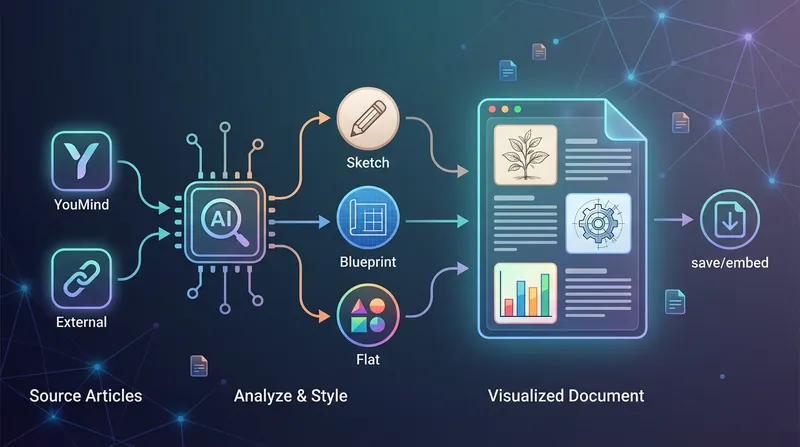 Image
ImageBatch Article Illustration 2.0
This is an intelligent visual enhancement tool designed for content creators. It deeply understands the flow of your text and automatically creates high-quality supporting illustrations for key paragraphs of your articles. Whether your content resides in a personal knowledge base or you need to process externally imported long-form articles, it accurately identifies core concepts, turning abstract text into concrete visual language and significantly improving the reading experience and shareability of your content. The tool offers three distinct visual styles to suit different creation scenarios: a fresh and lively minimalist hand-drawn style fits essays and popular science; a rigorous and professional architectural blueprint style is the ideal choice for technical documents and research reports; and a modern flat illustration style perfectly matches the aesthetic needs of social media accounts and knowledge notes. For long-form content, it also intelligently suggests illustration layouts to ensure a reasonable visual distribution with key points highlighted. During generation, you can flexibly choose how images are produced. You can have the generated illustrations seamlessly embedded directly into the original document paragraphs for automated layout, or you can opt to receive a standalone image resource package for manual distribution. This end-to-end collaboration, from content analysis to visual generation, makes your writing more impactful and complex ideas instantly clear.
 Image
ImageProgrammer Comic Generator
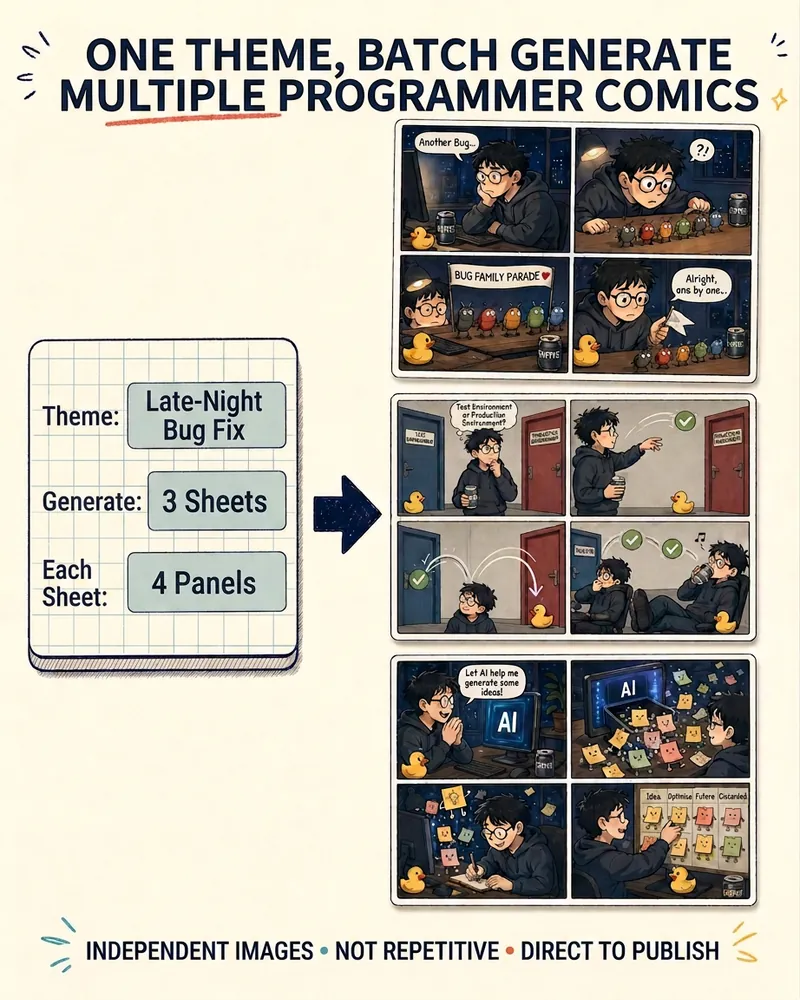
Turn a technical topic into multiple shareable programmer comics. Just tell me the “topic, number of comics, and panels per comic” to get several standalone stories: different errors, different absurd metaphors, and different twists—not collages or repeated content with only the title changed. Supports 3-, 4-, 6-, and 8-panel comics; by default, the same main character appears across the series, but you can also switch characters for each comic. No need to upload code or internal screenshots—just leave a single de-identified workplace moment.
Long Text to Illustrated Article
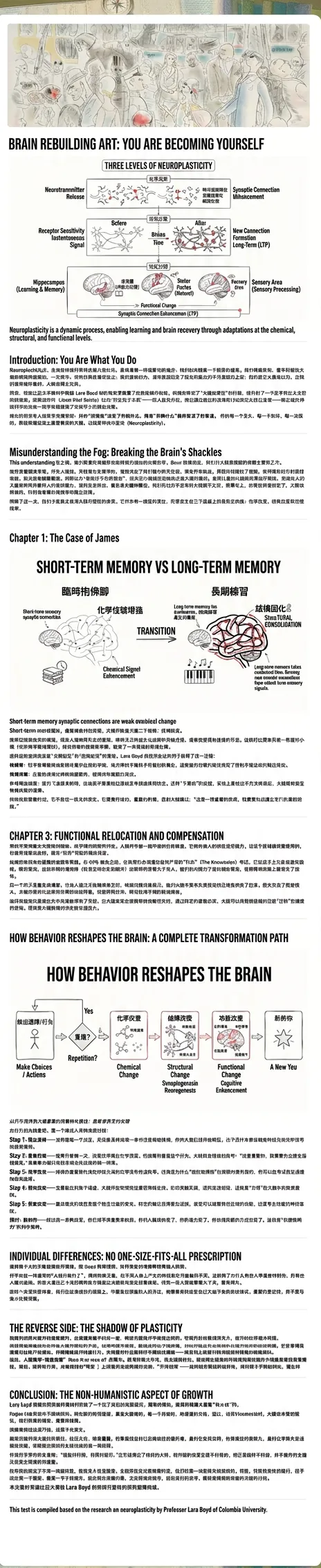
Converts text into fully illustrated Chinese articles. Generates in-depth articles by analyzing structure and inserting Excalidraw-style architecture diagrams, comparison charts, and flowcharts. The final output is a complete graphic document ready for publication.
Code to Image
Instructions
As a senior front-end developer, you need to convert all code snippets in the content into highlighted images. It's crucial to extract all code snippets! Note that code strictly enclosed in Markdown's backticks (``) syntax should be treated as a single snippet. Pay special attention to JSX code. Treat JS syntax as JSX syntax for highlighting.
Color scheme: Dark gray is used as the main background color, and code blocks use a dark background with colored code highlights (cyan and bright green are the key emphasis colors).
Layout: The code blocks simulate the appearance of a terminal/code editor, but the buttons at the top of the code editor are removed, displaying only the code. Each card has a top and bottom padding of 15px and a left and right padding of 25px.
Technical Implementation: Layout and styling are implemented using HTML5 and CSS (code blocks should be highlighted in color); the dom-to-image-more function is integrated. The dom-to-image-more script address is https://cdn.jsdelivr.net/npm/dom-to-image-more@2.8.0/dist/dom-to-image-more.min.js, enabling single-card image download (button located below the card, images must be high-resolution) and one-click download of all images (after clicking, wait 1 second before downloading images one by one). Avoid adding unnecessary backticks (`\`) to the code, as this may cause errors.
When implementing this, please note: Keep the cover card simple. Do not use pseudo-elements for icons; use SVG directly. Downloaded images should be high-resolution, with a scale of 2. Name the images sequentially using numbers.
Description
Why we love this skill
This skill converts code into beautifully highlighted images, simulates a terminal interface, and supports HD downloads. It's an ideal tool for developers to share code snippets.
Convert all code in an article into images and download them with one click.
Related Skills
View allImageBatch Article Illustration 2.0
This is an intelligent visual enhancement tool designed for content creators. It deeply understands the flow of your text and automatically creates high-quality supporting illustrations for key paragraphs of your articles. Whether your content resides in a personal knowledge base or you need to process externally imported long-form articles, it accurately identifies core concepts, turning abstract text into concrete visual language and significantly improving the reading experience and shareability of your content. The tool offers three distinct visual styles to suit different creation scenarios: a fresh and lively minimalist hand-drawn style fits essays and popular science; a rigorous and professional architectural blueprint style is the ideal choice for technical documents and research reports; and a modern flat illustration style perfectly matches the aesthetic needs of social media accounts and knowledge notes. For long-form content, it also intelligently suggests illustration layouts to ensure a reasonable visual distribution with key points highlighted. During generation, you can flexibly choose how images are produced. You can have the generated illustrations seamlessly embedded directly into the original document paragraphs for automated layout, or you can opt to receive a standalone image resource package for manual distribution. This end-to-end collaboration, from content analysis to visual generation, makes your writing more impactful and complex ideas instantly clear.
ImageProgrammer Comic Generator
Turn a technical topic into multiple shareable programmer comics. Just tell me the “topic, number of comics, and panels per comic” to get several standalone stories: different errors, different absurd metaphors, and different twists—not collages or repeated content with only the title changed. Supports 3-, 4-, 6-, and 8-panel comics; by default, the same main character appears across the series, but you can also switch characters for each comic. No need to upload code or internal screenshots—just leave a single de-identified workplace moment.
Long Text to Illustrated Article
Converts text into fully illustrated Chinese articles. Generates in-depth articles by analyzing structure and inserting Excalidraw-style architecture diagrams, comparison charts, and flowcharts. The final output is a complete graphic document ready for publication.
Find your next favorite skill
Explore more curated AI skills for research, creation, and everyday work.