
White Space | Minimalist PPT
Transform docs & data into minimalist PPT
White Space | Minimalist PPT
Transform docs & data into minimalist PPT
Showcase
Description
"White Space" is a Skill specifically designed to generate minimalist research report slides. Upload Word, PDF, web pages, data tables, research materials, or old PPTs, and it will convert them into an editable PPT with a cool white background, black-gray text, generous white space, thin line separators, and a touch of deep red accents. It automatically completes: · Reading and organizing raw materials · Extracting core conclusions from the report · Building a complete presentation storyline · Generating conclusion-style titles with one point per page · Redrawing native editable data charts · Unifying fonts, colors, margins, and page grids · Controlling text and chart density per page · Adding page numbers, dates, and data sources · Outputting actually editable Slides By default, it uses a 16:9 aspect ratio, with visual features including: · Cool white background · Black-gray text · Single deep red accent color · All left-aligned · Generous white space · Minimalist architectural geometry · At most two fonts throughout · Charts and shapes are fully editable Suitable for industry research, market analysis, business presentations, strategic plans, course reports, graduation defenses, and management reports. Simply upload your materials and describe the presentation scenario to generate a clean, professional, directly editable and presentable minimalist PPT.
Recommended by
Nico@YouMind
Why we love this skill
This Skill transforms reports into minimalist, professional PPTs. The unique design of cool white space and deep red accents ensures both logical content and visual appeal, directly producing editable Slides, making it a powerful tool for efficient presentations.
Related Skills
View all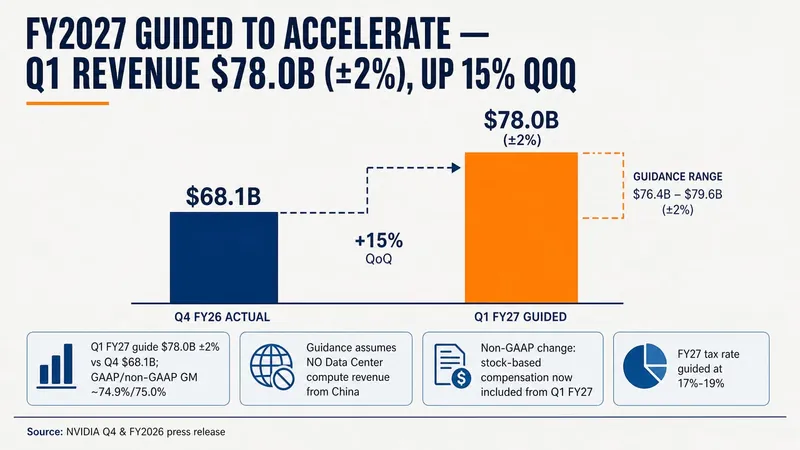 Slides
Consulting-Style Slides
This Skill helps you create high-quality business Slides to the professional standards of top-tier consulting firms. It strictly follows the Pyramid Principle and applies the core ideas of leading with conclusions, progressing logically, and using data to turn scattered business insights into structured, coherent presentations. Whether you are developing a strategy, proposing a project, or conducting a business analysis, it helps you quickly build a framework based on the MECE principle, ensuring that points are mutually exclusive and collectively exhaustive. During content development, this Skill automatically distills insightful slide titles and recommends the most suitable visualizations based on your data, such as waterfall charts, funnel charts, and stacked bar charts. It provides structured design guidance and can also generate a professional Slides file with title slides, content slides, comparison slides, and chart placeholders. The generated document uses a classic dark blue and orange business color palette, with clean, professional layouts and clear visual hierarchy, helping your presentation demonstrate a high level of professionalism in both design and content.
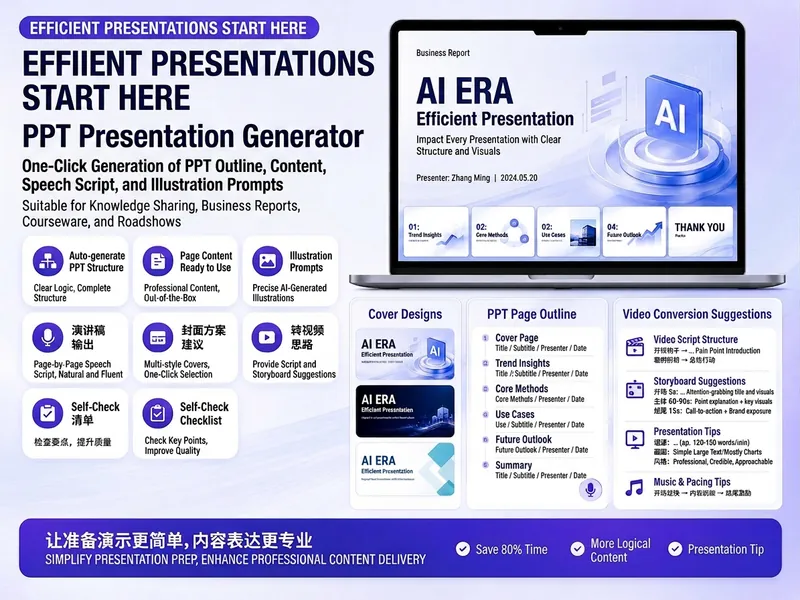
Trending PPT Slides Generator
Easily create engaging PPT Slides for knowledge sharing, business reports, course teaching, product introductions, or roadshows. Simply provide the topic, purpose, audience, duration, number of slides, or style preferences to get a customized PPT content plan. This skill provides a detailed PPT slides plan, including the PPT title, one-sentence theme, audience analysis, slide structure, titles for each slide, body text, and key points for your speech. It also offers specific visual suggestions and image prompts for each slide, even including cover design keywords to help you create a visually cohesive and attractive presentation. If you need to convert your PPT to a short video, this skill can also provide professional video conversion suggestions, covering key elements like rhythm, subtitles, voiceover, camera movements, and cover art to help your content perform well on multiple platforms. Say goodbye to vague outlines; every slide's content is ready to copy and use, ensuring your presentation is both substantive and impressive.
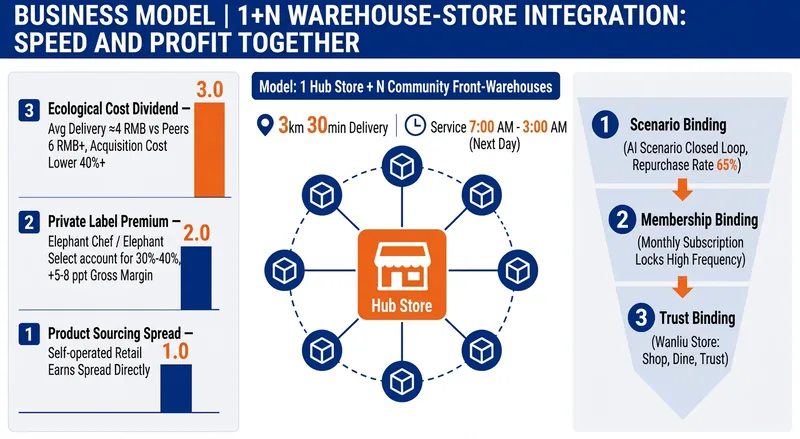
Research Studio: Report + PPT
Turn a company, industry, or competitor into a research report and PPT deliverable for management presentations and strategic decisions. The research covers strategic positioning, business models, operational detail, key data, the competitive landscape, supply chains, core strengths, and future capability priorities. It also considers industry trends, market size, risks and controversies, and practical competitive tactics—helping you understand how the business wins, whether it can scale, and where it should go next. The skill organizes public research into an evidence chain with dates, data definitions, sources, and credibility notes. It takes an opinion-led approach to distill strategic claims and decision-ready talking points for presentations. The final deliverable is a complete enterprise case study report with data sources and disclaimers, along with a consulting-style PPT outline and presentation built around a single thesis, making complex information easier to explain in about 15 minutes. From the outline through the visual presentation, you can confirm the narrative angle, audience depth, page count, and design style before completing the report and presentation. It is suited to corporate strategy, investment research, consulting projects, industry analysis, and competitive benchmarking. After completion, you can continue developing a specific dimension, make cross-comparisons, adjust the framework or visual style, or research a new subject.
Information
- Version
- v4
- Last updated
- Runtime credits
- Usage-based
- Models
- Auto
